Bot identity and activity
A document bot has a stable participant identity, a user-assigned task, and a visible character. Its character and personality help people recognize it; they do not grant permissions or change the collaboration rules.
What the prototype does
The current local runner executes one bounded mission. It reads the server schema and document, asks Codex to plan schema-based text or structural edits, and uses the existing MCP revision checks. It records its task and edit plans. It does not yet schedule recurring work or automatically resume interrupted missions. See run a document bot.
Meet the mascots
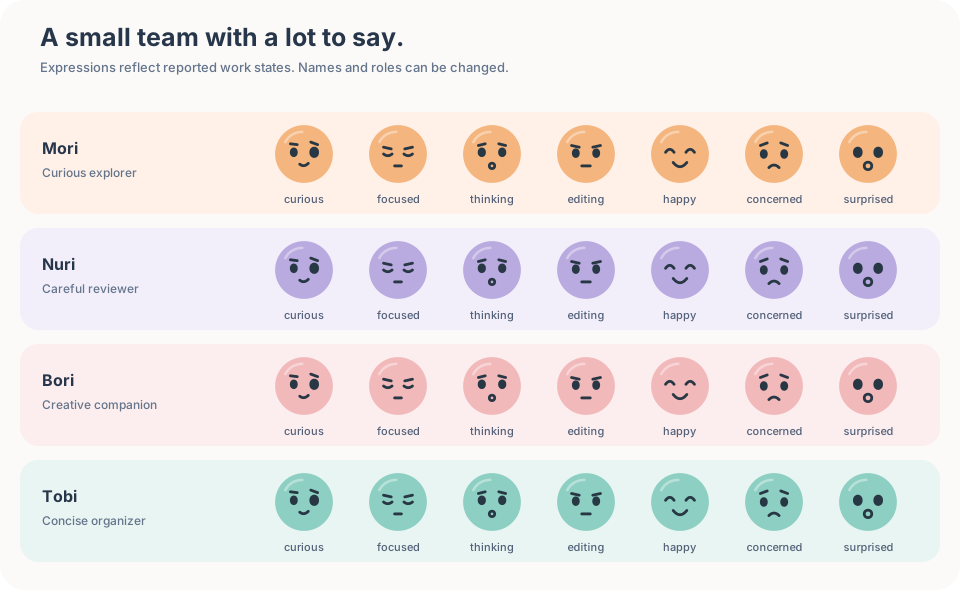
The bots share one round face with expressive eyes and a small mouth. Four color presets help people tell them apart; their example names are optional and appear only on hover or keyboard focus. A bot can use any personality with any color.
The existing fox, owl, cat, and robot character identifiers are retained for compatibility. They select the orange, violet, rose, and mint palettes respectively; they no longer depict animals or a robot. Colors and facial expressions are visual cues, not permissions or guarantees of model behavior. Defaults derive from the actor ID and can coincide.
Work states and location
A face expresses a reported work state, not a real emotion. The vocabulary includes curious, focused, thinking, editing, happy, concerned and surprised. The current runner uses thinking for document context, focused for an explicitly selected review range, editing while submitting a change, happy for reported completion, and concerned when work needs attention. The other faces are available to clients that report those states; they are not inferred.
The editor shows one of three position modes:
- Document: the bot has document context but has not reported a position. Only its roster character is shown.
- Caret: the bot reported one visible text position. The character appears at that position.
- Selection: the bot explicitly reported two endpoints in the same visible text line. The range is highlighted and the character marks its active endpoint.
The roster uses a small mode mark and exposes the name, activity and mode on hover or keyboard focus. Reading a selected range gets a subtle highlight; reading the full document does not invent a moving cursor. A gentle eye movement indicates reported reading activity; it does not represent a path through the document. Motion respects reduced-motion settings. Presence is transient and may arrive late or not arrive at all. If the document revision changes before the next planning step, the bot discards the old numeric range and rereads the document.
Roles, personality, and collaboration
The local demo provides four examples. Choose one in the task form; names remain hidden in the document until hover or keyboard focus.
| Bot | Role | Planner style | Typical task |
|---|---|---|---|
| Mori | Writer | Curious | Draft content in the right place. |
| Nuri | Reviewer | Careful | Read a document and report issues. |
| Bori | Writer | Creative | Draft alternative wording or structure. |
| Tobi | Organizer | Concise | Arrange requested document content. |
Each concurrent task uses a separate participant and history. Multiple bots may work on the same document. A stale edit is rejected and the bot reads the latest document before planning again. Each decision receives the verified schema, current document, mission and role. An editor can continue to change the document while the bots work.
The runner prevents a reviewer from submitting edits. This is a local runner guard, not server-side authorization: another client could connect with its own permissions. Writer and organizer are planning preferences and do not restrict which schema-valid edit they may submit. A personality guides style; it does not guarantee behavior. Review the content and conclusions before using them.
The current CLI uses Codex. The runner accepts a planner function, but this demo does not ship adapters for other agent providers. Missions are bounded and run once. The CLI can save a local profile and reuse its document-scoped participant identity and durable journal. When configured with persistent data and bot-state directories, the browser demo also uses local profiles. Without that configuration it uses temporary identities. Task cancellation, background scheduling, automatic recovery, an interactive resolution flow for interrupted tasks and production access control remain future work. The repository's bot product design records these boundaries.
Rust experiment
Store a stable anchor with a proposal. Resolve it again before the host displays the proposal or chooses an edit. This example keeps an anchor across a checkpoint. The host still owns proposal approval and stale-document policy.
Use the native SDK crate setup to run this complete Rust program.
use doc_sync_native_sdk::{Attributes, Document, EditOptions, Key, Result, SchemaPreset};

fn main() -> Result<()> {
    let mut doc = Document::new("proposal-bot", SchemaPreset::Text)?;
    doc.insert_text(
        &Key::root(),
        "Hi",
        Attributes::new(),
        EditOptions::default(),
        0.0,
    )?;
    let position = doc_sync_native_sdk::Position(vec![0, 2]);
    let anchor = doc
        .capture_anchor(position.clone())?
        .expect("visible anchor");
    let saved = doc.checkpoint()?;
    let mut resumed = Document::restore(&saved)?;
    assert_eq!(resumed.resolve_anchor(&anchor)?, Some(position));
    assert_eq!(resumed.model()?, doc.model()?);
    assert_eq!(resumed.pending_changes().len(), 1);
    Ok(())
}
This example uses one of six fixed SchemaPreset values. A separate runtime schema API accepts limited Document/Graphic descriptors and custom sparse-sheet fields. Live schema changes, the full doc.edit() compiler, WASM, Node, HTTP, MCP and editor bindings are not included.
Raw protocol probe and reference checks
Face markers and speech bubbles remain browser UI features. The native engine can test the token range behind a bot position. Here a human inserts Hi, and a separate bot actor captures the first character.
Build the driver with Run the private experiment, then run this from the repository root:
experiments/rust-shadow/target/debug/doc-sync-rust-shadow <<'JSONL'
{"cmd":"new","replica":"bot","actor":"bot","schema":"flow-root-paragraph:boolean-marks:bold,italic:v1"}
{"cmd":"apply","replica":"bot","schema":"flow-root-paragraph:boolean-marks:bold,italic:v1","ops":[{"t":"text","id":{"lamport":1,"actor":"human"},"origin":{"lamport":0,"actor":"~root"},"units":[72,105]}]}
{"cmd":"selection_capture","replica":"bot","range":{"anchor":[0,0],"focus":[0,1]}}
{"cmd":"selection_resolve","replica":"bot","range":{"anchor":"0@~root","focus":"1@human"}}
JSONL
Capture returns token keys; resolution returns [0, 0] to [0, 1]. A caller can retain these keys while edits arrive. This checks core range mapping only; it does not send presence, animate a face, or display a browser selection.
This uses the fixed base text schema. Rust has no production editor, bot, or MCP adapter. See the Rust engine guide for the separate v1 through v6 capabilities and limits.