Change an open editor's schema
When the server accepts a compatible schema, a client with the old schema stops synchronization. Its local document, pending changes and history remain available. Before reconnecting, the application must rebuild its native editor and binding for the accepted schema.
This guide describes the host contract used by the product demo for ProseMirror, Slate and Lexical. The library coordinates the transition; your application owns the editor, plugins and rendering.
The APIs below use the production TypeScript engine. The private Rust engine loads a limited runtime schema subset through a separate native API. It does not transition an open document or provide a Client backend. Its planned schema compiler and compatible transition have separate gates; see Rust schema delivery.
With the unified Client, first check client.sync and pass that actual SyncClient to the helpers below. Keep the unified Client attached to the binding; it reads the same backend and updated schema. Local mode has no schema-transition API. The rebuild host in this guide is the application lifecycle contract, not the per-view EditorHost created internally by a binding.
What changes
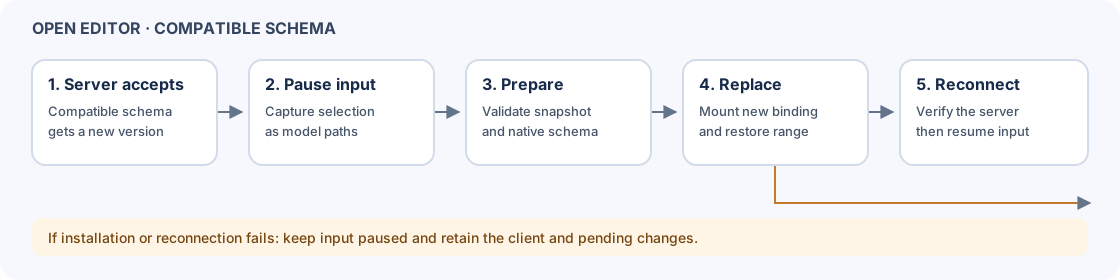
On a narrow screen, scroll the diagram horizontally to see every step. The same steps are also listed in the host methods.
The same SyncClient stays in use. Its pending operations and undo/redo history are not replaced by the editor rebuild. Both selection endpoints are saved as document-token anchors and resolved in the new document. Remote changes received after reconnect can move those positions again.
Only compatible additions are supported. Existing rules, node types and mark order cannot be changed or removed by this transition. See changing a schema for the exact rules and server checks.
Coordinate the rebuild
First obtain the schema accepted by the server. In an MCP session, get_server_schema returns it; the demo HTTP server also exposes a schema endpoint. Resolve an unconfirmed conditional edit before proceeding.
import {upgradeOpenEditorSchema} from "@barocss/doc-sync/sync";

// Implement editorHost for your mounted editor. nextSchema must be the
// compatible schema already accepted by the server.
await upgradeOpenEditorSchema(client, nextSchema, editorHost);
editorHost supplies these operations:
| Host method | Application responsibility |
|---|---|
pause() | Capture native selection before losing focus. Block editing and reject active composition without discarding its draft. |
selection() | Return the captured {anchor, focus} as model paths, or null when no selection exists. Reject native selection types that cannot be represented. |
prepare(schema, model) | Build and validate replacement resources without changing the mounted editor. Return the resources needed for installation. |
detach() | Remove the old binding, native view and application listeners. |
install(prepared, selection) | Mount the replacement editor and binding. Restore the supplied model range. This method may be asynchronous. |
resume() | Unblock input after the helper confirms the server connection. |
pause, selection, prepare and detach are synchronous. pause must either block input successfully or throw before changing the editor. The reconnect timeout defaults to 10 seconds and can be passed as the fourth argument; it starts after installation. Keep client callbacks in place until the transition finishes.
These methods are application code. For a complete integration with mounted editors, see the product demo host. The demo's Load server schema button fetches an accepted server schema; it does not submit a new one.
Map text selections
The following fragments show the model conversion performed by a host. They use the editor, binding and schema objects from that application's mount code. Restore both endpoints to preserve a backward selection.
Slate
Capture with slateRangeToModel before the old editor is detached. After mounting a replacement, resolve the supplied range against the new editor's children:
import {Transforms} from "slate";
import {slateRangeToModel, modelRangeToSlate} from "@barocss/doc-sync-slate";

const captured = slateRangeToModel(client.schema, editor.children, editor.selection);
// After mounting the replacement editor and receiving `selection` from the helper:
const range = modelRangeToSlate(client.schema, newEditor.children, selection);
if (selection && !range) throw new Error("Selection cannot be restored");
if (range) Transforms.select(newEditor, range);
Dispose the old SlateBinding and rebuild the React provider, rendering and application plugins as needed. Finish any composition before detaching.
Lexical
Build new schema information and register its node classes when creating the replacement editor. Capture with $lexicalSelection inside a read; restore with $setLexicalSelection inside an update:
import {SKIP_DOM_SELECTION_TAG} from "lexical";
import {$lexicalSelection, $setLexicalSelection, LEXICAL_REMOTE_TAG} from "@barocss/doc-sync-lexical";

const captured = editor.getEditorState().read(() => $lexicalSelection(info), {editor});
// After mounting newEditor and newInfo:
if (selection) {
    let restored = false;
    newEditor.update(() => { restored = $setLexicalSelection(newInfo, selection); }, {
        discrete: true,
        tag: [LEXICAL_REMOTE_TAG, SKIP_DOM_SELECTION_TAG],
    });
    if (!restored) throw new Error("Selection cannot be restored");
}
The remote tag prevents the restoration from becoming a local edit. The skip tag avoids taking DOM focus from another editor. The host can restore focus after the transition if this editor had focus before the pause.
ProseMirror
Convert the old text selection to model paths before destroying the view. Convert the returned range against the replacement state and the current model:
import {TextSelection} from "prosemirror-state";
import {pmPosToPath, pathToPmPos} from "@barocss/doc-sync-prosemirror";

const oldSelection = binding.state.selection;
if (!(oldSelection instanceof TextSelection)) throw new Error("Unsupported selection");
const model = client.doc.toJSON();
const captured = {
    anchor: pmPosToPath(client.schema, binding.state.doc, oldSelection.anchor, model),
    focus: pmPosToPath(client.schema, binding.state.doc, oldSelection.head, model),
};
// After mounting newBinding and newView:
if (selection) {
    const doc = newBinding.state.doc;
    const current = client.doc.toJSON();
    const anchor = pathToPmPos(client.schema, doc, selection.anchor, current);
    const focus = pathToPmPos(client.schema, doc, selection.focus, current);
    newBinding.state = newBinding.state.apply(
        newBinding.state.tr.setSelection(TextSelection.create(doc, anchor, focus)),
    );
    newView.updateState(newBinding.state);
}
Recreate application plugins and their state as required by your editor. Node selections and other non-text selections need an application-specific policy; the demo rejects them during transition.
If the transition fails
| Failure | Result and next step |
|---|---|
| Incompatible schema, active composition or failed preparation | The old editor is not detached. Finish composition or correct the schema and try again. |
| Selection cannot be anchored | The old editor resumes. Inspect the native selection and choose a supported position. |
| Installation or reconnect fails after detachment | The client disconnects and input remains paused. Retain the client and its pending changes; inspect the error and rebuild or reconnect explicitly. |
| Server epoch changes while a known epoch is being reconnected | The helper stops before replacing the local document or history. Inspect the server state and preserve pending work. |
| Conditional edit outcome is unresolved | The transition is rejected. Resolve the exact request or inspect recovery status first. |
The helper does not submit a server transition, migrate incompatible schemas, persist a client checkpoint, or rebuild arbitrary application plugins. The default demo server is a single-process development server without authentication.
Chrome checks cover the three editors and three sample schemas with pending input, another participant's input, forward and backward selections, carets, undo/redo, native input and an added node. Additional Word-profile cases check forward and backward selections and carets when no other participant edits during the transition. A synthetic composition case checks the pause and retry path. These checks do not establish real OS IME, all native selection types, large-document transition performance or production recovery.