Physics: fixed time steps and copied simulation state
See the capability and example map for bounded rigid, water, cloth and controlled-capsule entries, their evidence/adoption and the planned HINGE2 blocker. This page's runnable Manual examples retain their original 5f5ad866205a source profile.
Open the manually stepped sphere. Use Advance 1, Advance 20 and Reset to compare accepted states without a hidden clock.
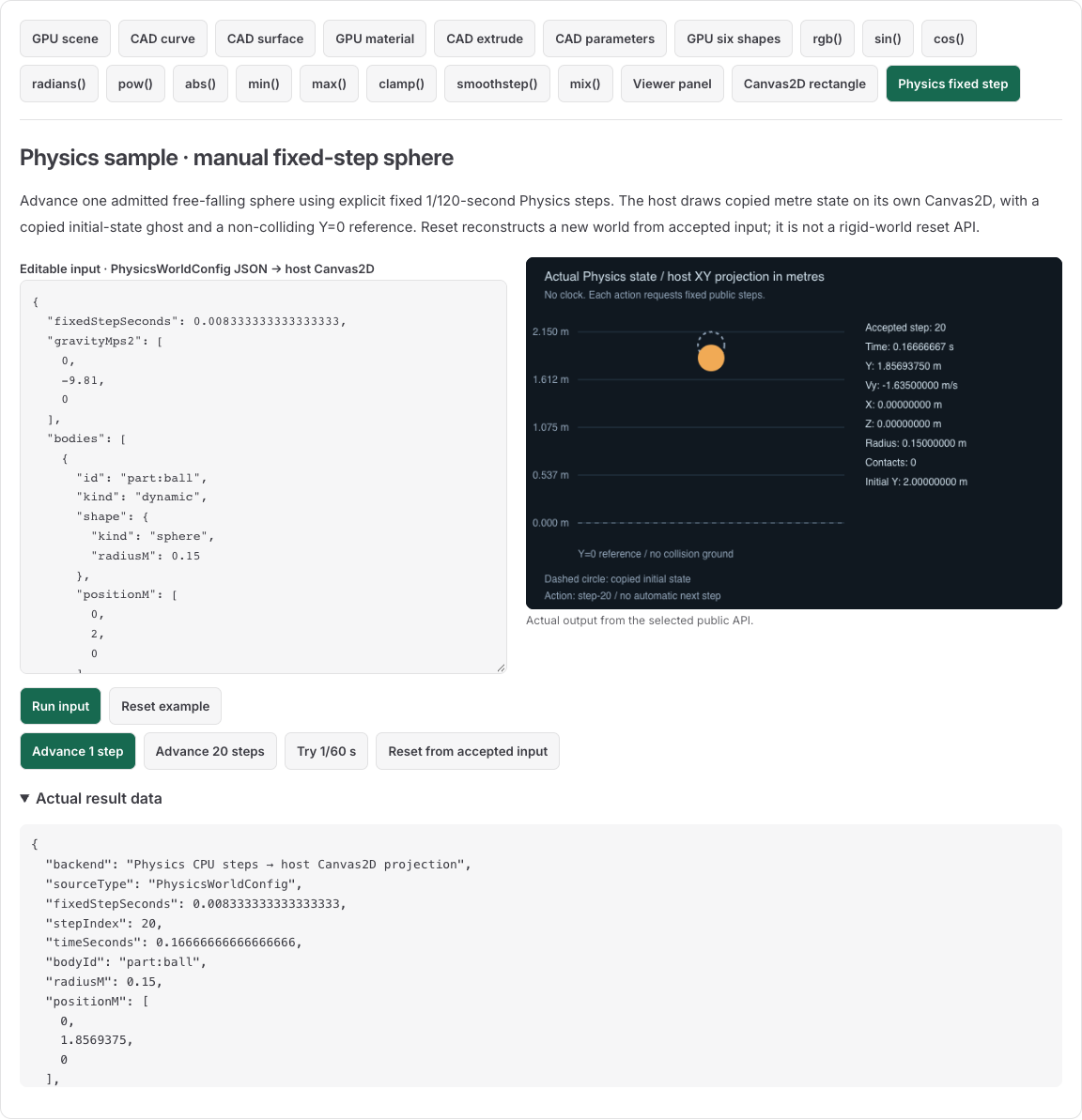
The picture is a host Canvas2D XY projection of actual Physics state. It is not a GPU renderer or the BaroCSS Canvas2D package. The orange circle uses copied current position/radius; the dashed circle is the initial pose. Y=0 is a reference line, not a floor collider. Z is shown numerically rather than rendered as depth.
Advance a rigid world explicitly
Physics uses metres, kilograms and seconds. This complete input has one dynamic sphere and no other collider. Use ordinary public imports in a TypeScript-capable application bundle; the Physics root itself needs no DOM.
import { createPhysicsWorld, PhysicsError } from '@barocss/physics';
import type { PhysicsWorldConfig } from '@barocss/physics';

const config: PhysicsWorldConfig = {
  fixedStepSeconds: 1 / 120,
  gravityMps2: [0, -9.81, 0],
  bodies: [{
    id: 'part:ball', kind: 'dynamic', shape: { kind: 'sphere', radiusM: 0.15 },
    positionM: [0, 2, 0], velocityMps: [0, 0, 0], massKg: 1, restitution: 0.25,
  }],
};
let world = createPhysicsWorld(config);
const first = world.step(config.fixedStepSeconds);
console.log(first.stepIndex, first.timeSeconds);
console.log(first.bodies[0].positionM, first.bodies[0].velocityMps);
// 1, 0.008333333333333333; [0,1.99931875,0]; [0,-0.08175,0].

try {
  world.step(1 / 60);
} catch (error) {
  if (!(error instanceof PhysicsError)) throw error;
  console.log(error.code); // INVALID_STEP; the accepted world stays at step 1.
}

// Reset by admitting a fresh world; the rigid interface has no reset() method.
const replacement = createPhysicsWorld(config);
const previous = world;
world = replacement;
previous.dispose();
for (let index = 0; index < 20; index++) world.step(config.fixedStepSeconds);
const twentieth = world.getState();
console.log(twentieth.stepIndex, twentieth.timeSeconds);
console.log(twentieth.bodies[0].positionM, twentieth.bodies[0].velocityMps);
// 20, 0.16666666666666666; [0,1.8569375,0]; [0,-1.635,0].
world.dispose();
Advance 20 in the interactive example adds 20 steps to the current state. Reset, then Advance 20 reaches step 20; Advance 1 followed by Advance 20 reaches step 21. Each public step is accepted separately. If a later step refuses, earlier accepted steps are not rolled back as one batch.
The package advances velocity and then position under the configured gravity. Returned states are copies for host display. A wrong step or invalid command refuses before accepting that candidate. Retain the last accepted state for correction. Dispose worlds when closing a simulation; subsequent world calls refuse with DISPOSED.
Own the clock and display conversion
Your host chooses when to request steps. If using a browser animation loop, accumulate elapsed time and request the configured fixed interval rather than sending a variable frame delta directly. Physics starts no timer, renderer or listener.
The live view admits one dynamic sphere at 1/120 s. It fits current and initial XY positions into its plot, so screen scale can change while the labelled physical values remain metres. The first step moves less than a millimetre; use numeric values rather than pixels to interpret it. Change gravity, initial position/velocity or radius through a complete valid config to start a new world. Admit that candidate before replacing your accepted world. Invalid config must not destroy the current world.
For CAD/Viewer display, convert metres to millimetres once at the supported pose/frame boundary. A simulation proxy is separate from native CAD geometry and its sampled mesh. This one-body free-fall example demonstrates time/state ownership; it does not establish collision behavior, long-run stability or engineering accuracy.
Use a fixed visual cloth profile
import { createClothWorld } from '@barocss/physics/cloth';
const cloth = createClothWorld({
  format: 'barocss-cloth-scene', version: 1, revision: 'sheet-v1',
  basis: 'right-handed-xyz-metres', fixedStepSeconds: 1 / 120,
  profile: 'pinned-sheet-sphere-v1',
});
try {
  const frame = cloth.step(1 / 120);
  console.log(frame.vertexCount, frame.triangleCount); // 289,512.
  console.log(frame.positionsM.length); // 867 XYZ values in metres.
  const reset = cloth.reset();
  console.log(reset.stepIndex); // 0.
} finally { cloth.dispose(); }
This separate profile fixes topology, two pins and a simulation sphere. Its arrays are copied for caller display. Cloth has its own public reset(); do not infer that method on the rigid world. The profile does not admit arbitrary cloth meshes or calibrated fabric stress. Keep the copied simulated state separate from any display layer.