Render Editor: original scene source and accepted presentation
A source document stores original GPU Scene text and camera. The session holds drafts/history. The controller presents prepared changes before committing authoring. Rendered pixels and compiler buffers are derived output, not saved scene authority.
Use the workspace package with a TypeScript-capable host. /react requires a compatible React 19.2.3 peer and a browser. This package is separate from the React screen-spec renderer in Render.
Native Light scene downloads
These are complete current authoring files for the Native Light workbench, with original CAD source, qualified body/material bindings, shader source and supplied overrides, camera, poses and a homogeneous light catalog. They preserve authored signed values, including -0, raw camera Up and quaternion components. They are source inputs, not meshes, screenshots or GPU-acceptance certificates.
- Download the directional light scene
- Download the point light scene
- Download the shared TypeScript host
In the app, open Material Editor → Light workbench, choose the matching directional or point workspace, and Open its JSON file. Select an original body under Scene bodies; edit position in mm, dimensionless scale, Scene camera and a light. Apply once, try Undo/Redo, then Save accepted. Open that saved file in a fresh same-kind workspace and re-edit the same qualified body. Refused numeric input stays available for correction; Save still contains accepted data. See the complete workflow and no-op rules.
Edit the existing amount uniform on Surface B
Both JSON downloads above already contain this example; no file or shader changes are needed to expose the control.
- Open either download in its matching workspace. Under Scene bodies, select Surface B, original ID
body_preview_b. The initially selected Surface A (body_preview_a) has no editable scalar uniforms. - In Body material, find
amount: its originalnative_blend_bshader declaresfloat(0, 1, .25), so the range is 0 to 1 and the default is 0.25. The file supplies 0.75, with Override enabled. - Keep Override enabled and enter 0.4, or clear Override to omit
amountand use 0.25. Supplying 0.25 with Override enabled is a distinct authored choice from clearing it. Switching to Surface A and back retains Surface B's corrective text without applying it. - Optionally edit a body transform, Scene camera or light, then Apply once for all fields. A changed Surface B material advances its embedded revision from 0 to 1; Surface A's material remains unchanged. Undo/Redo restores the whole scene together after drafts are resolved.
- Save accepted, then Open that saved file in a fresh workspace of the same kind. Select
body_preview_bagain: the accepted0.4override, or its accepted omission and shader default, is ready to re-edit. A download request alone does not prove physical persistence.
To inspect refusal retention, enter 1e or an out-of-range value such as 1.1 with Override enabled, then Apply. Correct the retained field before expecting acceptance; Save still contains the previous accepted value. If the accepted override is 0.4, entering .40 alone is a numeric-format no-op. Signed zero remains distinct, and clearing an override remains an authored change even when its supplied value equalled the default. These are authoring instructions, not a screenshot or physical GPU/file result; #1573 remains unresolved. See the binding and transaction rules.
Import, mount and clean up the shared host
Place the downloaded .ts file beside your TypeScript-capable browser entry. It imports only the actual unsuffixed public parseRenderNativeLightDocument, prepareRenderNativeLightDocument, serializeRenderNativeLightDocument, createRenderNativeLightRequest and createRenderNativeLightSession APIs. Its qualifyLightScene(text) helper reconstructs native/TEN/material requests on the CPU. createLightSceneHost is example host code, not a new package export or public provider-injection seam.
The host requires a real canvas and working WebGPU. Supply complete initial and edited JSON text of the same kind; edited text must keep the accepted scene owner/revision and matching light owner/revision. Use the signed serializer to produce it. Supply persist from your file-storage integration: resolve only when it succeeds, and reject on cancellation or failure.
import { createLightSceneHost } from './render-editor-light-scene';
import type { RenderNativeLightSavePayload } from '@barocss/render-editor';

async function editAndSave(
  canvas: HTMLCanvasElement, initialText: string, editedText: string,
  persist: (payload: RenderNativeLightSavePayload) => Promise<void>,
) {
  const host = createLightSceneHost(canvas, { width: 960, height: 600 });
  const close = () => host.dispose();
  const check = (result: { ok: true } | { ok: false; error: unknown }) => {
    if (!result.ok) throw result.error;
  };
  window.addEventListener('pagehide', close, { once: true });
  try {
    check(await host.mount(initialText));
    check(host.stage(editedText));
    check(await host.apply());
    check(await host.undo());
    check(await host.redo());
    check(await host.save(persist));
    return host.getSnapshot()?.accepted;
  } finally {
    window.removeEventListener('pagehide', close);
    host.dispose();
  }
}
This short sequence closes after the operation; an interactive editor keeps the host until route exit and displays refused outcomes while leaving corrective drafts available. The download fences mount, Apply, history, Open and Save through one pending-operation guard. stage and discardDraft are synchronous outcomes; mount/Apply/history/Open/Save return promises of {ok:true} or {ok:false,error}. Await and check each one. getSnapshot() returns an immutable snapshot or null. dispose() is idempotent; call it even while mount is pending so a late successful session is immediately released. No startup is assumed cancellable.
For a fresh same-kind Open, create a new host/canvas lifetime, await mount(initialText) with the matching fixture, then await open(savedText, confirmReplacement). The confirmation callback must return an actual user decision before replacing dirty or unsaved state; it defaults to refusal. A freshly mounted seed is unsaved, so include that callback. Check both outcomes, re-edit through stage/Apply, and use the same closure cleanup. Open preserves the imported revision and begins fresh history. Cross-kind files refuse without replacing the seed or any later accepted state.
save(persist) captures getSavePayload(), awaits persistence, then acknowledges that exact payload with markSaved. It never saves raw corrective fields or treats a browser download click as disk proof. A signed whole-document comparison suppresses a true no-op before preparing Apply; the bare session does not add that policy. Required WebGPU startup, physical files, pixels and recovery still need their own actual-device checks. The unresolved arrow-control report #1573 is not fixed or verified by these numeric examples.
Historical Source1 and mixed-depth examples
Create a complete source document
import { createRenderEditorSession, editRenderSceneObjectSource } from '@barocss/render-editor';
import type { RenderSceneDocumentV0 } from '@barocss/render-editor';

const sceneDocument: RenderSceneDocumentV0 = {
  format: 'barocss-render-editor', version: 0, kind: 'gpu-scene',
  documentId: 'sphere_document', title: 'Sphere', revision: 0, sourceVersion: 1,
  sceneSource: `@scene sphere_demo {
    version: 1; background: #161c22; sphere #orb;
  }
  #orb { radius: .75; translate: 0 0 0; color: #72c8bb; }`,
  camera: { eye: [0, 1.3, 8], target: [0, 0, 0], up: [0, 1, 0],
    fovYDegrees: 45, near: 0.01, far: 100 },
};
const session = createRenderEditorSession(sceneDocument);
const nextSource = editRenderSceneObjectSource(sceneDocument.sceneSource, 'orb', { radius: 1 });
session.setDraftSource(nextSource);
The public source editor uses the actual compiler AST/effective properties. orb remains the original object ID. The change stages radius 1 scene unit without accepting it yet. No-op effective edits preserve original bytes. This is original source editing, not a mesh or transform-gizmo operation.
Mount and apply through the controller
The host supplies a container with a defined workspace size and its ordinary TSX entry:
<div id="root" style="height:760px"></div>
<script type="module" src="./main.tsx"></script>
Use the session from the complete document above:
import { createRoot } from 'react-dom/client';
import { createRenderEditorController } from '@barocss/render-editor';
import { RenderEditor } from '@barocss/render-editor/react';
import '@barocss/render-editor/style.css';

const controller = createRenderEditorController(session);
const root = createRoot(document.getElementById('root')!);
root.render(<RenderEditor controller={controller} onError={console.error}
  onAction={action => console.log('Host file request:', action)} />);
window.addEventListener('pagehide', () => {
  root.unmount(); controller.dispose(); session.dispose();
}, { once: true });
The viewport attaches the public GPU presenter. A host control can request Apply after that viewport has mounted:
const outcome = controller.apply('both');
if (!outcome.ok) console.error(outcome.error);
Apply compiles/prepares the complete draft, presents it, then commits the session. A successful radius edit advances accepted revision to1. The controller's presentedRevision is separate from accepted revision; inspect both when diagnosing a failed display.
Invalid source or camera does not overwrite accepted authoring/history. A later presentation failure can require compensation or explicit recovery. Context loss can make presentation unavailable while CPU authoring remains retained. Check the controller action's ok/error result instead of treating preparation as acceptance. Mounting this component in a new host remains a host integration task; the GPU image below does not certify its file/history/recovery behavior.
Serialize source, not rendered output
import { serializeRenderEditorDocument, parseRenderEditorDocument,
  inspectRenderSceneObjects } from '@barocss/render-editor';
const accepted = session.getSnapshot().accepted;
const saved = serializeRenderEditorDocument(accepted);
const reopened = parseRenderEditorDocument(saved);
console.log(inspectRenderSceneObjects(reopened.sceneSource));
After successful Apply, the reopened effective orb radius is1. The file retains original source and camera; it does not contain IR, GLSL, GPU buffers or screenshots. The host owns download, file reading, cancellation and saved-status policy. Resolve drafts before replacement and preserve accepted data on a refused Open.
Temporary camera previews also remain separate from authoring. Use view stages the chosen camera and runs complete Apply; Cancel view restores accepted presentation and retains drafts. Hidden invalid fields can block Use view. Dispose controller/presenter resources and caller-owned sessions when closing the document.
Interpret a scene image and a mixed document
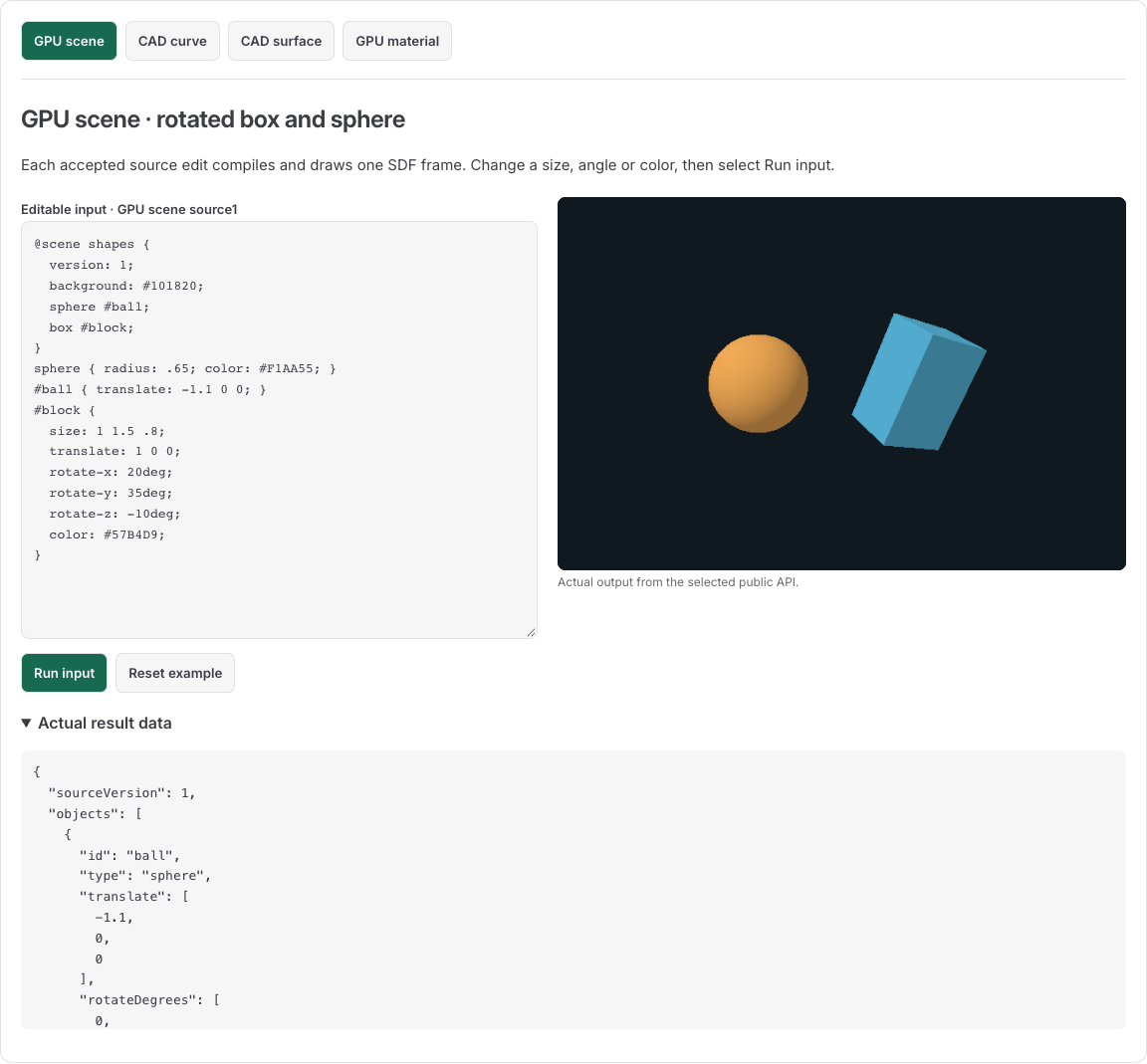
The GPU Scene example renders original Source1 input through the GPU package. This image shows the render path the editor orchestrates; it is not an editor Save/Open or recovery result.
A version 1 mixed document is a separate profile with one original Sphere scene and one selected native CAD Surface. Sphere fields rewrite scene source; Surface placement transforms display geometry after the explicit mm-to-scene conversion. Complete original native source/weights/knots/IDs remain separate. A native Surface point query uses original U/V and returns mm, not a screen pick. See the mixed editing guide for the complete boundary.