Model operations
An editor describes changes with model paths. The document compiles those changes into stable token operations. Paths address the current NodeJSON model; they are not transmitted as persistent identities.
For a client-backed editor, prefer Client and call client.edit(edits) to apply and record one action (and queue it in sync mode). Do not commit that return value again. The lower-level Doc.edit() examples below return {ops, normalize} and retain their separate commit contract.
Start with one API
Use doc.edit() for text and blocks. You do not need a separate table, list, or container API. The schema determines how each operation is compiled.
For example, with the block guide's schema, start with a document containing one paragraph:
const {ops} = doc.edit([
    // Insert a new block after the first paragraph.
    {
        op: "insert",
        at: [1],
        content: [{type: "paragraph", runs: [{text: "New block"}]}],
    },
    // Change that block's type.
    {op: "update", at: [1], attrs: {type: "heading2"}},
    // Insert text at offset 3 inside the same block.
    {op: "insert", at: [1, 3], content: "!"},
]);
// When doc is client.doc, send the operations once.
// edit() has already applied them locally.
client.commit(ops);
Block positions are model paths. They use the same child indices as doc.toJSON():
| Path | Target in a model with a paragraph at index 0 and a table at index 1 |
|---|---|
[0] | First paragraph itself: change attributes or delete the block. |
[0, 3] | Text offset 3 inside that paragraph. |
[1] | Table itself: change its attributes or delete it. |
[1, 0] | First table row. |
[1, 0, 2] | Third cell in that row. |
[1, 0, 2, 0] | That cell's body flow. |
[1, 0, 2, 0, 0, 4] | Text offset 4 in its first paragraph. |
For insert, the last child index specifies an insertion boundary: [1] inserts before the current second block, or appends when only one block exists. For update and delete, it identifies an existing node. A text position has one more final offset. Paths change when the model changes; each operation in a batch reads the state produced by preceding operations. Resolve a new action against the current model instead of retaining an old index across remote edits.
Run block, list, table, and nested-flow examples with this API →
See the before and after
Each diagram is generated by running doc.edit() against the real document engine. The left side is the model before one operation. The right side is the resulting model. Labels such as [1] are paths in that side's current model. Each example starts from its own document.
On a small screen, scroll a figure horizontally to read it at full size.
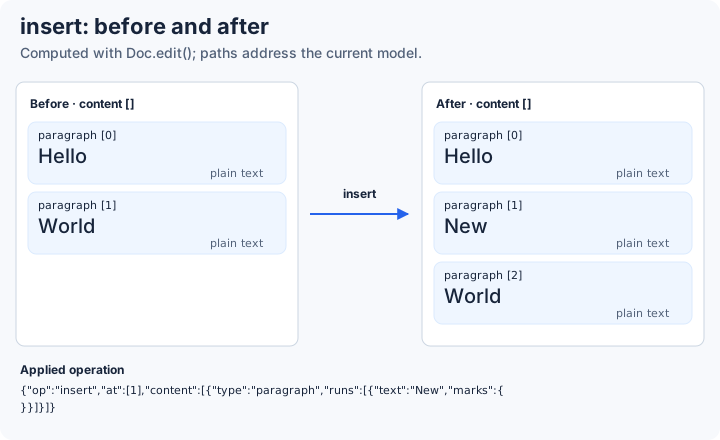
Insert a block
Insert at [1]: the new block becomes child 1, and the previous child 1 becomes child 2.
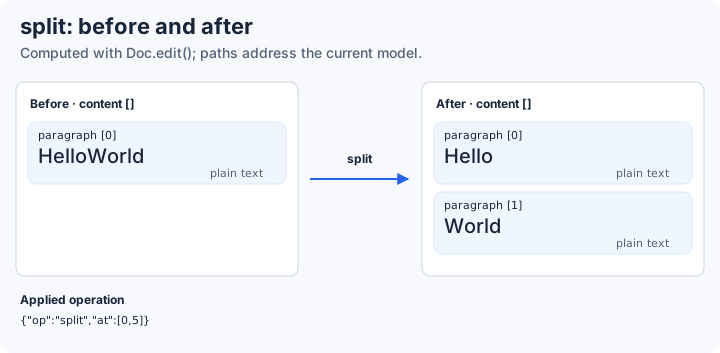
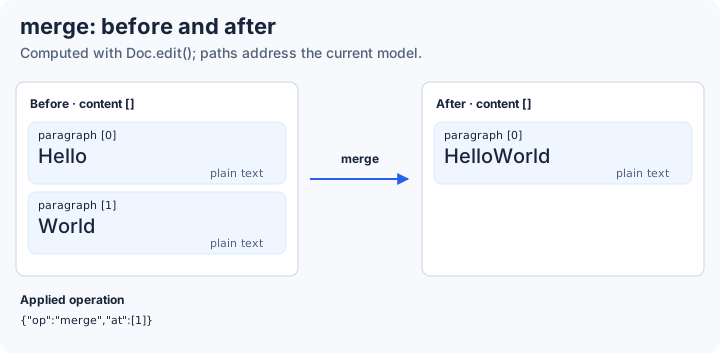
Split and merge paragraphs
Split targets a text offset. Merge targets the block to join into its predecessor.
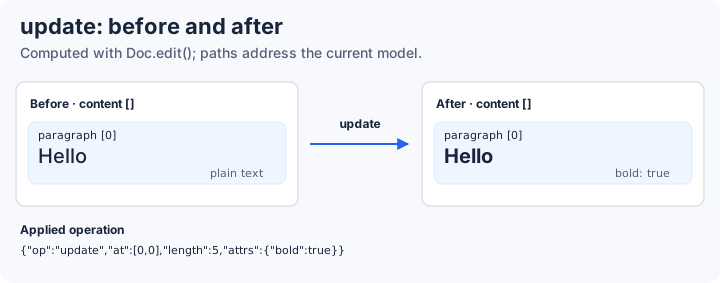
Update content or delete a block
Update changes a node's attributes or text type, or formats a text range. The illustrated update applies bold to five characters. Delete removes the addressed node; later child indices shift.
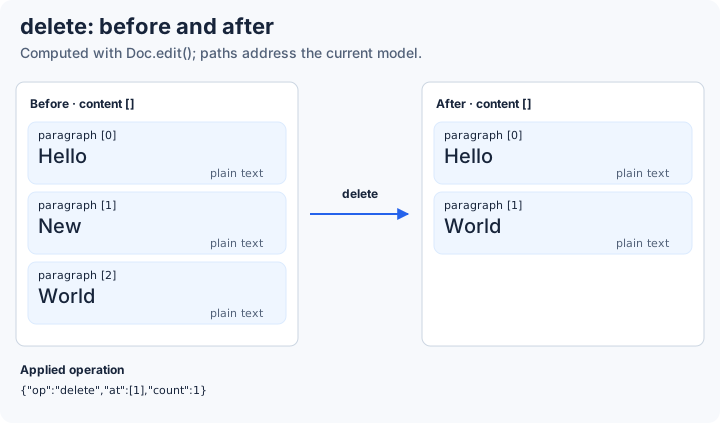
These are local model transitions. The compiler sends token operations for replication; it does not send these changing child indices as persistent identities. See table-cell merging and restoration for a nested example.
Move an existing block
Move uses current model paths, like the other editing operations. It retains the source block's identity and contents. Text edits and annotations remain attached to those identities.
// Move the second root block before the first root block.
client.commit(client.doc.edit([{op: "move", from: [1], at: [0]}]).ops);
The destination parent path refers to the model before removal. The final destination index refers to that parent's children after the source has been removed, when both parents are the same. For example, from: [0], at: [2] moves the first block to index 2 of a three-block flow. Each later operation in a batch reads the preceding result. Structural blocks can require empty text input slots before or after them. The canonical model and returned normalization edits include those slots; a structural move to index 0 can therefore produce an empty input paragraph followed by the moved block.
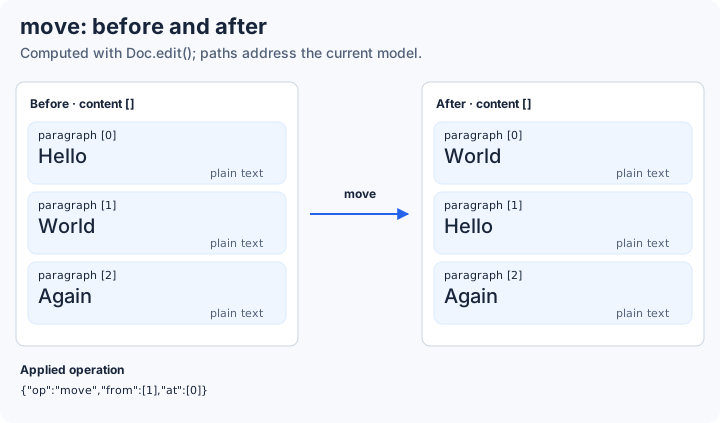
Paragraphs, nested flows, tables and atomic blocks retain their stored identities. A group such as a list is a view over consecutive text blocks. Moving a group moves its constituent blocks in order. Rows and columns retain their separate table editing contract. See document rules for required children, nested fields and persistent annotations.
Six operations
| Operation | Model example | Result |
|---|---|---|
move | {op: "move", from: [1], at: [0]} | Move one existing block while retaining its identity. |
insert | {op: "insert", at: [0, 2], content: "x"} | Insert text into the first block. |
delete | {op: "delete", at: [0, 2], count: 1} | Delete the addressed content. |
update | {op: "update", at: [0, 0], length: 3, attrs: {bold: true}} | Format three model units. |
split | {op: "split", at: [0, 3]} | Split a text block. |
merge | {op: "merge", at: [1]} | Merge the second block into its predecessor where allowed. |
Operations in a batch run in order. Each later path refers to the state after the earlier operation.
Apply edits and normalize
const {ops, normalize} = doc.edit([
    {op: "insert", at: [0, 0], content: "shared"},
    {op: "split", at: [0, 3]},
], {normalize: true});
ops contains the wire operations already applied to the document. Send them with client.commit(ops) when the document belongs to a SyncClient. normalize contains changes needed to bring an editor's proposed model into the CRDT's canonical form.
Optional command helpers
The commands namespace is a convenience layer over doc.edit(). It translates actions such as Backspace and inserting a table column into the model operations above. It is useful when an editor already has command-style positions or needs keyboard-action policy.
These helpers use different addresses: {line?, b, o} for text positions, and a current GridBlock plus row/column indices for table helpers. They convert those addresses to model paths internally. They are optional; application code can use doc.edit() throughout. Both interfaces apply operations before returning them, so do not apply the returned operations a second time.
Respect coordinate units
Storage positions and Pos.o use UTF-16 token units. Model conversion uses code points in some paths. A grapheme can contain multiple code points. An editor adapter must handle these differences explicitly; ASCII-only tests do not establish full Unicode editing behavior.
Same-boundary Enter
Concurrent Enter operations created from the same observed boundary produce one visible split. An Enter created after observing the earlier split has a different boundary and creates another block. This rule is preserved when document caches are rebuilt.
Read the exact collaboration rules →
Rust experiment
Use explicit token anchors for text authoring. The SDK returns the changes for insertion, mark, deletion, undo and redo. It does not compile the full TypeScript doc.edit() command set.
Use the native SDK crate setup to run this complete Rust program.
use doc_sync_native_sdk::{Attributes, Document, EditOptions, Key, Result, SchemaPreset};

fn main() -> Result<()> {
    let mut doc = Document::new("writer", SchemaPreset::Text)?;
    let inserted = doc.insert_text(
        &Key::root(),
        "Hi",
        Attributes::new(),
        EditOptions::default(),
        0.0,
    )?;
    let doc_sync_native_sdk::Op::Text { id, .. } = &inserted.ops[0] else {
        panic!("expected insertion")
    };
    let marked = doc.set_mark(
        vec![id.clone()],
        doc_sync_native_sdk::Mark::Bold(Some(true)),
        EditOptions::default(),
        10.0,
    )?;
    assert_eq!(marked.ops.len(), 1);
    let before_delete = doc.model()?;
    doc.delete_text(vec![id.clone()], EditOptions::default(), 20.0)?;
    let deleted = doc.model()?;
    assert_ne!(deleted, before_delete);
    assert!(!doc.undo()?.ops.is_empty());
    assert_eq!(doc.model()?, before_delete);
    assert!(!doc.redo()?.ops.is_empty());
    assert_eq!(doc.model()?, deleted);
    Ok(())
}
This example uses one of six fixed SchemaPreset values. A separate runtime schema API accepts limited Document/Graphic descriptors and custom sparse-sheet fields. Live schema changes, the full doc.edit() compiler, WASM, Node, HTTP, MCP and editor bindings are not included.
Raw protocol probe and reference checks
Rust currently applies wire operations. It does not compile doc.edit() commands. This small native History example records one local insertion, undoes it, and redoes it.
Build the private executable with the commands in the Rust guide. Run the following command from the repository root. Each input line produces one JSON response.
experiments/rust-shadow/target/debug/doc-sync-rust-shadow <<'JSONL'
{"cmd":"new","replica":"A","actor":"A","schema":"flow-root-paragraph:boolean-marks:bold,italic:v1"}
{"cmd":"history_record","replica":"A","schema":"flow-root-paragraph:boolean-marks:bold,italic:v1","ops":[{"t":"text","id":{"lamport":1,"actor":"A"},"origin":{"lamport":0,"actor":"~root"},"units":[72,105]}],"now":1000,"options":{"caretBefore":"start","caretAfter":"end"}}
{"cmd":"history_undo","replica":"A"}
{"cmd":"history_redo","replica":"A"}
JSONL
The record response contains Hi, undo contains no visible text, and redo contains Hi again. Native History generates the deletion and cancellation operations. Plain apply does not create a local History entry. Use it for duplicate remote delivery or saved pending batches; history_record is not retry-safe.
This uses the base paragraph fixture. The separate pinned v6 fixture supports block movement and logical split/join; see the native block example. Neither fixture supplies a Rust authoring compiler, production transport, arbitrary runtime schema or live schema transition. See operation application.