CAD examples
Exact editable prism and source-edge chamfer
Run the complete sketch → prism → slab → edit → codec example, then chamfer the original uncut parent. The pinned CPU consumer checks remaining volume 5120→3328 mm³ and chamfer retained volumes 7104/7152 mm³. This is separate from the historical gallery and makes no editor/GPU or arbitrary Boolean claim.
Adaptive Curve display — Use a complete weighted degree-five Curve request to change display tolerance while keeping the native coefficients and full source intact.
Compile original geometry, query it, then prepare a separate display mesh. These examples use actual @barocss/cad public exports at version 0.0.0-experimental. Use the language reference to edit source0/1/2 correctly.
Open the CAD playground · Compiler API · Surface sampling guide
Divide a paired-roof Body
The paired-roof Body split example shows a compile-only typed application boundary over complete existing parents, explains the recorded 9/128 + 9/128 = 9/64 mm³ fixture, and links the existing native demonstration without running it automatically.
More editable language examples
Use CAD language practice for weighted parameters, curved extrusion and nonunit Curve domains. Read the native values alongside each fitted display.
Shape a quadratic rational Surface with nine poles, a typed rise and a central weight. Open the rational dome to compare its fixed boundary curves with the changed interior and evaluated grid.
Insert one original U knot into a Surface without sculpting the sheet. Compare 3×2 and 4×2 control nets with actual 17×9 native evaluations, using a common XYZ projection and separate provider/application query counts.
Compute dimensions with Source3 quantity functions in the named-call example. Its separate matching provider keeps native Model0, complete mixed geometry and explicit raw-source fresh compilation. Defaults change dimensions; the sampled open Surface is not a closed Body or editor Save/Open flow.
Build a width Face and a closed abstract Shell
Use the original Line-width extrusion example to create a 5 mm centered Face from a selected Line in a complete mixed model, then change its +Z distance from 10 to 12 mm. Read the six native Faces and twelve qualified pairs without treating the closed abstract Shell as a certified Solid.
Edit its two-node graph through height and width updates, suppression/resume, authored JSON Save/Open and a fresh height edit. Read actual Face-corner illustrations as CPU native-data projections, with no graphics/editor admission claim.
Edit sections and rebuild a Loft
Use the complete NURBS Loft graph example to change a middle section pole and weight, preserve unrelated original geometry, and inspect affected versus reused results. The guide uses a separate newer API version and explains authored Save/Open versus complete evaluated result ingestion.
Sample a complete Body boundary
Use the Body boundary mesh example to sample the occupied, trimmed six-Face boundary. Download its complete Body input and compare original topology with the shared mesh and faceted display data. Its numeric projection shows actual mesh positions; renderer admission remains a separate step.
Compile and evaluate geometry
Use compileCadModel to turn complete language input into native geometry. Query original parameters with evaluateCurve or evaluateSurface. For display, create a separate sampled packet with tessellateSurface and convert its millimetres to scene units once.
| Geometry task | Result to inspect |
|---|---|
Curve with domain [2,7] | Point at 4.5: [10,0,0] mm |
| Weighted Surface | Point at U=V=0.5: [7.7,5.2,1] mm |
| Weighted Surface, 17×17 grid | 289 vertices and 512 triangles |
| Open source1 extrusion | Point at U=V=0.5: [10,0,15] mm |
| Source2 Parameter edit, 10 cm→12 cm | Wall midpoint changes from [50,0,50] to [60,0,60] mm |
The qualified translated-strip Body uses a separate, newer Body API. It joins qualified Faces into shared topology and verifies the whole material boundary. The Curve/Surface examples below create geometry and display packets; they do not create that Body.
View the weighted Surface
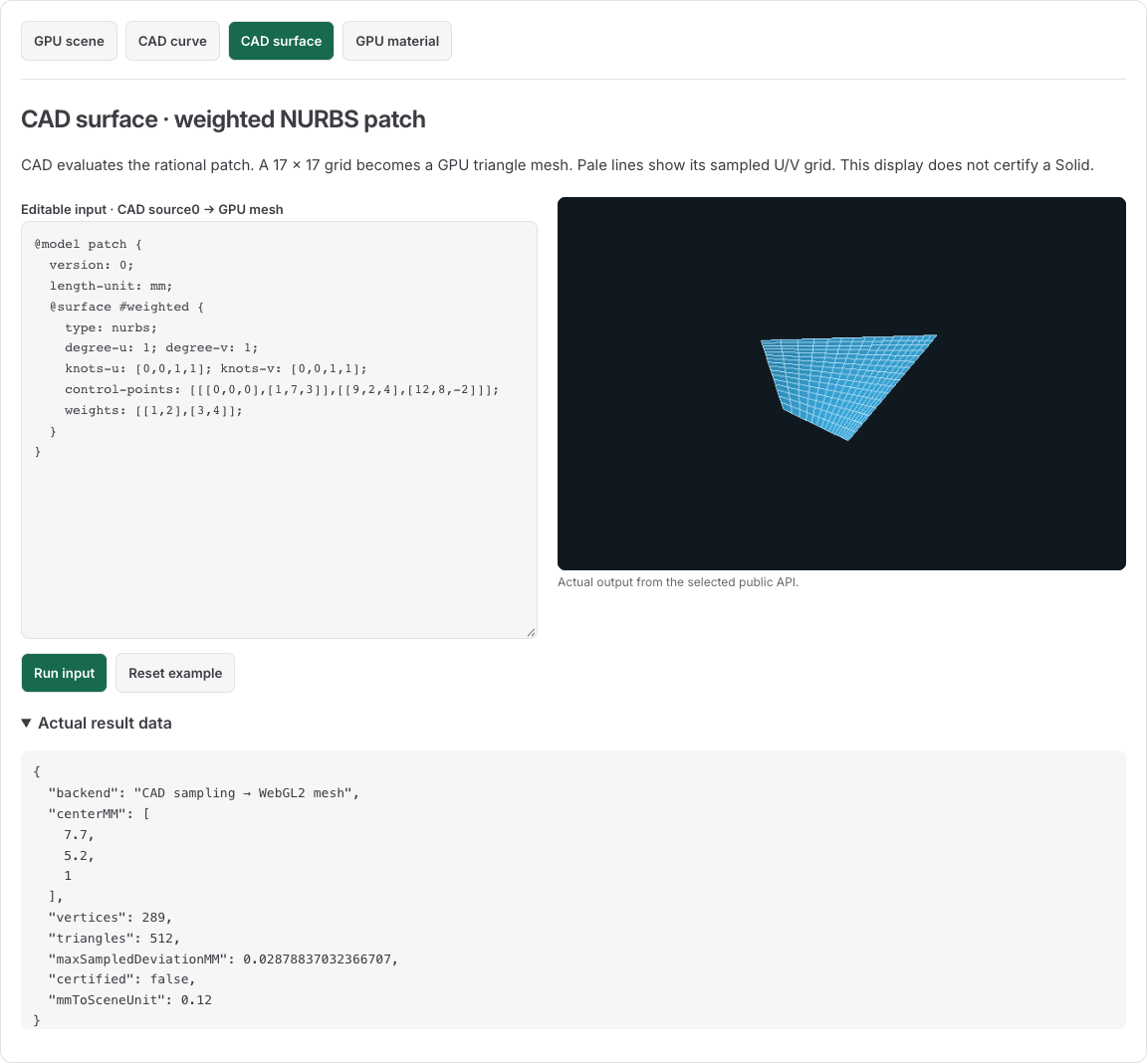
This display comes from four authored poles and four weights. The rendered triangles are sampled output. Pale U/V lines show the sampled grid, not the control net or topological edges. The original poles/weights below remain the editable native definition. The native midpoint follows the rational Surface evaluation, not an average of the four corner coordinates.
Open CAD surface, replace its source with the text below and select Run input. Inspect the native midpoint, mesh counts and report beside the canvas. Edit a pole or weight, then run the candidate again. Preserve accepted native/display state when a candidate refuses.
Full source0 input
@model preview_weighted {
  version: 0;
  length-unit: mm;
  @surface #weighted {
    type: nurbs;
    degree-u: 1;
    degree-v: 1;
    knots-u: [0,0,1,1];
    knots-v: [0,0,1,1];
    control-points: [[[0,0,0],[1,7,3]],[[9,2,4],[12,8,-2]]];
    weights: [[1,2],[3,4]];
  }
}
The control grid is U then V. Its weights are not colors or opacities. At U=V=.5, every bilinear basis product is.25. Weighted coordinate sums divided by the weight sum give [7.7,5.2,1] mm.
Complete public-API module
import { compileCadModel, evaluateSurface, tessellateSurface, exportIGES } from '@barocss/cad';
import { prepareMesh } from '@barocss/gpu';

const source = `@model preview_weighted {
  version: 0; length-unit: mm;
  @surface #weighted {
    type: nurbs; degree-u: 1; degree-v: 1;
    knots-u: [0,0,1,1]; knots-v: [0,0,1,1];
    control-points: [[[0,0,0],[1,7,3]],[[9,2,4],[12,8,-2]]];
    weights: [[1,2],[3,4]];
  }
}`;
const compiled = compileCadModel(source, { sourceVersion: 0 });
if (!compiled.ok) throw new Error(JSON.stringify(compiled.diagnostics));
const surface = compiled.model.objects[0];
if (surface.kind !== 'surface') throw new Error('Expected a Surface');
const centerMM = evaluateSurface(surface, 0.5, 0.5);
const { packet, report } = tessellateSurface(surface, {
  countU: 17, countV: 17, revision: 0,
});
const buffers = prepareMesh(packet, {
  mmToSceneUnit: 0.1, translate: [0,0,0],
  color: [0.2,0.6,0.9], background: [0.04,0.06,0.1],
});
const exchange = exportIGES(compiled.model, ['weighted']);
console.log(centerMM, report.vertexCount, report.triangleCount);
console.log(report.maxSampledDeviationMM, report.certified);
console.log(buffers.positions.length, buffers.indices.length);
console.log(exchange.report.objects[0].entity, exchange.report.solid);
Use a TypeScript-capable bundler when consuming development source entries. A built ESM package uses its compiled JavaScript entry. The complete module above uses public CAD and GPU imports.
Here scale 0.1 converts each native mm to 0.1 scene units once. The packet retains native mm/Y-up declaration and original U/V parameters. GPU owns the derived Float32 positions/normals and Uint16 indices. These calls prepare CPU geometry and buffers. Your application supplies the canvas, camera, display placement and renderer lifecycle. The playground shows the same native geometry with its own view settings.
The observed deviation samples five points per cell. It is not a global error bound. Native Source, Model, packet, display pose and image must remain separate records.
Read a rational quarter-circle result
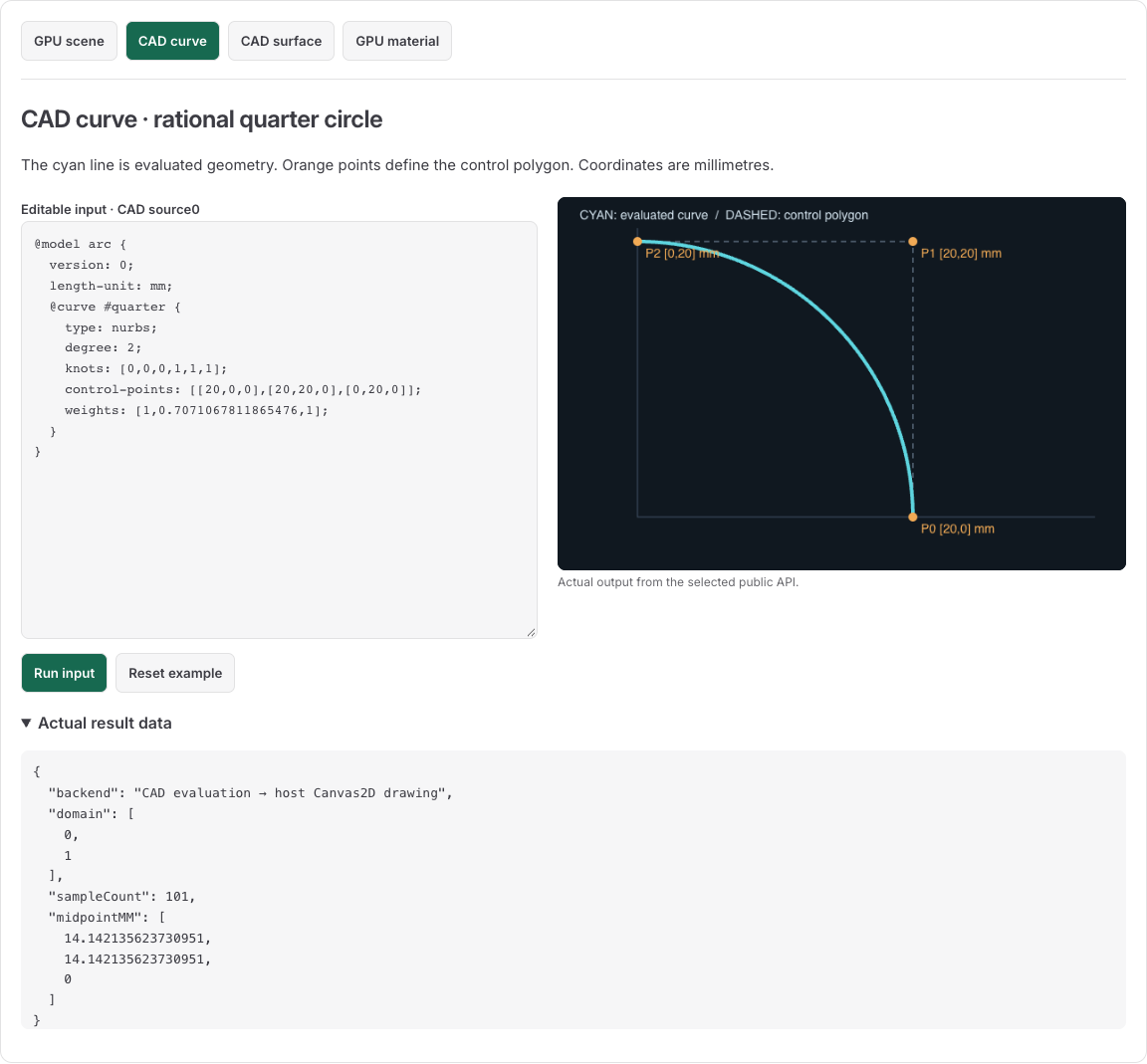
Open the live Curve input. The cyan line is the actual CAD evaluation. Orange points and dashed lines show the three control poles. The middle pole [20,20,0] is outside the curve; a NURBS pole is not generally a point on the curve.
@model arc {
  version: 0; length-unit: mm;
  @curve #quarter {
    type: nurbs; degree: 2;
    knots: [0,0,0,1,1,1];
    control-points: [[20,0,0],[20,20,0],[0,20,0]];
    weights: [1,0.7071067811865476,1];
  }
}
The original domain is [0,1]. The host evaluates101 uniformly spaced parameters. At u=.5, the actual point is approximately [14.142135623730951,14.142135623730951,0] mm. The middle rational weight produces the quarter circle of radius20; replacing it with1 changes the shape. The image uses CAD evaluation followed by a host Canvas2D drawing.
Query a Curve with an original domain
Insert a knot into a complete source0 Curve to compare a changed control polygon with retained sampled shape at the same original parameters. The native-data illustration and producer observations have separate sampling counts; the operation adds no gallery/editor/GPU workflow.
This complete module uses source0 with knot domain 2..7:
import { compileCadModel, curveDomain, evaluateCurve } from '@barocss/cad';

const source = `@model original_domain {
  version: 0; length-unit: mm;
  @curve #edge {
    type: nurbs; degree: 1; knots: [2,2,7,7];
    control-points: [[0,0,0],[20,0,0]]; weights: [1,1];
  }
}`;
const result = compileCadModel(source, { sourceVersion: 0 });
if (!result.ok) throw new Error(JSON.stringify(result.diagnostics));
const curve = result.model.objects[0];
if (curve.kind !== 'curve') throw new Error('Expected a Curve');
console.log(curveDomain(curve)); // [2,7]
console.log(evaluateCurve(curve, 4.5)); // [10,0,0], mm
The public evaluator takes an original native parameter. Do not normalize4.5 to 0.5 before this call. Sampling is uniform in that native parameter, not automatically uniform in arc length. For a rational arc, that parameter is not necessarily angle.
Construct an open Surface in source1
Source1 admits a Curve and its extrusion. It excludes literal Surface blocks. Open CAD extrude for the same complete source shown below. Its compiler option is sourceVersion:1. Select Run input after changing the vector. The initial native midpoint is [10,0,15] mm.
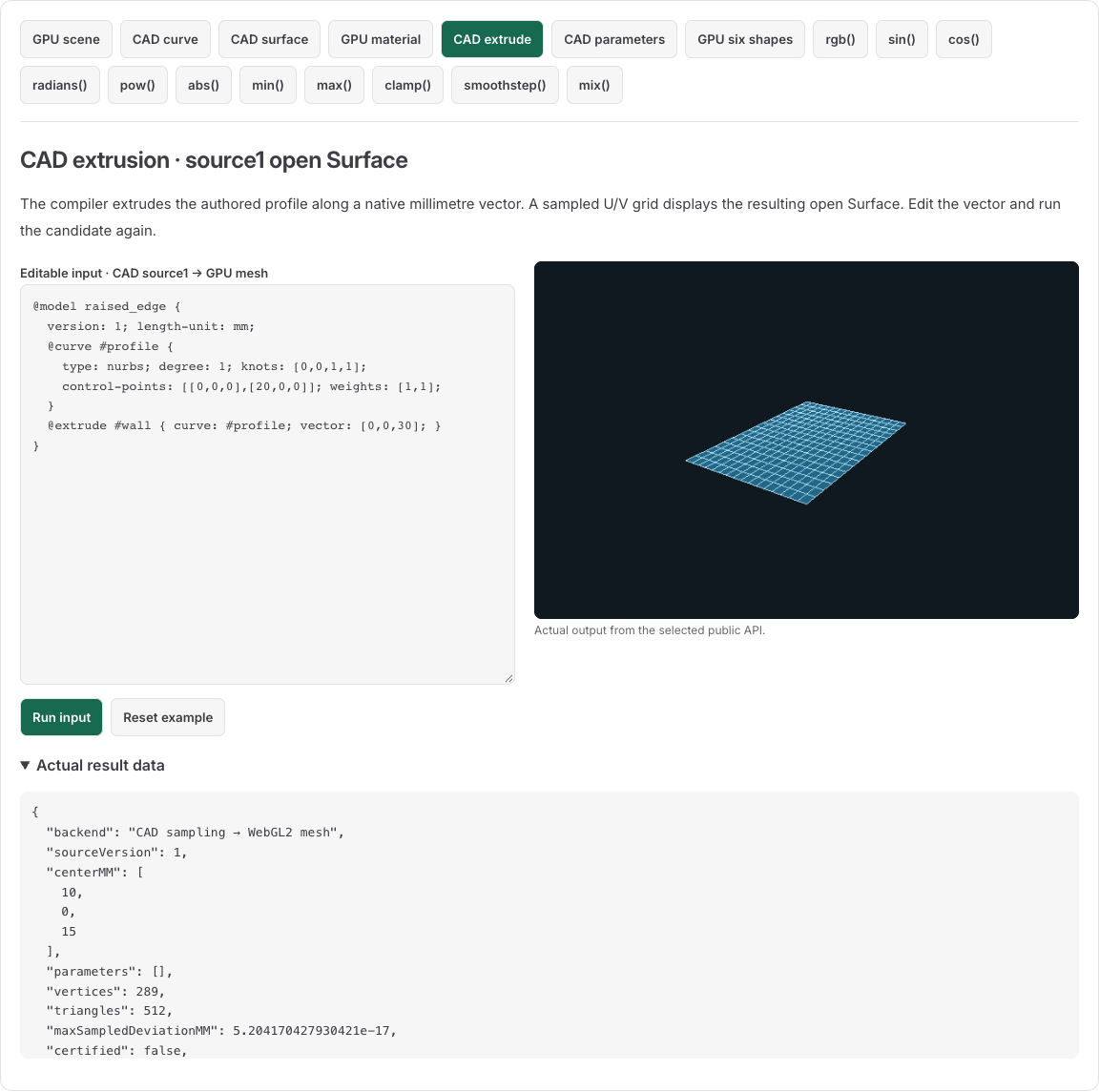
Pale lines show the sampled U/V grid. The retained profile Curve and extrusion vector define the native Surface. The public API example below compiles the same source and evaluates the native Surface.
import { compileCadModel, evaluateSurface } from '@barocss/cad';

const source = `@model raised_edge {
  version: 1; length-unit: mm;
  @curve #profile {
    type: nurbs; degree: 1; knots: [0,0,1,1];
    control-points: [[0,0,0],[20,0,0]]; weights: [1,1];
  }
  @extrude #wall { curve: #profile; vector: [0,0,30]; }
}`;
const result = compileCadModel(source, { sourceVersion: 1 });
if (!result.ok) throw new Error(JSON.stringify(result.diagnostics));
const wall = result.model.objects.find(object => object.id === 'wall');
if (!wall || wall.kind !== 'surface') throw new Error('Expected wall Surface');
console.log(result.model.objects.map(object => object.id)); // ['profile','wall']
console.log(evaluateSurface(wall, 0.5, 0.5)); // [10,0,15], mm
console.log(result.ir.schemaVersion, result.ir.sourceVersion, result.model.version);
// 1,1,0
The Surface is C(u)+v[0,0,30], with V domain 0..1. This is an open Surface with no caps or Solid topology. Retain the construction's output/input IDs and source spans. Displaying the result does not make it a closed native body.
Recompile a parameter edit in source2
Source2 quantities distinguish length and scalar. Open CAD parameters. Its compiler option is sourceVersion:2. Change 10 cm to 12 cm, then select Run input. Native width changes from 100 to 120 mm, height from 50 to 60 mm, and the wall midpoint from [50,0,50] to [60,0,60] mm. The scalar remains 2 and native IDs remain profile and wall.
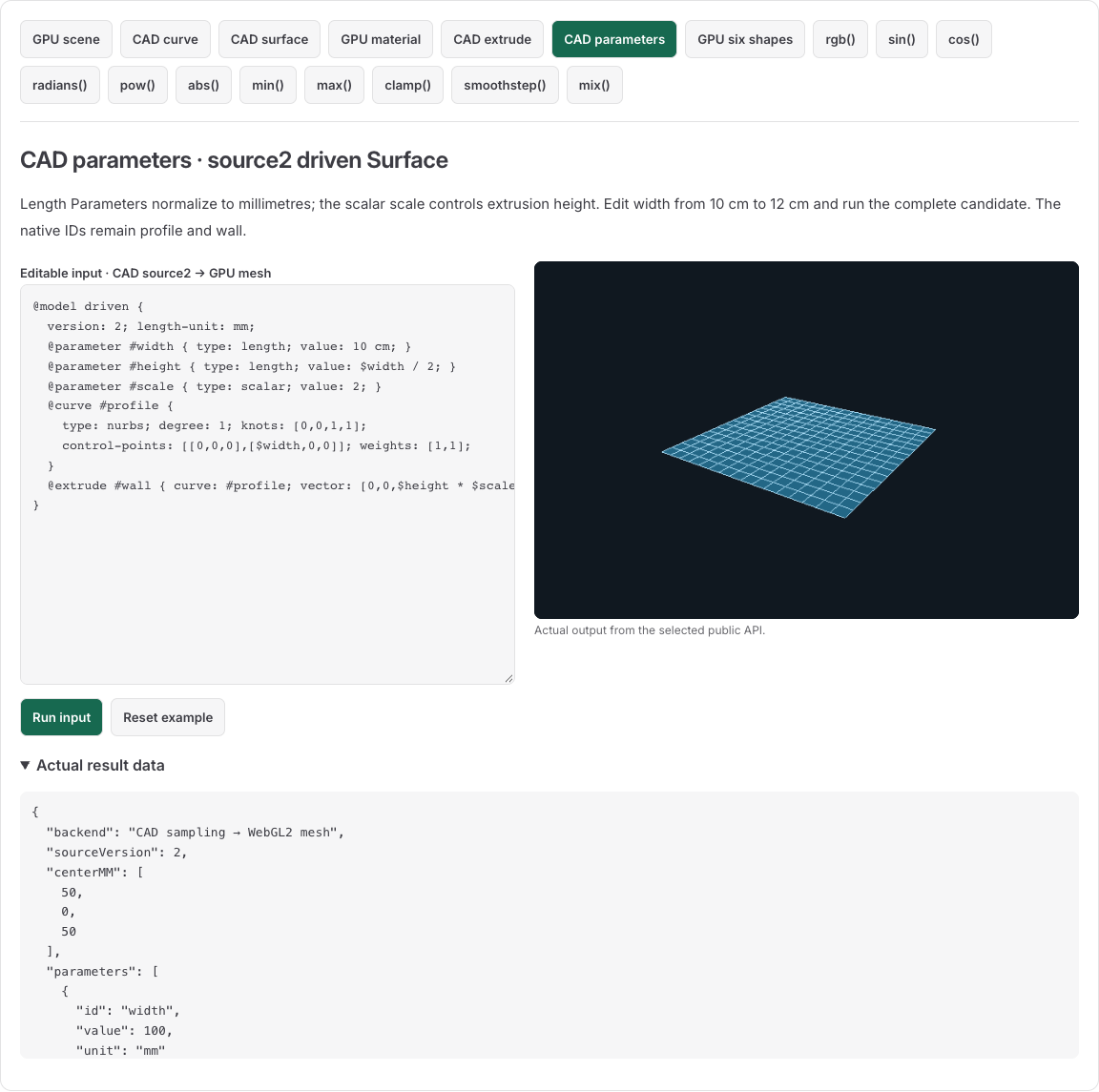
The host fits sampled bounds for display. When both native dimensions grow by the same factor, the fitted image can retain the same aspect; inspect the result panel for the actual millimetre values. To change the shape independently, edit the scalar scale while leaving width unchanged. The complete public API example below recompiles both versions and reads their native values.
import { compileCadModel, evaluateSurface } from '@barocss/cad';

const source = `@model driven {
  version: 2; length-unit: mm;
  @parameter #width { type: length; value: 10 cm; }
  @parameter #height { type: length; value: $width / 2; }
  @parameter #scale { type: scalar; value: 2; }
  @curve #profile {
    type: nurbs; degree: 1; knots: [0,0,1,1];
    control-points: [[0,0,0],[$width,0,0]]; weights: [1,1];
  }
  @extrude #wall { curve: #profile; vector: [0,0,$height * $scale]; }
}`;
for (const input of [source, source.replace('10 cm', '12 cm')]) {
  const result = compileCadModel(input, { sourceVersion: 2 });
  if (!result.ok) throw new Error(JSON.stringify(result.diagnostics));
  if (result.ir.schemaVersion !== 2) throw new Error('Expected schema2');
  const wall = result.model.objects.find(object => object.id === 'wall');
  if (!wall || wall.kind !== 'surface') throw new Error('Expected wall Surface');
  console.log(result.ir.parameters.map(p => [p.id, p.value, p.unit]));
  console.log(evaluateSurface(wall, 0.5, 0.5));
}
// First: width100mm,height50mm,scale2; midpoint[50,0,50]mm.
// Edited: width120mm,height60mm,scale2; midpoint[60,0,60]mm.
Recompile the complete candidate. The previous native result does not change. Source2 IR retains parameter expressions and field bindings; native Model version remains 0. The language guide explains why 1mm+2mm is valid but a coordinate 1+2 refuses.
The direct Loader source path accepts source0 only. A compiler source2 result does not establish that every Loader, editor file envelope or Save/Open host accepts that dialect.
Understand a refused edit
The following edits violate the selected language or quantity rules:
| Change | Result |
|---|---|
| Weighted Surface model changed to source1/header1 | KIND: source1 excludes literal Surfaces |
| Original Curve header0 with compiler sourceVersion 1 | VERSION |
Source2 profile endpoint changed from $width to 1+2 | UNIT: scalar expression in a length field |
Source2 height changed from $width/2 to $width/0 | DIVISION_ZERO |
Compilation failure returns diagnostics only. It has no partial Model to adopt. Keep accepted source/model/display state in the host; show code/message and the actual UTF-16 source range. Do not use geometry substitution or unit retagging to hide a refused edit.
Sample a plane and prepare GPU buffers
This complete example samples a native plane and prepares its display buffers:
import { compileCadModel, tessellateSurface, evaluateSurface } from '@barocss/cad';
import { prepareMesh } from '@barocss/gpu';

const source = `@model plane_example {
  version: 0; length-unit: mm;
  @surface #plane {
    type: nurbs; degree-u: 1; degree-v: 1;
    knots-u: [0,0,1,1]; knots-v: [0,0,1,1];
    control-points: [[[0,0,0],[0,10,0]],[[20,0,0],[20,10,0]]];
    weights: [[1,1],[1,1]];
  }
}`;
const compiled = compileCadModel(source, { sourceVersion: 0 });
if (!compiled.ok) throw new Error(JSON.stringify(compiled.diagnostics));
const surface = compiled.model.objects[0];
if (surface.kind !== 'surface') throw new Error('Expected plane Surface');
const { packet, report } = tessellateSurface(surface, {
  countU: 3, countV: 3, revision: 0,
});
const buffers = prepareMesh(packet, {
  mmToSceneUnit: 0.001, translate: [0,0,0],
  color: [0.2,0.6,0.9], background: [0.06,0.09,0.12],
});
console.log(evaluateSurface(surface, 0.5, 0.5)); // [10,5,0], mm
console.log(report.vertexCount, report.triangleCount); // 9,8
console.log(buffers.positions[6], buffers.positions[7]);
// [0,0.01] approximately as Float32: a native [0,10,0] vertex.
Increasing U follows +X and V follows +Y, so this plane preview's normal follows +Z. This path applies no axis rotation. Scale 0.001 means metres per mm.
Retain editable geometry
Keep the complete source, Model name, native IDs, conversion options and approximation report with your application state. Recompile after source edits. A sampled mesh or rendered image does not replace the Curve poles, knots, weights or Surface control net.
IGES exports selected geometry and a separate identity report. Keep native source for later editing; the export does not serialize a closed Solid or a universal CAD document.