Edit CAD language examples
These three complete inputs use the CAD model language in experimental @barocss/cad provider 5f5ad866. The source2 examples resolve typed Parameters before producing native geometry version 0. The source0 Curve keeps its original parameter domain. They use the existing Surface mesh and XY Curve display; they add no Body, Solid or new language capability.
Open an example, edit the complete source and press Run input. The selected preset fixes the sourceVersion option. Keep the matching version header. A refused candidate shows its diagnostic and retains the last accepted display and numeric result. Reset example restores that preset's original text.
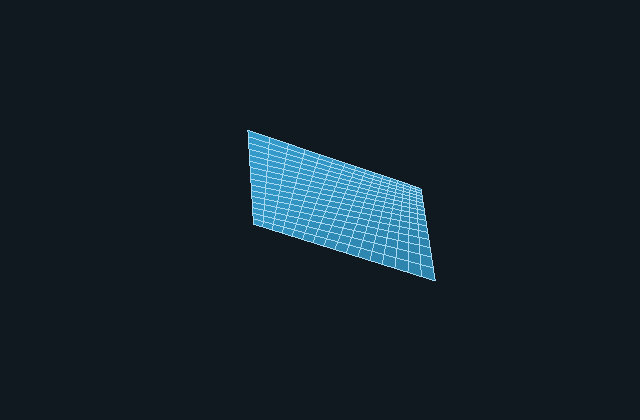
Change a rational Surface weight
Open the weighted Parameter example.
@model weighted_parameters {
  version: 2; length-unit: mm;
  @parameter #width { type: length; value: 4 cm; }
  @parameter #height { type: length; value: 2 cm; }
  @parameter #lift { type: length; value: 1 cm; }
  @parameter #cornerWeight { type: scalar; value: 3; }
  @surface #patch {
    type: nurbs; degree-u: 1; degree-v: 1;
    knots-u: [0,0,1,1]; knots-v: [0,0,1,1];
    control-points: [[[0,0,0],[0,$height,0]],
                     [[$width,0,0],[$width,$height,$lift]]];
    weights: [[1,1],[1,$cornerWeight]];
  }
}
The length Parameters resolve to width 40 mm, height 20 mm and lift 10 mm. cornerWeight is a dimensionless scalar. The outer pole index is U; the inner index is V. Both domains are [0,1].
At (u,v)=(0.5,0.5), the four degree-1 basis contributions have equal polynomial factors. The rational center is therefore the weighted sum of the four poles divided by their weight sum:
center = (P00 + P01 + P10 + 3*P11) / 6
≈ [26.666667,13.333333,5] mm| Edit | Result at U/V 0.5/0.5 |
|---|---|
Keep cornerWeight value 3 | Approximately [26.666667,13.333333,5] mm |
Change its value: 3; to value: 1; | [20,10,2.5] mm |
| Change its value to 0 | WEIGHTS refusal; no replacement Surface |
Weight changes influence the shape between poles. They do not multiply the lifted corner's authored XYZ: that pole remains [40,20,10] mm. Setting a weight to zero is outside the positive-weight contract. Keep lengths and scalars distinct; value: 3 mm is not a scalar weight.
Extrude a curved, parameter-driven profile
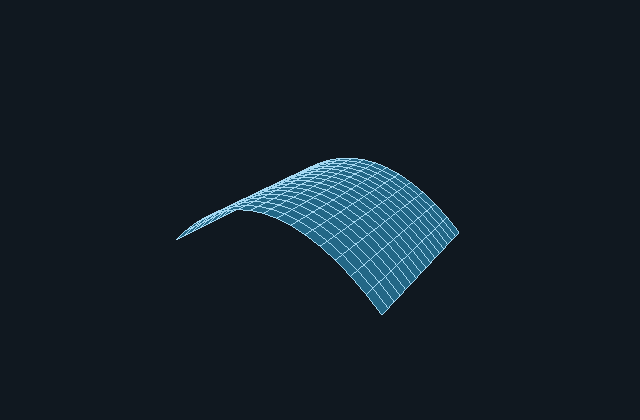
Open the curved Extrude example.
@model curved_extrusion {
  version: 2; length-unit: mm;
  @parameter #span { type: length; value: 4 cm; }
  @parameter #bow { type: length; value: 2 cm; }
  @parameter #height { type: length; value: 3 cm; }
  @curve #profile {
    type: nurbs; degree: 2;
    knots: [0,0,0,1,1,1];
    control-points: [[0,0,0],[$span/2,$bow,0],[$span,0,0]];
    weights: [1,1,1];
  }
  @extrude #wall { curve: #profile; vector: [0,0,$height]; }
}
The profile has span 40 mm and a middle control pole at [20,20,0] mm. The expression $span/2 remains a length. At U = 0.5 the quadratic profile evaluates to [20,10,0] mm; a control pole generally is not a point on the evaluated Curve.
The extrusion constructs S(u,v)=C(u)+v*[0,0,height]. It retains the profile's U domain [0,1] and adds V domain [0,1]. The native Model contains profile Curve and wall Surface, in that order.
| Edit | Wall center at U/V 0.5/0.5 |
|---|---|
| Keep bow 2 cm and height 3 cm | [20,10,15] mm |
Change bow's value: 2 cm; to value: 4 cm; | [20,20,15] mm |
Change height's value: 3 cm; to value: 0 mm; | GEOMETRY refusal: extrusion vector must be nonzero |
Changing bow moves the profile's interior without changing its endpoints or extrusion height. Length Parameters normalize to mm, while knots and weights remain dimensionless. This Extrude creates an open Surface. It supplies no end caps, Shell or Solid.
Preserve a nonunit Curve domain
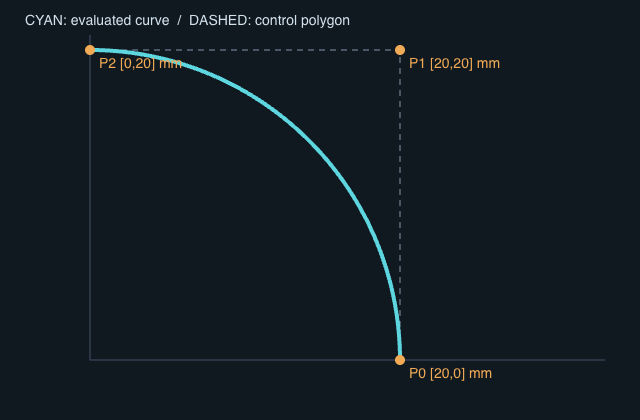
Open the nonunit Curve example.
@model nonunit_arc {
  version: 0; length-unit: mm;
  @curve #quarter {
    type: nurbs; degree: 2;
    knots: [2,2,2,7,7,7];
    control-points: [[20,0,0],[20,20,0],[0,20,0]];
    weights: [1,0.7071067811865476,1];
  }
}
The knots give domain [2,7]; the midpoint parameter is 4.5, not 0.5. The middle weight approximates the rational quarter-circle weight. All poles have z = 0, so the XY drawing includes the entire authored Curve plane.
| Edit | Result at parameter 4.5 |
|---|---|
| Keep the authored middle weight | Approximately [14.142136,14.142136,0] mm |
Replace the weights with [1,1,1] | [15,15,0] mm; a polynomial quadratic with the same poles/domain |
Replace knots with [2,2,2,1,7,7] | KNOTS refusal: descending knot sequence |
The drawing uses 101 evaluated points across the original domain and shows the control polygon separately. Changing a weight changes the evaluated Curve while retaining the poles. U is dimensionless; changing its domain does not change XYZ units or justify treating U as millimetres.
Evaluate with the public API
The following application function accepts one complete input above and its sourceVersion. It reports compiler diagnostics against that same text. A successful source2 result selects the Surface; source0 selects the Curve.
import {
  compileCadModel, evaluateSurface, tessellateSurface,
  curveDomain, evaluateCurve,
} from '@barocss/cad';

export function inspectCadInput(sourceText: string, sourceVersion: 0 | 2) {
  const compiled = compileCadModel(sourceText, { sourceVersion });
  if (!compiled.ok) {
    return {
      ok: false,
      diagnostics: compiled.diagnostics.map(diagnostic => ({
        ...diagnostic,
        text: sourceText.slice(diagnostic.range.start, diagnostic.range.end),
      })),
    };
  }
  const surface = compiled.model.objects.find(object => object.kind === 'surface');
  if (surface?.kind === 'surface') {
    const preview = tessellateSurface(surface, {
      countU: 17, countV: 17, revision: 0,
    });
    return {
      ok: true, centerMM: evaluateSurface(surface, 0.5, 0.5),
      parameters: compiled.ir.schemaVersion === 2 ? compiled.ir.parameters : [],
      packet: preview.packet, report: preview.report,
    };
  }
  const curve = compiled.model.objects.find(object => object.kind === 'curve');
  if (curve?.kind !== 'curve') throw new Error('Expected a Curve or Surface');
  const [start, end] = curveDomain(curve);
  return {
    ok: true, domain: [start, end],
    midpointMM: evaluateCurve(curve, (start + end) / 2),
  };
}
Each displayed Surface uses a 17×17 sampling grid: 289 vertices and 512 triangles. Its report has certified:false; sampled deviation is not a global error certificate. Automatic display fitting uses sampled bounds, so a parameter edit may change the numeric geometry while keeping it similarly sized on screen. Native XYZ remains authored mm; display conversion applies to a separate mesh copy. The Curve drawing is a sampled XY projection, not a mesh or Solid qualification.
Source2 admits at most 64 Parameters and 16 geometry declarations. Fields keep their quantity rules: coordinate/vector components require lengths; degrees, knots and weights require scalars. Arrays must fit the native degree, pole and positive-weight bounds. Compiler ranges use half-open UTF-16 offsets and one-based lines/columns; apply them only to the exact candidate text that produced them. Recompile the complete edited input to obtain new independent native data.
Shape a quadratic rational dome
Open the rational dome and read the complete rational Surface guide. Its source2 input has a typed rise and dimensionless central weight, degree 2 in both directions and nine literal XY poles.
The center pole is 24 mm high, while the original Surface center is 96/7 mm. Weight 4→1 changes that center to 6 mm without moving any pole. After Reset, rise 24→36 mm at weight 4 gives 144/7 mm. The four entire boundary curves stay fixed; an off-center probe shows that weight also changes XY parameterization. The displayed 17×17 grid and 34 evaluated U/V paths are sampled geometry, not the control net or Solid topology.
Compute dimensions with typed quantity functions
Open CAD quantity functions and read the complete Source3 guide. Its separate 4f93558d provider adds named calls, closed defaults and lexical length/scalar formals. Initial width/depth/height are 100/25/100 mm; changing the default factor from 2 to 1 halves only height. It retains the full four-object Model and displays a sampled open extrusion, without upgrading the Source0/2 inputs above.