Combine scene rules and material functions
These three editable examples combine the language features explained in the scene guide and material guide. Open a sample, change one value, then select Run input. Use Reset example to restore its complete input.
They use local @barocss/gpu version 0.0.0 at source snapshot 5f5ad866205a21510ac69552e704cc162fa253b5. Scene inputs select source1 explicitly. The material uses mesh-opaque-fragment-v0 and a host-controlled amount. The browser needs WebGL2; a separate source-package host needs a TypeScript-capable bundler.
Shared rounded-box styles and ID overrides
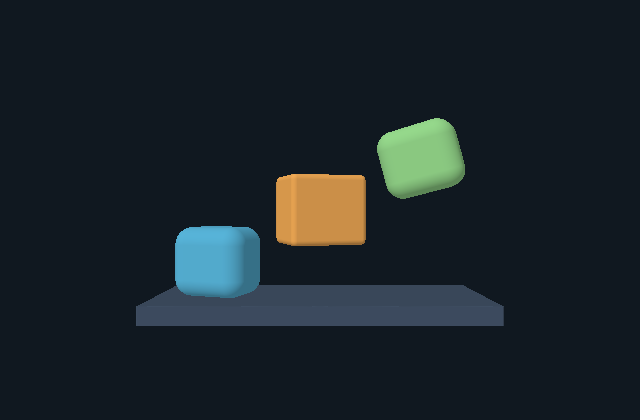
The blue and green boxes share their rounding radius. The orange box has a smaller radius and the opposite Y rotation. The base is a separate box.
@scene roundedStack {
  version: 1;
  background: #101820;
  box #base;
  rounded-box #left;
  rounded-box #center;
  rounded-box #right;
}
#base { size: 3.8 .2 1.5; translate: 0 -1.1 0; color: #425267; }
rounded-box { size: .9 .8 .7; radius: .12; rotate-y: -20deg; color: #57B4D9; }
#left { translate: -1.2 -.6 0; }
#center { translate: 0 0 0; radius: .06; rotate-y: 20deg; color: #F1AA55; }
#right { translate: 1.2 .6 0; rotate-z: 15deg; color: #95D88B; }
rounded-box { radius: .2; }
The first rounded-box rule supplies shared size, radius, rotation and color. The last type rule changes the radius to.2. An ID rule has higher specificity than a type rule, so the center radius remains.06 even though its rule appears earlier.
| Object | Final radius | Rotation [X,Y,Z] degrees |
|---|---|---|
left | .2 | [0,-20,0] |
center | .06 | [0,20,0] |
right | .2 | [0,-20,15] |
The cascade is per property. The center's Y rotation overrides the shared Y rotation. The right's Z rotation adds another axis value; it does not remove the shared Y value. Size gives full outer extents in scene units.
- Change the last type rule to
rounded-box { radius: .3; }. Run. The side boxes become more rounded; the center keeps its ID radius. - Change the center's
rotate-yfrom20deg to0deg. Run. Only that box changes orientation. - Set the last type radius to
.4. Run. The side boxes refuse it because.4exceeds half their smallest outer extent,.7/2 = .35. The accepted view remains available while its context is live.
Read declarations and style precedence before adapting this rule order. Rules change declared objects; they do not create a hierarchy or group transform.
Local capsule endpoints and a rotated ring
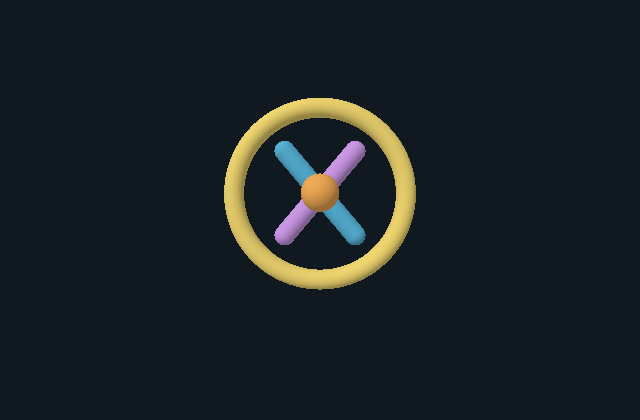
Two capsules share the same local endpoints and translation. Their opposite Z rotations make them cross. The torus is behind them, and the small orange sphere is closer to the default camera.
@scene crossedCapsules {
  version: 1;
  background: #101820;
  torus #frame;
  capsule #left;
  capsule #right;
  sphere #center;
}
#frame { major-radius: 1.05; minor-radius: .12; translate: 0 .2 -.2; rotate-x: 90deg; color: #F0D670; }
capsule { radius: .12; start: 0 -.65 0; end: 0 .65 0; translate: 0 .2 0; }
#left { rotate-z: 40deg; color: #57B4D9; }
#right { rotate-z: -40deg; color: #CA97E5; }
#center { radius: .22; translate: 0 .2 .15; color: #F1AA55; }
Capsule start and end are local segment endpoints. The segment length is1.3scene units. Adding a radius.12 at both ends gives a local overall Y extent of1.54before rotation. Translation places each rotated shape in the scene; it does not rewrite those endpoints.
The torus starts with its axis along local Y and its ring in local XZ. X rotation90deg turns that ring toward the camera. Source1 uses right-handed coordinates with Y up and applies local X, then Y, then Z rotation.
- Change the torus's
rotate-xfrom90deg to0deg. Run. The ring returns to its local XZ plane and appears more edge-on. - Change the capsule
endto0 1 0. Run. Both segments grow from the same local start. Their segment midpoints move, while the object translations stay unchanged. - Set
endto0 -.65 0. Run. This equalsstart, so the compiler refuses the unusable center segment. It does not replace the accepted scene.
Each declaration remains a separate SDF primitive. Their overlap does not create a CAD Boolean result, shared topology or a certified Body. See rotation and coordinate order and the property reference.
The browser host mounts either complete scene with:
import { mountScene } from '@barocss/gpu';

// canvas belongs to your host; source is a complete scene above.
const renderer = mountScene(canvas, source, undefined, { sourceVersion: 1 });
const changed = renderer.update(editedSource);
if (!changed.ok) console.error(changed.error.message);
// On host teardown: renderer.dispose();
Mounting and each accepted update draw one frame. The host controls editing and lifetime; these static arrangements create no orbit or animation clock.
Compose a material transition window
Open Material transition window.
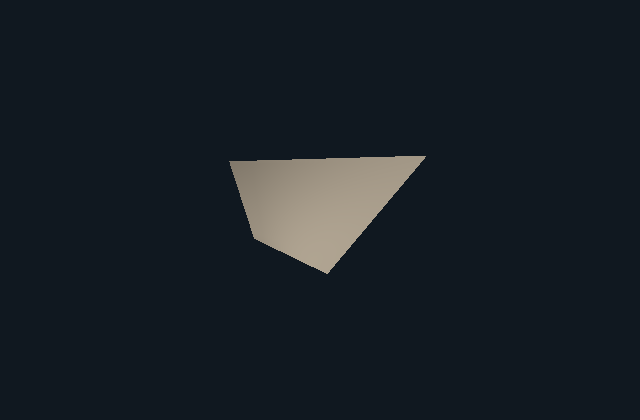
The image uses amount.5. The same CAD-derived mesh stays in place; the shader changes its color. The initial control value is0. Move it to.5 and1 to compare the center and warm endpoint.
@shader #transition_window {
  @uniform amount: float(0,1,0);
  @let ratio: float(smoothstep(.25,.75,clamp(amount*1.5-.25,0,1)));
  @let cold: color(rgb(24,96,180));
  @let warm: color(rgb(240,208,96));
  @fragment { color: mix(cold,warm,ratio); }
}
Follow the expression from its input to output:
amount*1.5-.25remaps the host control.clamp(...,0,1)bounds that value.smoothstep(.25,.75,...)eases the bounded transition.rgbsupplies literal color channels;mixinterpolates their linear values using the eased ratio.
| Host amount | Remapped value | Clamped value | Eased ratio |
|---|---|---|---|
| 0 | -.25 | 0 | 0 |
| .5 | .5 | .5 | .5 |
| 1 | 1.25 | 1 | 1 |
The transition begins at amount1/3 and reaches its warm endpoint at amount2/3. Below the first boundary, the ratio is0. Above the second, it is1. These are source-derived scalar values; mesh lighting and color conversion affect screen pixels.
- Replace
rgb(24,96,180)withrgb(24,144,96). Set amount0. Run. The cold endpoint changes from blue to green. - Compare amounts0, .5 and1. Geometry stays unchanged; only the bound material color changes.
- Reverse the literal edges to
smoothstep(.75,.25,...). Run. The compiler returnsRANGEbecause the edges are not ordered. Keep the previously accepted material.
The shader declares one float uniform, amount, with range0..1 and default0. The host binds it through setMaterial({material,uniforms:{amount}}) on an admitted mesh renderer. Compile before adoption, and handle the result before changing accepted host state. The material setup and cleanup recipe shows this lifetime.
This program combines existing functions; it adds no UV input, texture access, geometry or clock. Read individual function examples and range analysis when changing the expression.