GPU examples
Start the visual playground. It runs the real source APIs in your browser. Choose GPU scene to edit shapes, or GPU material to change the color of a CAD-derived mesh. Each example shows its input, accepted result and diagnostics.
The original scene and mesh-material examples below describe the local experimental @barocss/gpu version0.0.0 at source snapshot 5f5ad866205a21510ac69552e704cc162fa253b5. The scene samples use source1; the material samples use mesh-opaque-fragment-v0. The images show the browser-rendered samples.
Procedural UV plasma
The advanced shader example combines UV wrapping, domain distortion, interference waves and diagonal highlights. Edit the full shader, adjust four uniforms, or use its host Play/Pause controls. Its separate API version and example WebGL2 host are stated in the guide.
The interference caustics example combines crossing wave fields and narrow highlights. It has its own editable source and controls and uses the same public UV material profile and example host.
More scene and material examples
Reuse a float easing function and a color palette in the new language example. Its complete @fn program uses a separate newer source profile; it changes fragment color on a fixed UV quad and adds no Scene shape or clock.
Use GPU compositions for style precedence, local rotations and a material transition window. Each source is complete and editable in the playground.
Typed parameters, repeats and conditions
Open Generated scene and read the complete Source2 input. Compare equality, stable repeat IDs and a third stud at the common origin. The separate profile supplies frozen source/AST/scene/shader data; an application Canvas2D view draws diagnostic local boxes while the shader text remains unexecuted.
Inspect material color without a display
Use the public CPU evaluation example to inspect linear RGB from a compiled shader, explicit uniforms and UV. It explains defaults, copied immutable results, zero handling and genuine range errors. Its numeric result is separate from a GPU frame.
Discrete threshold palette
Select a color at an exact threshold in the CPU language example. The separate discrete material profile chooses dark or light colors across .5. Canvas2D displays three public CPU reference values and the current color; lowered GLSL remains unexecuted text.
Run the portal
Open the playground and select a sample. Edit its complete source, then select Run input. Use Reset example to restore the original input. See Use the interactive examples for input selection, browser requirements and result interpretation.
The API code below belongs in a browser host with a TypeScript-capable bundler. WebGL2 is required for the scene, surface and material views. The host owns the canvas, controls and source editing. It displays compilation or rendering errors when an input cannot be adopted.
Rotated box and sphere
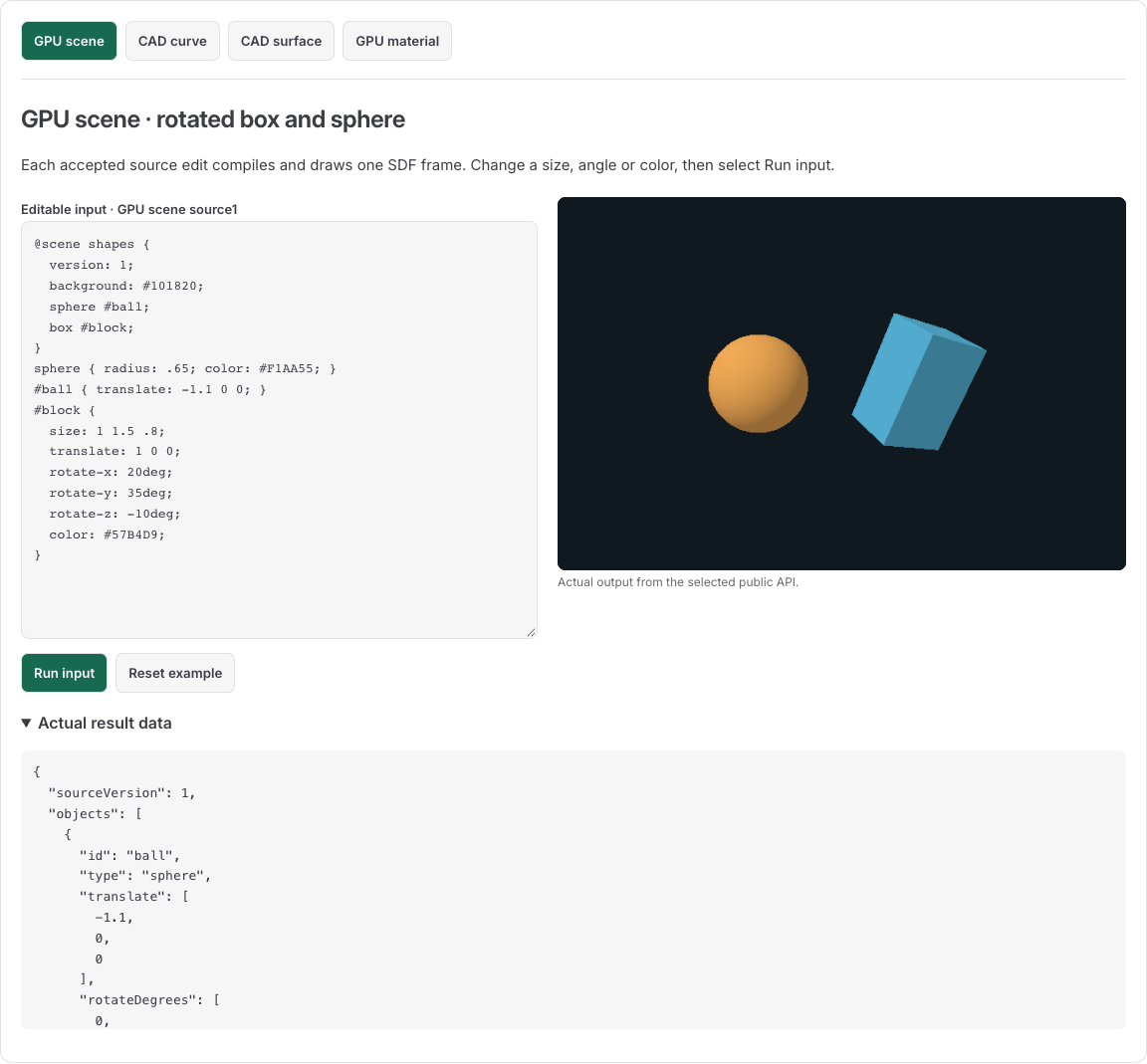
This image shows the source1 SDF renderer. The left object is an orange sphere. The right object is a rotated blue box. Both come from the following complete source:
@scene shapes {
  version: 1;
  background: #101820;
  sphere #ball;
  box #block;
}
sphere { radius: .65; color: #F1AA55; }
#ball { translate: -1.1 0 0; }
#block {
  size: 1 1.5 .8;
  translate: 1 0 0;
  rotate-x: 20deg;
  rotate-y: 35deg;
  rotate-z: -10deg;
  color: #57B4D9;
}
The declaration block creates ball and block. Style blocks change their properties. The box size is its full XYZ extent, not half extent. The three rotations apply in X-Y-Z order. Numbers without deg use scene units.
The portal makes this call:
import { mountScene } from '@barocss/gpu';

const renderer = mountScene(canvas, source, undefined, { sourceVersion: 1 });
console.log(renderer.scene.objects.map(object => ({
  id: object.id,
  type: object.type,
  translate: object.translate,
  rotateDegrees: object.rotateDegrees
})));
Expected accepted data:
[
  { "id": "ball", "type": "sphere", "translate": [-1.1,0,0], "rotateDegrees": [0,0,0] },
  { "id": "block", "type": "box", "translate": [1,0,0], "rotateDegrees": [20,35,-10] }
]
Change the input and explain the result
- Change
rotate-y: 35degtorotate-y: 0deg. Run the input. The box's orientation changes, while its size and translation stay the same. - Change the sphere radius from
.65to.9. Run the input. The sphere grows; its center stays at[-1.1,0,0]. - Change its radius to0. Run the input. The renderer refuses the candidate and retains the previously accepted scene while the context is live.
- Select Reset example to restore the exact original source.
A version: 1 header alone does not change a source0 parser. Pass the explicit source1 option when mounting. A rotation such as 20rad is refused because this grammar requires degrees. Read the complete scene language for all six shapes, defaults, cascade and errors.
Compare all six source1 primitives
Open GPU six shapes. This source1 scene compares all six admitted SDF shapes with the default camera:
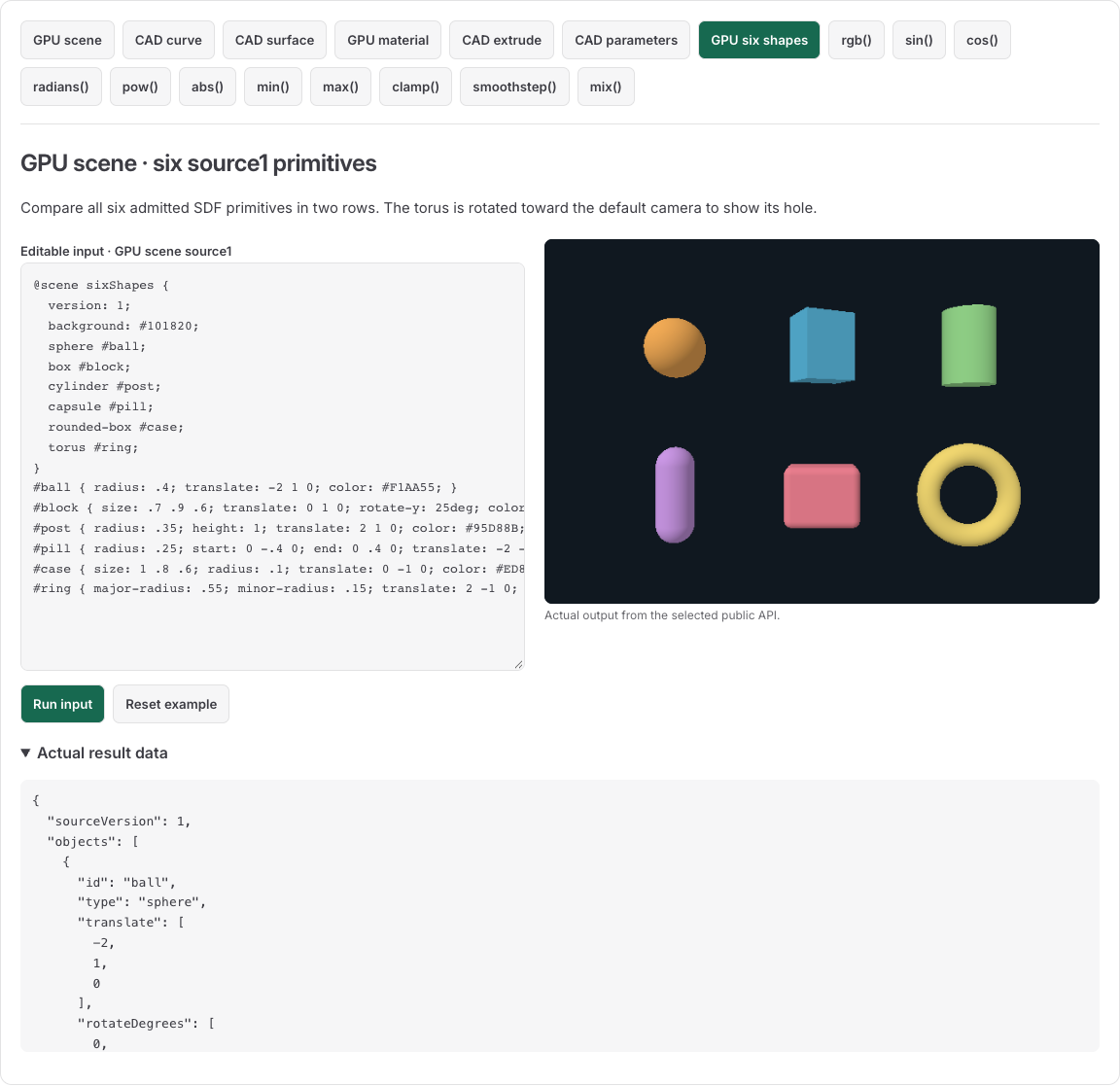
| Position | ID / shape | Color | Dimensions before rotation |
|---|---|---|---|
| Top left | ball / sphere | Orange | Radius.4, diameter.8 |
| Top center | block / box | Blue | Full size.7 × .9 × .6 |
| Top right | post / cylinder | Green | Radius.35, full height1 |
| Bottom left | pill / capsule | Purple | Radius.25, center segment length.8, overall Y extent1.3 |
| Bottom center | case / rounded-box | Pink | Full outer size1 × .8 × .6, rounding radius.1 |
| Bottom right | ring / torus | Yellow | Major radius.55, minor radius.15, outside diameter1.4 |
The box has Y rotation25deg. The torus has X rotation90deg, which turns its ring toward the camera. These rotations change orientation, not authored dimensions. This is an SDF rendering example, not a native CAD geometry or Boolean certificate.
The complete input is:
@scene sixShapes {
  version: 1;
  background: #101820;
  sphere #ball;
  box #block;
  cylinder #post;
  capsule #pill;
  rounded-box #case;
  torus #ring;
}
#ball { radius: .4; translate: -2 1 0; color: #F1AA55; }
#block { size: .7 .9 .6; translate: 0 1 0; rotate-y: 25deg; color: #57B4D9; }
#post { radius: .35; height: 1; translate: 2 1 0; color: #95D88B; }
#pill { radius: .25; start: 0 -.4 0; end: 0 .4 0; translate: -2 -1 0; color: #CA97E5; }
#case { size: 1 .8 .6; radius: .1; translate: 0 -1 0; color: #ED8090; }
#ring { major-radius: .55; minor-radius: .15; translate: 2 -1 0; rotate-x: 90deg; color: #F0D670; }
The host uses the same public call as the first scene example: mountScene(canvas, source, undefined, {sourceVersion: 1}). The result contains six objects in declaration order. Each reports its ID, type, translation and rotation. The source name is sixShapes.
- Set the ring's
rotate-xto0deg and run. Its plane returns to local XZ, making the camera view more edge-on. - Set the capsule's
endto0 .8 0and run. Its center segment grows from.8to1.2; the two hemispherical ends retain radius.25. - Set the ring's minor radius to
.55. Run. Equal major/minor radii are refused, because no positive ring hole remains. The live view retains its accepted scene while the context is usable. - Reset the example to restore the exact six-shape source.
The scene grammar explains each shape's Float32 boundary checks and the required source1 option.
Host-controlled material blend
The two images show the same CAD-derived mesh with two admitted uniform values:
| Amount0: blue endpoint | Amount1: orange endpoint |
|---|---|
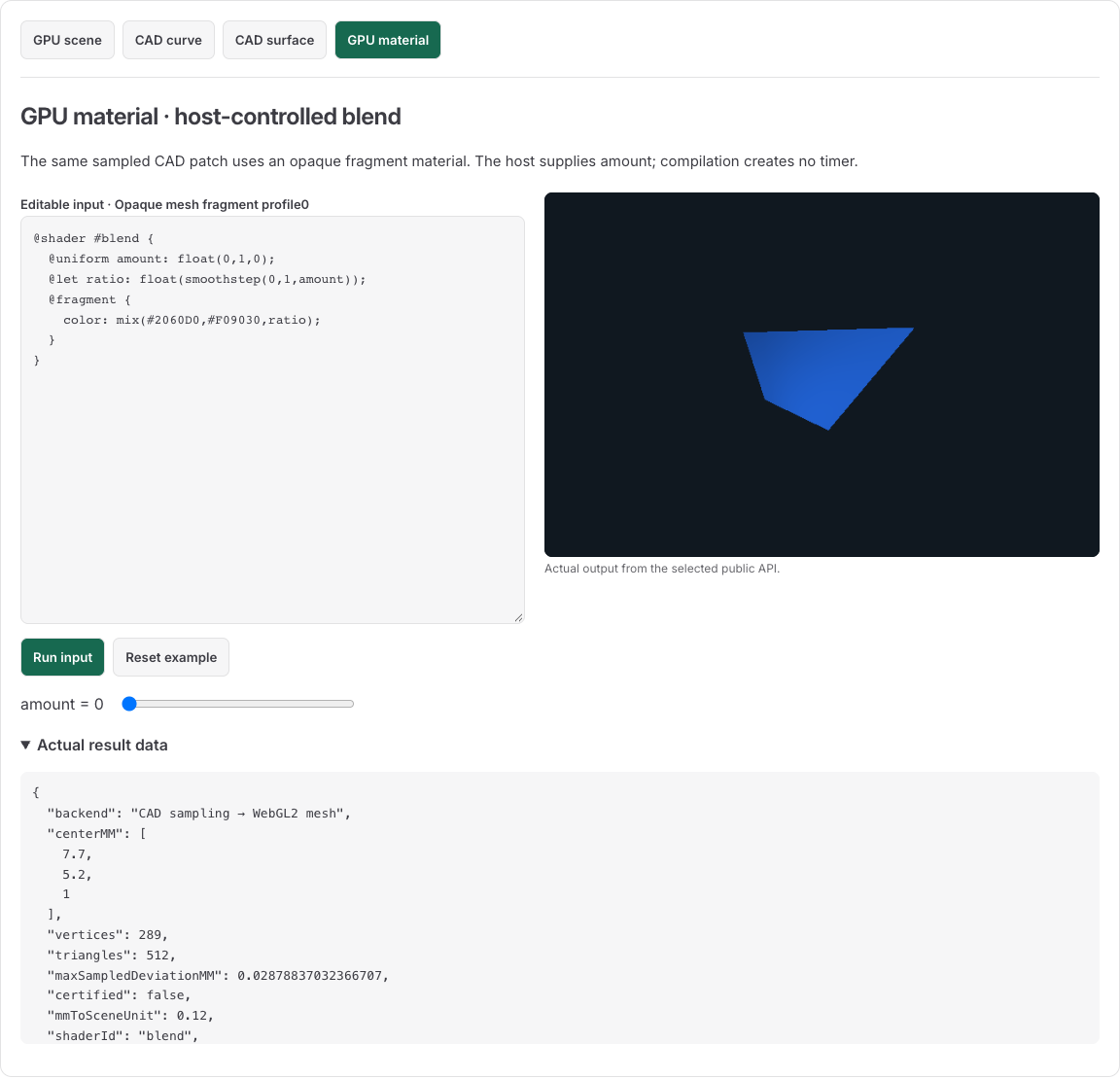 | 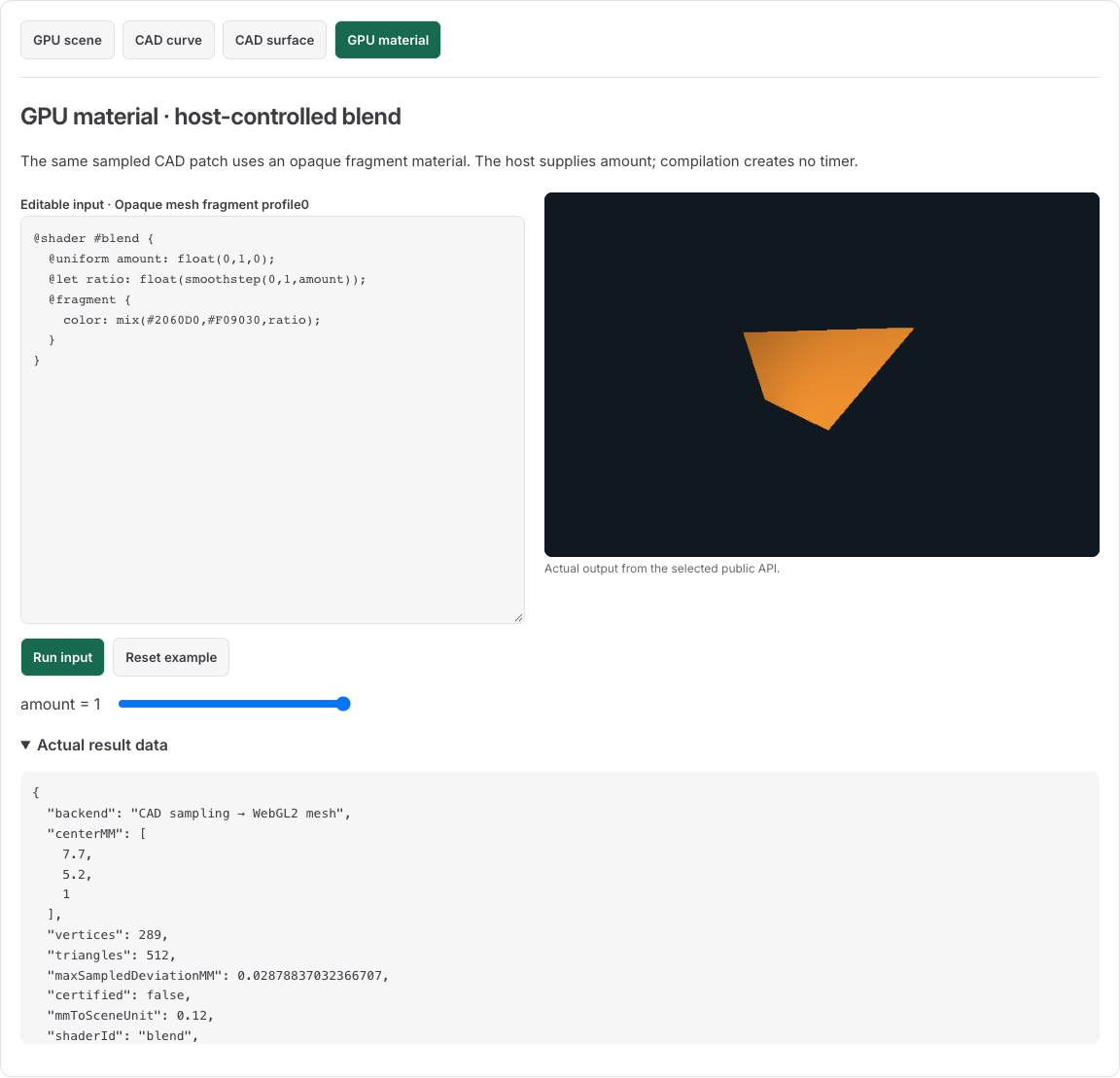 |
The geometry stays the same. A real MeshRenderer draws it. The material changes its opaque fragment color:
@shader #blend {
  @uniform amount: float(0,1,0);
  @let ratio: float(smoothstep(0,1,amount));
  @fragment {
    color: mix(#2060D0,#F09030,ratio);
  }
}
The portal supplies amount0 initially. The Material amount slider supplies a value from0 to1; the visible label shows amount=value. At.5, the easing ratio is.5. Color mixing happens in linear color, so the displayed midpoint need not equal the arithmetic mean of the input RGB bytes.
import { compileMeshMaterial } from '@barocss/gpu';

const compiled = compileMeshMaterial(source);
if (!compiled.ok) throw new Error(JSON.stringify(compiled.diagnostics));

function setAmount(amount: number) {
  const result = renderer.setMaterial({
    material: compiled.material,
    uniforms: { amount }
  });
  if (!result.ok) throw result.error;
}
setAmount(0);
setAmount(.5);
setAmount(1);
This function assumes the mesh renderer from the next section. A material source creates no geometry and no timer. The host owns the uniform values and scheduling. Read the material grammar and complete function table.
For separate complete inputs for all11functions, read GPU function examples. The cosine sample uses a complete cycle: amounts0, .5 and1 produce ratios1, 0 and1. The clamp sample limits its mix ratio to.25 through.75, so those amounts produce ratios.25, .5 and.75. Both use the same admitted mesh and host-controlled amount contract.
Exercise errors without guessing the result
| Change | Expected result |
|---|---|
Bind {amount: .5} | Accepted |
Bind {amount: 2} | Refused: outside the declared0..1 range |
Bind {missing: .5} | Refused: unknown uniform name |
Bind {} | Uses the declared amount default0 |
Change mix to unknown | Compile failure with SYNTAX code |
Use declared range-1..1 directly as the mix ratio | Compile failure with RANGE code |
Change output to color: amount; | Compile failure with TYPE code |
Changing amount0 to1 changes the color endpoint. A candidate containing unknown() is refused by the compiler and supplies no replacement material. Keep the accepted binding after a refused edit. setMaterial(null) clears the material. Clear overlays and face/object selections before adopting an opaque material.
CAD surface to a rendered mesh
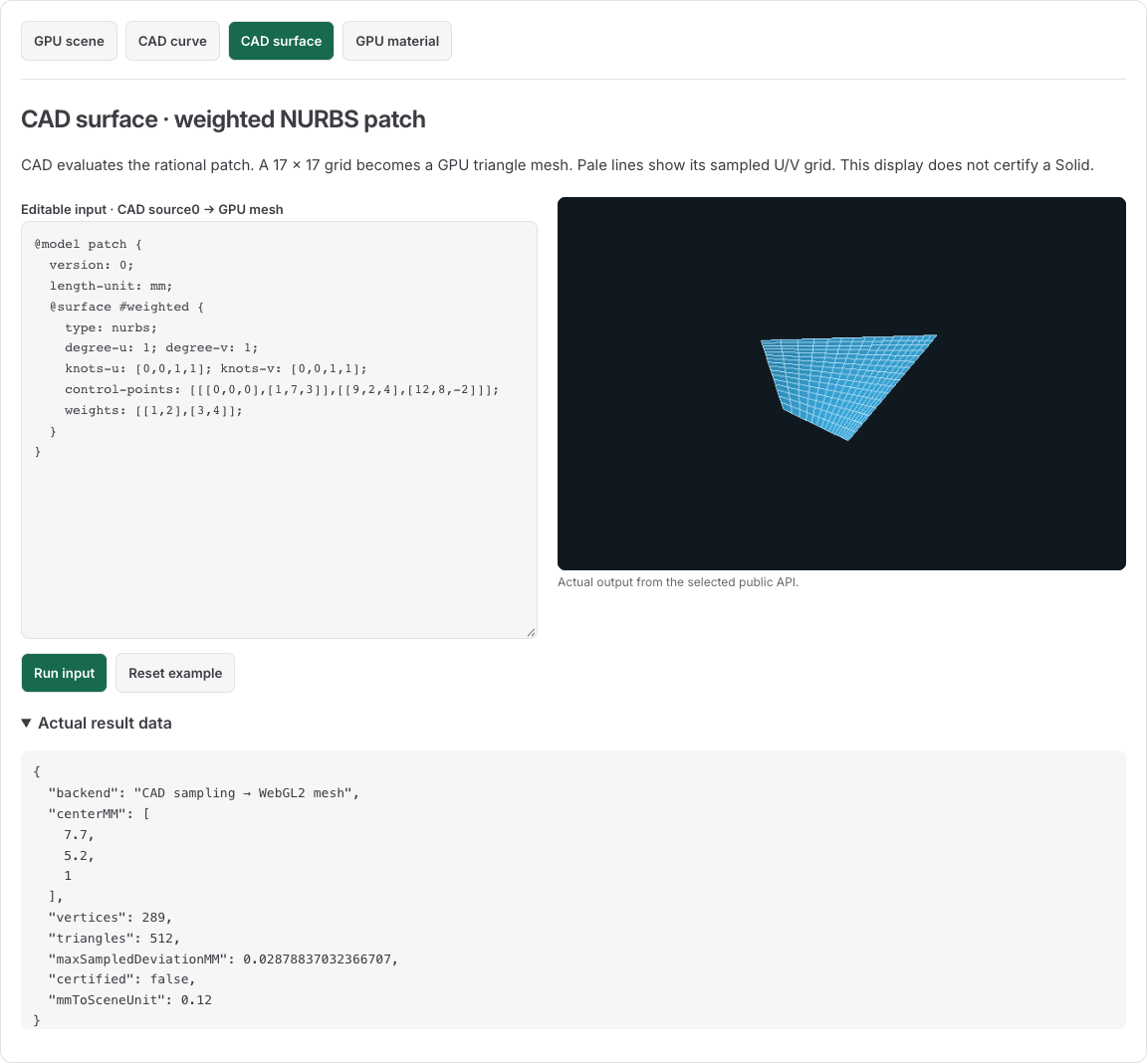
The surface and material examples use the same source geometry. The packet is a sampled preview of the native CAD surface. The surface view adds sampled U/V grid paths as a host visual aid. That grid is not native topology or a Solid certificate.
@model patch {
  version: 0;
  length-unit: mm;
  @surface #weighted {
    type: nurbs;
    degree-u: 1; degree-v: 1;
    knots-u: [0,0,1,1]; knots-v: [0,0,1,1];
    control-points: [[[0,0,0],[1,7,3]],[[9,2,4],[12,8,-2]]];
    weights: [[1,2],[3,4]];
  }
}
Native surface coordinates use millimeters. The renderer uses scene units. Conversion occurs once in MeshOptions.mmToSceneUnit; it does not change the source coefficients.
The following public-import code performs the compile, sample and mount sequence. canvas must be an HTMLCanvasElement; cadSource is the complete source above. This minimal mount omits the host's optional sampled grid overlay.
import {
  compileCadModel,
  evaluateSurface,
  tessellateSurface
} from '@barocss/cad';
import { mountMesh } from '@barocss/gpu';

const compiled = compileCadModel(cadSource, { sourceVersion: 0 });
if (!compiled.ok) throw new Error(JSON.stringify(compiled.diagnostics));
const surface = compiled.model.objects.find(object => object.kind === 'surface');
if (!surface) throw new Error('Expected a Surface');

const sampled = tessellateSurface(surface, {
  countU: 17,
  countV: 17,
  revision: 0
});
console.log(evaluateSurface(surface, .5, .5));
console.log(sampled.report.vertexCount, sampled.report.triangleCount);
console.log(sampled.report.certified);

canvas.width = 800;
canvas.height = 500;
const renderer = mountMesh(canvas, sampled.packet, {
  mmToSceneUnit: .12,
  translate: [-.7,-.45,0],
  color: [.22,.65,.85],
  background: [.063,.094,.125],
  camera: {
    eye: [2,1.6,3],
    target: [0,0,0],
    up: [0,1,0],
    fovYDegrees: 45,
    near: .01,
    far: 100
  }
});
At U=.5 and V=.5, the weighted surface point is [7.7,5.2,1] millimeters. The17×17 sampling grid creates289vertices and512triangles. The report's certified field is false. Sampled deviation is an observation, not a proof of maximum error over the continuous surface.
The eye, target, clipping and translation values use scene units. The up vector is dimensionless. A source Z value of4mm contributes.48 scene units before translation at the scale.12.
Change one weight and run the surface input. The native point and packet change. Change only a material uniform and the packet geometry stays the same. Read the CAD language for knots, coefficients, weights and original-domain rules.
Compile and inspect without a browser
Compile material text before drawing it. Compilation returns typed material data, called intermediate representation (IR). Validation checks that the data still matches its source. Lowering converts that validated data into a fragment expression and a uniform layout:
import {
  compileMeshMaterial,
  validateMeshMaterialIR,
  lowerMeshMaterial
} from '@barocss/gpu';

const result = compileMeshMaterial(`
@shader #wave {
  @uniform timeSeconds: float(0,2,0);
  @fragment {
    color: mix(#204080,#E08020,sin(timeSeconds*1.5707963267948966)*0.5+0.5);
  }
}`);
if (!result.ok) throw new Error(JSON.stringify(result.diagnostics));
const material = validateMeshMaterialIR(result.material);
const lowered = lowerMeshMaterial(material);
console.log(material.shaderId); // 'wave'
console.log(lowered.uniformLayout[0]); // Declared timeSeconds and generated mat_u_0.

const candidate = compileMeshMaterial('@shader #bad { @fragment { color: unknown(); } }');
if (!candidate.ok) console.log(candidate.diagnostics); // SYNTAX: unsupported function.
The timeSeconds uniform has min0, max2 and default0. It lowers to the generated name mat_u_0; renderer bindings use the declared name timeSeconds. The compiler and lowerer create no timer, canvas or frame. The host supplies the time value and adopts the result through setMaterial. Read caller time and cleanup for that lifecycle.
The SDF scene renderer and indexed mesh renderer have separate inputs. A CPU Engine scene prepares hierarchy and query data; it does not supply a general Engine renderer in this API profile. Read CPU Engine guide when using that separate format.
Scene language · Material language · Quickstart · API · Limits
Repeat UV patterns with explicit controls
Woven grid, contour bands and halftone dots are separate complete material programs. Each guide explains its source, controls, numerical checks and actual browser image. Open its language sample to edit the program and inspect the result.
These examples reuse the Manual's public repeating-UV material profile and its app-owned WebGL2 quad. The host supplies phase and Play/Pause. Compilation and CPU evaluation create no clock or renderer. The displayed patterns change color, not native geometry.