Move the display while retaining native coordinates
Open Viewer display pose to rotate and translate a displayed panel, measure its native points and select the actual sampled hit. The playground link opens the same example.
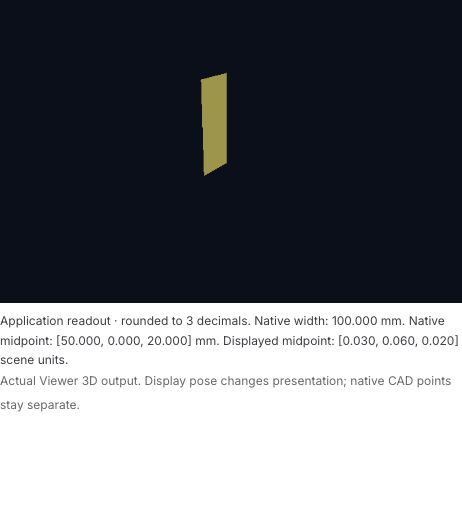
The actual image shows the panel after applying the 90° display pose. The application readout below it reports native measurement and midpoint coordinates, rounded to three decimal places. That DOM text is separate from the native canvas frame; the pose changes presentation while the native midpoint remains [50,0,20] mm.
This guide uses experimental @barocss/viewer version 0.0.0-experimental at fixed source profile 5f5ad866205a21510ac69552e704cc162fa253b5. Use a matching TypeScript-capable browser consumer and WebGL2. Source availability, CPU calculations, actual Viewer presentation and publication are separate stages.
The public method names applyMotionFrame and resetMotion accept caller-owned display data. The pose actions import no Motion package, start no clock and perform no native geometry edit. timeSeconds:0 is supplied frame metadata, not a request to advance a simulation.
Complete application input
The initial editor contains this application recipe:
{
  "nativeSource": "@model pose_panel {\n  version: 0; length-unit: mm;\n  @surface #panel {\n    type: nurbs; degree-u: 1; degree-v: 1;\n    knots-u: [0,0,1,1]; knots-v: [0,0,1,1];\n    control-points: [[[0,0,0],[0,0,40]],[[100,0,0],[100,0,40]]];\n    weights: [[1,1],[1,1]];\n  }\n}",
  "pose": null,
  "probeUV": [
    0.35,
    0.4
  ]
}
This JSON format belongs to the example host. It is not a public Viewer document codec. The host requires nativeSource, a pose value or null, and probeUV with two finite original U/V values. It then calls public Viewer methods. pose:null means the initial display has no pose override.
The nested complete Source0 is:
@model pose_panel {
  version: 0; length-unit: mm;
  @surface #panel {
    type: nurbs; degree-u: 1; degree-v: 1;
    knots-u: [0,0,1,1]; knots-v: [0,0,1,1];
    control-points: [[[0,0,0],[0,0,40]],[[100,0,0],[100,0,40]]];
    weights: [[1,1],[1,1]];
  }
}
The panel is 100×40 mm, with a native midpoint [50,0,20] mm at U=V=.5. The probe [.35,.4] evaluates to [35,0,16] mm. The actual CPU source check returned nine display vertices and eight triangles for countU=countV=3. These samples are derived display data, not additional native poles or Faces. These values describe the complete starting source; editing nativeSource submits a different native candidate.
Apply a full frame with an explicit binding
Choose Apply 90° display pose. The host submits:
{
  "contextId": "pose-panel-session",
  "timeSeconds": 0,
  "poses": [{
    "targetId": "panel-pose",
    "translation": [30,10,0],
    "rotation": [0,0,0.7071067811865476,0.7071067811865476],
    "scale": [1,1,1]
  }]
}
The quaternion is ordered XYZW and represents a 90° rotation about Z. Its pivot is the authored origin, not the panel midpoint. Translation is in mm; scale is dimensionless. The binding associates panel-pose with qualified native reference {modelId:'pose_panel',surfaceId:'panel'}. Frame and binding context IDs must match.
The declared basis is part-xyz-matches-rhyup. The caller explicitly asserts that the authored XYZ/mm basis matches the Viewer's right-handed Y-up/mm convention. This sample performs no automatic axis swap.
For a native point P, the display applies scale, quaternion rotation and translation in mm, then multiplies by mmToSceneUnit:.001 once. The midpoint therefore has an expected display position near [.03,.06,.02] in scene units. The independent application calculation produced [.02999999999999999,.06000000000000002,.02]. That CPU calculation is separate from an actual Viewer projection or GPU pixel.
Choose Measure native 100 mm to query U=0 and U=1 at V=.5. Their native coordinates are [0,0,20] and [100,0,20] mm. The public native distance uses those original coordinates. A display pose does not transform them into a different native model or measurement frame. The button name describes the starting 100 mm panel; after a source edit, read the actual returned native distance.
Complete public browser consumer
The module below supplies the full source, pose, binding, basis and camera. It mounts one visible canvas before asking for a CSS projection:
import { createViewer } from '@barocss/viewer';
import type { Viewer, ViewerPoseFrame, ViewerMotionBinding } from '@barocss/viewer';
import { evaluateSurface } from '@barocss/cad';

const source = `@model pose_panel {
  version: 0; length-unit: mm;
  @surface #panel {
    type: nurbs; degree-u: 1; degree-v: 1;
    knots-u: [0,0,1,1]; knots-v: [0,0,1,1];
    control-points: [[[0,0,0],[0,0,40]],[[100,0,0],[100,0,40]]];
    weights: [[1,1],[1,1]];
  }
}`;
const ref = { modelId: 'pose_panel', surfaceId: 'panel' };
const frame: ViewerPoseFrame = {
  contextId: 'pose-panel-session', timeSeconds: 0,
  poses: [{ targetId: 'panel-pose', translation: [30,10,0],
    rotation: [0,0,Math.SQRT1_2,Math.SQRT1_2], scale: [1,1,1] }],
};
const bindings: ViewerMotionBinding[] = [{
  contextId: frame.contextId, targetId: 'panel-pose', ref,
}];
const camera: Parameters<Viewer['setView']>[0] = {
  eye: [.25,.18,.3], target: [.05,.035,.02], up: [0,1,0],
  fovYDegrees: 45, near: .01, far: 10,
};
const canvas = document.createElement('canvas');
canvas.width = 640; canvas.height = 420;
canvas.style.cssText = 'display:block;width:640px;height:420px';
document.body.append(canvas);
const viewer = createViewer(canvas, {
  mmToSceneUnit: .001, background: [.04,.06,.1],
});
const measure = () => viewer.measureNativeSurfacePoints(
  { ...ref, u: 0, v: .5 }, { ...ref, u: 1, v: .5 },
);
try {
  viewer.loadNative(source, { sourceVersion: 0, countU: 3, countV: 3 });
  viewer.setView(camera);
  const model = viewer.getState().native?.model;
  const surface = model?.objects.find(object => object.kind === 'surface' && object.id === ref.surfaceId);
  if (!surface || surface.kind !== 'surface') throw new Error('The native panel is missing');
  console.log(evaluateSurface(surface,.5,.5)); // Native XYZ in mm.
  console.log(measure().distanceMM); // Native distance.
  viewer.applyMotionFrame(frame, bindings, { basis: 'part-xyz-matches-rhyup' });
  console.log(measure().distanceMM); // Same native query after the display change.
  const projection = viewer.projectNativePoint({
    kind: 'surface', ...ref, u: .35, v: .4,
  });
  if (projection) {
    const hit = viewer.pick(projection.xCss, projection.yCss);
    if (hit) viewer.select(hit.ref);
  }
  console.log(viewer.getState().selected);
  // Later, on an explicit user action: viewer.resetMotion();
} catch (error) {
  viewer.dispose(); canvas.remove();
  throw error;
}
function teardown() {
  window.removeEventListener('pagehide',teardown);
  viewer.dispose(); canvas.remove();
}
window.addEventListener('pagehide',teardown,{once:true});
The camera is caller-owned. Its eye, target, near and far use scene units; up is dimensionless. Loading native source and choosing a camera are separate from changing display pose. This example uses the native panel renderer's normal appearance; it does not claim a qualified Surface material binding on the loadNative path.
getState() supplies copied state, including native data, motion, camera, selection and measurement. Editing that copy does not edit the Viewer. The public query above evaluates a copied native Surface; it does not modify weights, knots or source.
Project a point, then pick what is displayed
projectNativePoint evaluates the original native point, applies the current display pose and camera, then returns canvas-local CSS coordinates. It requires a visible canvas rectangle and visible referenced geometry. It returns null when the point is clipped or outside the admitted view.
A projection reports approximate:true and occlusion:'not-tested'. A projected point is not proof that it is visible in the frame or that a certified native ray hits the Surface. Use its CSS coordinates to call pick, and select only the actual returned hit.ref.
Choose Select projected probe to run that sequence. Picking uses the displayed sampled triangles and approximate parameters. The example retains the last successful hit and the pose under which it was picked. After a later pose or camera change, that retained hit is historical; it is not a fresh screen query.
The application readout below the canvas uses the already computed native measurement and midpoint projection. It rounds displayed vectors to three decimal places; the full report retains their original numeric values. This DOM text is a display aid, not part of the native canvas frame.
CSS coordinates are not backing pixels. Do not multiply xCss,yCss by the canvas resolution or device-pixel ratio before pick. Keep native mm, displayed scene units, CSS points and RGBA readback data separate.
Reset the display and retain the native result
Reset display pose calls resetMotion() and sets the recipe's pose to null. It removes the display override. It does not reload the original Model, change the native measurement, move the camera or clear selection. A selected Surface remains a qualified reference, while a saved last-pick record retains its historical meaning.
Reset example is different: it reconstructs the initial application recipe and session. Source edits also prepare a new Viewer candidate. The host loads the whole source, checks the one pose_panel/panel reference, supplies the camera, admits any pose and validates probe U/V before replacing the accepted canvas.
Actual browser observation
In the recorded development-browser flow, the native measurement remained 100 mm after applying the pose. Public midpoint projection returned a displayed position near [.03,.06,.02] scene units. The projected probe produced an actual sampled hit on qualified pose_panel/panel, with U/V near [.35,.4]. Reset set motion to null while retaining selection, native measurement and camera.
The submitted quaternion [0,0,0,2] failed the component range check; it did not exercise the later unit-norm refusal branch. Probe U=2 also refused. For these two live operations, the application compared the old copied state with recursive Object.is and every byte of the 1,075,200-byte frame. Both state and pixels were retained. Application lifecycle counters remain call observations, not measured native GPU object deletion.
Refusal and lifetime boundaries
Try a non-unit quaternion such as [0,0,0,0] in a non-null pose recipe. The public pose admission refuses it. An original probe parameter outside [0,1] also refuses through the public native query. Do not invent one stable Viewer error code from the explanatory message; reached loader/CAD/GPU causes retain their own errors.
For this application, a rejected candidate should leave the accepted Viewer, native data and frame available. The host can compare copied getState() values with recursive Object.is and compare every actual readPixels() byte around a refusal. That measures one live operation. It is not a universal transaction guarantee for context loss, allocation failure or every Viewer mode.
The public pose bounds are 1..4 target records, timeSeconds 0..3600, translation components within ±10000 mm, positive scale components .001..100, and a unit quaternion within norm tolerance 1e-9. Bindings must cover the actual displayed targets with matching context and qualified references. Assemblies keep their authored instance poses and refuse this override/reset route. Native load counts are integers 2..17 per Surface axis; this example uses 3.
Dispose the Viewer on setup failure and teardown. Remove caller-owned listeners or dispose pointer/keyboard adapters before releasing their Viewer. A context-lost or unavailable frame is a different boundary from a source refusal. Application create/dispose/listener counters describe calls, not measured deletion of every native GPU object.
Viewer examples · Coordinate and frame conventions · Viewer limits