Canvas2D: edit a scene, paint it and route input
Open the rectangle example to resize a retained object and inspect its current semantic hit.
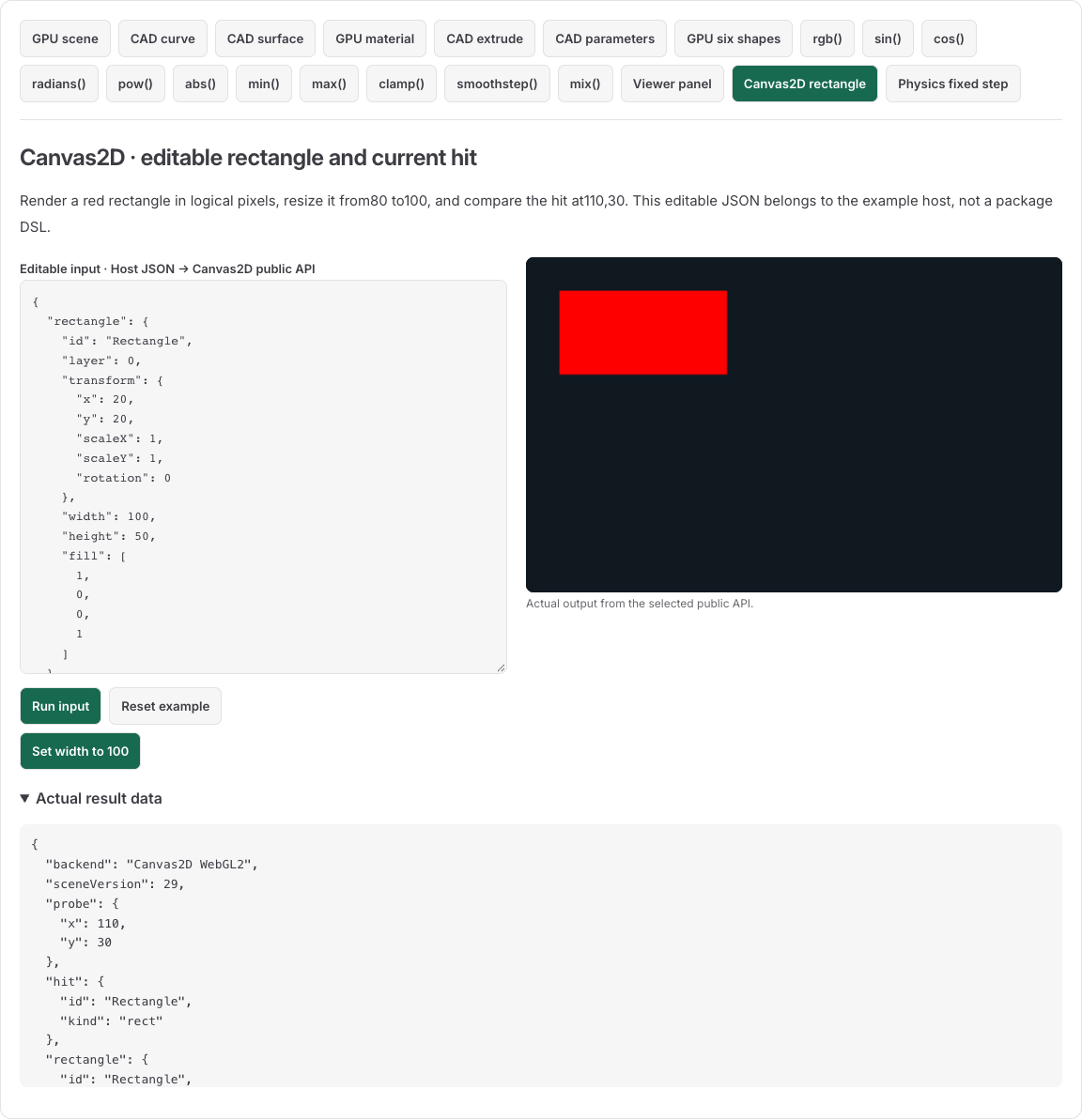
The red rectangle starts at (20,20) with size 80×50 logical pixels. Its right edge is X=100, so the probe (110,30) initially returns no hit. Set width to100: the edge moves to X=120 and the same probe returns {id:"Rectangle",kind:"rect"}. Width 0 is invalid and leaves the last accepted rectangle available. The interactive input combines rectangle data and a host probe; it is not the package's Scene JSON format.
Use Unicode labels for the newer browser-text profile and try the label. That example prepares 설계 圖面 A1 with explicit font/DPR/policy and saves or restores text, layout and copied RGBA bytes in page memory. The rectangle recipe below retains its earlier 5f5ad866 source contract.
The diagram label guide combines ASCII ellipsis with a separate bitmap outline, keeps the full semantic label and saves or opens an actual JSON file. Try the diagram label; its source profile is separate from the rectangle and Unicode examples.
Edit quadratic and cubic controls with public setPath, copied paint and local-coordinate mapping. Try the path editor for a completed drag, one-edit Undo/Redo and physical JSON Save/Open; this uses its own matching Canvas source profile.
Export a linear SVG from the SVG API example. Compare the native canvas and actual SVG image, download display SVG, or save editable JSON for fresh Open and another gradient edit. It uses the named public exporter at its stated newer source profile.
Export a radial SVG from the radial API example. Enlarge its local radius from 60 to 90, keep the Path and pose unchanged, then save editable JSON for fresh Open and another paint edit. This uses the separate exportSceneGradientSVG source profile.
Import an SVG arc from the arc API example. Inspect its cubic approximation, edit a control point and save the complete scene for fresh JSON Open. The viewport clip and transformed group remain part of that scene.
CPU geometry recipes
Intersect two convex polygons to run the diamond/triangle fixture, inspect all six canonical points, accept a disjoint empty result and handle contact refusal. The source and genuine emitted public entries are checked without creating a renderer.
Split an authored L/Q/C segment using splitPathSegment, the exact cubic midpoint fixture, copied-command ownership and bounded refusals. Each recipe declares its own source profile; these are CPU recipes, not additional interactive gallery entries.
Create and submit a retained object
Use a browser host with a TypeScript-capable bundler and the workspace package dependency. Put this HTML in the host page and use the following module as its main.ts entry. The bundler resolves public imports and transforms TypeScript; the browser receives JavaScript.
<canvas id="canvas" width="320" height="200" style="width:320px;height:200px"></canvas>
<button id="resize" type="button">Set width to 100</button>
<output id="result"></output>
<script type="module" src="./main.ts"></script>import { createCanvas2D, createDisplayTree, Canvas2DError } from '@barocss/canvas2d';
const canvas = document.querySelector<HTMLCanvasElement>('#canvas')!;
const result = document.querySelector<HTMLOutputElement>('#result')!;
const resizeButton = document.querySelector<HTMLButtonElement>('#resize')!;
const tree = createDisplayTree('RectangleScene');
const rectangle = tree.createRect({
id: 'Rectangle', layer: 0,
transform: { x: 20, y: 20, scaleX: 1, scaleY: 1, rotation: 0 },
width: 80, height: 50, fill: [1, 0, 0, 1],
});
tree.stage.addChild(rectangle);
const renderer = createCanvas2D(canvas, {
logicalSize: { width: 320, height: 200 }, dpr: 1,
backgroundColor: [0.063, 0.094, 0.125, 1],
});
try {
renderer.updateScene(tree.snapshot());
renderer.render();
} catch (error) {
renderer.dispose();
throw error;
}
result.value = JSON.stringify(renderer.hitTest({ x: 110, y: 30 }));
function resize() {
try {
rectangle.setRect({ width: 100, height: 50, fill: [1, 0, 0, 1] });
renderer.updateScene(tree.snapshot());
renderer.render();
result.value = JSON.stringify(renderer.hitTest({ x: 110, y: 30 }));
} catch (error) {
result.value = error instanceof Canvas2DError ? error.code : String(error);
}
}
resizeButton.addEventListener('click', resize);
window.addEventListener('pagehide', () => {
resizeButton.removeEventListener('click', resize);
renderer.dispose();
}, { once: true });The three operations have separate meanings. A handle edit changes the tree. updateScene admits a copied scene. render paints that accepted scene. A handle mutation alone paints nothing. logicalSize and dpr are required; they set backing pixels, while the host sets the CSS size.
Handle validation rejects an invalid width before changing its data. Renderer admission can separately reject assets, geometry budgets or device requirements after a valid tree edit. Keep your previous accepted snapshot and candidate tree separate when implementing whole-document replacement. Restore or correct the candidate before resubmission. Context loss can prevent pixel restoration even when CPU scene data is retained.
Dispatch a current pointer hit
A hit is a semantic node ID and kind. It does not select an object or install a DOM listener. Convert the browser point to logical viewport pixels, query the current accepted renderer, then dispatch that hit through the tree.
const stopListening = rectangle.onPointer('pointerdown', event => {
  console.log(event.target?.id, event.point);
});
function pointerDown(event: PointerEvent) {
  const bounds = canvas.getBoundingClientRect();
  const point = {
    x: (event.clientX - bounds.left) * 320 / bounds.width,
    y: (event.clientY - bounds.top) * 200 / bounds.height,
  };
  tree.dispatchPointer({
    type: 'pointerdown', pointerId: event.pointerId, point,
    hit: renderer.hitTest(point),
  });
}
canvas.addEventListener('pointerdown', pointerDown);
window.addEventListener('pagehide', () => {
  canvas.removeEventListener('pointerdown', pointerDown);
  stopListening();
}, { once: true });
Dispatch routes from the attached target to its ancestors. A stale or detached hit is refused. Browser pointer capture and tree pointer capture are separate: the host owns the DOM operation, while the tree controls its semantic route.
Save scene data and reconstruct handles
import { stringifySceneJSON, parseSceneJSON, createDisplayTreeFromScene } from '@barocss/canvas2d';
const savedScene = stringifySceneJSON(tree.snapshot());
const reopenedTree = createDisplayTreeFromScene(parseSceneJSON(savedScene));
const reopenedRectangle = reopenedTree.get('Rectangle');
The current tree snapshot uses Scene version 29. Reopening creates new handles with copied data; it does not rebind old handles or listener registrations. Scene JSON contains asset references rather than image bytes. Use the document entry when you need a document that includes referenced image/atlas bytes. A captured PNG is derived pixels and cannot reconstruct this editable tree.
Dispose owned renderers and remove host listeners on document close. The canvas belongs to the host. WebGL2 availability, context state and admitted scene limits still apply.