Edit quadratic and cubic path controls
Drag an authored control point, keep the path's identity and paint, and reopen the original commands for another edit. Try the path editor.
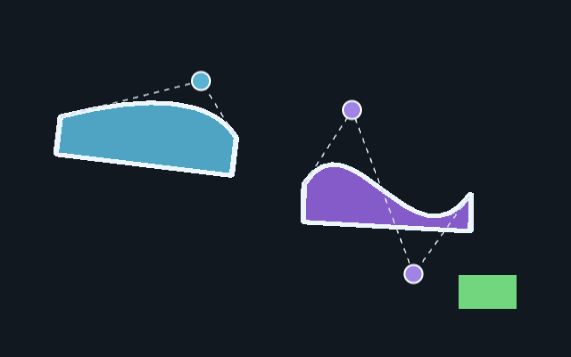
The cyan curve is shown after moving its Q control. The purple curve and green Marker are unchanged.
This guide uses public @barocss/canvas2d version 0.0.0-experimental at local source provider a833201e3b5d03f07dc9a46bb7ef407619e2de0b. Its path APIs are also present in the earlier diagram provider. The controller, overlays and single-edit Undo/Redo below belong to the browser application; they are not package editor or history services. The rectangle, Unicode, diagram and shader examples retain their own source profiles.
For a runnable public command-only example that inserts a boundary without flattening an L/Q/C segment, see path subdivision. That guide uses a newer adopted source revision; it does not change this editor’s fixed profile.
Create complete authored paths
Use the matching source dependency with a TypeScript-capable browser bundler. Put this HTML in the host page and the following blocks, in order, in main.ts. The bundler resolves the ordinary public imports and supplies JavaScript to the browser.
<style>
  #stage { position:relative; width:320px; height:200px; }
  #stage canvas, #guides { position:absolute; inset:0; width:100%; height:100%; }
  #stage canvas { border:0; padding:0; }
  #guides { pointer-events:none; z-index:2; }
  #stage button { position:absolute; z-index:3; width:16px; height:16px;
    padding:0; border:2px solid white; border-radius:50%; background:#f6b957;
    transform:translate(-50%,-50%); touch-action:none; }
</style>
<div id="stage">
  <svg id="guides" viewBox="0 0 320 200" aria-hidden="true"></svg>
  <button id="q-control" type="button" aria-label="Q control"></button>
  <button id="c1-control" type="button" aria-label="C first control"></button>
  <button id="c2-control" type="button" aria-label="C second control"></button>
</div>
<button id="undo" type="button">Undo edit</button>
<button id="redo" type="button">Redo edit</button>
<button id="save" type="button">Save path JSON</button>
<label>Open path JSON <input id="open" type="file" accept=".json,application/json"></label>
<pre id="status" aria-live="polite"></pre>
<script type="module" src="./main.ts"></script>import {
createCanvas2D, createDisplayTree, createDisplayTreeFromScene, Canvas2DError
} from '@barocss/canvas2d';
import type {
Canvas2DRenderer, DisplayTree, Point, SceneV29, PathCommand
} from '@barocss/canvas2d';
import { serializeCanvasDocument, stageCanvasDocument } from '@barocss/canvas2d/document';
const stage = document.querySelector<HTMLDivElement>('#stage')!;
const guides = document.querySelector<SVGSVGElement>('#guides')!;
const status = document.querySelector<HTMLPreElement>('#status')!;
const undoButton = document.querySelector<HTMLButtonElement>('#undo')!;
const redoButton = document.querySelector<HTMLButtonElement>('#redo')!;
const saveButton = document.querySelector<HTMLButtonElement>('#save')!;
const openInput = document.querySelector<HTMLInputElement>('#open')!;
const logicalSize = { width: 320, height: 200 }, dpr = 2;
const view = { panX: 10, panY: 6, zoom: .95 };
const options = { logicalSize, dpr,
backgroundColor: [.063,.094,.125,1] as [number,number,number,number] };
const pose = (x = 0, y = 0) => ({ x, y, scaleX: 1, scaleY: 1, rotation: 0 });
const targets = [
{ button: document.querySelector<HTMLButtonElement>('#q-control')!, id: 'QuadraticPath', slot: 'q' },
{ button: document.querySelector<HTMLButtonElement>('#c1-control')!, id: 'CubicPath', slot: 'c1' },
{ button: document.querySelector<HTMLButtonElement>('#c2-control')!, id: 'CubicPath', slot: 'c2' }
] as const;
type Target = typeof targets[number];
type Session = { canvas: HTMLCanvasElement; renderer: Canvas2DRenderer; tree: DisplayTree };
const initial = createDisplayTree('PathEditScene');
const parent = initial.createContainer({ id:'ParentPathGroup', layer:0,
transform:{ x:30, y:22, scaleX:1.1, scaleY:.9, rotation:.12 } });
parent.addChild(initial.createPath({ id:'QuadraticPath', layer:0, transform:pose(),
commands:[
{kind:'M',x:0,y:45}, {kind:'Q',cx:45,cy:-5,x:95,y:45},
{kind:'L',x:95,y:70}, {kind:'L',x:0,y:70}, {kind:'Z'}
],
fill:{color:[.12,.65,.78,1],rule:'evenodd'},
stroke:{color:[.92,.96,1,1],width:3}
}));
parent.addChild(initial.createPath({ id:'CubicPath', layer:1,
transform:{...pose(130,20),rotation:-.08},
commands:[
{kind:'M',x:0,y:50},
{kind:'C',c1x:25,c1y:0,c2x:60,c2y:105,x:90,y:50},
{kind:'L',x:90,y:75}, {kind:'L',x:0,y:75}, {kind:'Z'}
],
fill:{color:[.55,.35,.82,1],rule:'evenodd'},
stroke:{color:[.92,.96,1,1],width:3}
}));
initial.stage.addChild(parent);
initial.stage.addChild(initial.createRect({ id:'UnrelatedMarker', layer:1,
transform:pose(260,156),width:34,height:20,fill:[.25,.85,.45,1] }));
function pathOf(tree: DisplayTree, id: string) {
const handle = tree.get(id);
if (!handle || handle.kind !== 'path') throw new Error('Expected path '+id);
return handle;
}
function mount(tree: DisplayTree): Session {
const canvas = document.createElement('canvas');
canvas.style.touchAction = 'none';
const renderer = createCanvas2D(canvas, options);
try {
renderer.setView(view);
renderer.updateScene(tree.snapshot());
renderer.render();
return { canvas, renderer, tree };
} catch (error) { renderer.dispose(); throw error; }
}
let base = mount(initial);
stage.prepend(base.canvas);
let closed = false, busy = false;
let downloadURL: string | null = null;
let history: { before:SceneV29; after:SceneV29; at:'before'|'after' } | null = null;M starts a subpath. Q contains one control (cx,cy) and an endpoint (x,y). C contains two controls (c1x,c1y) and (c2x,c2y), plus its endpoint. The two L commands and Z retain a closed filled contour. Moving a control must not replace an endpoint or change those closing commands.
The authored commands are the editable source. Renderer flattening produces approximate display geometry; do not reconstruct commands from that stroke. Both paths start with width-3 strokes and fills. The unrelated green marker has its own ID and transform.
Convert pointer coordinates and edit copied commands
Append this block. The actual CSS rectangle is converted to logical viewport coordinates, then to world coordinates and finally to the path's local coordinates. The inverse includes every parent and the path's own transform.
function controlPoint(tree: DisplayTree, target: Target): Point {
  const command = pathOf(tree,target.id).data.commands[1];
  if (target.slot === 'q' && command.kind === 'Q') return {x:command.cx,y:command.cy};
  if (target.slot !== 'q' && command.kind === 'C') return target.slot === 'c1'
    ? {x:command.c1x,y:command.c1y} : {x:command.c2x,y:command.c2y};
  throw new Error('Expected the selected Q/C command');
}
function setControl(tree: DisplayTree, target: Target, point: Point) {
  const handle = pathOf(tree,target.id), data = handle.data;
  const commands: PathCommand[] = data.commands.map(command => ({...command}));
  const command = commands[1];
  if (target.slot === 'q' && command.kind === 'Q') {
    commands[1] = {...command,cx:point.x,cy:point.y};
  } else if (command.kind === 'C' && target.slot !== 'q') {
    commands[1] = target.slot === 'c1' ? {...command,c1x:point.x,c1y:point.y}
      : {...command,c2x:point.x,c2y:point.y};
  } else throw new Error('Expected the selected Q/C command');
  handle.setPath({ commands,
    ...(data.fill === undefined ? {} : {fill:data.fill}),
    ...(data.stroke === undefined ? {} : {stroke:data.stroke})
  });
}
function viewportPoint(event: PointerEvent): Point {
  const rect = (drag?.preview.canvas ?? base.canvas).getBoundingClientRect();
  if (rect.width <= 0 || rect.height <= 0) throw new Error('Canvas has no CSS extent');
  return {x:(event.clientX-rect.left)*logicalSize.width/rect.width,
    y:(event.clientY-rect.top)*logicalSize.height/rect.height};
}
function localPoint(event: PointerEvent, target: Target): Point {
  return pathOf(base.tree,target.id).toLocal(base.renderer.viewportToWorld(viewportPoint(event)));
}
function projected(session: Session, id: string, local: Point): Point {
  return session.renderer.worldToViewport(pathOf(session.tree,id).toWorld(local));
}
function showControls(session: Session) {
  const rect = stage.getBoundingClientRect();
  for (const target of targets) {
    const p = projected(session,target.id,controlPoint(session.tree,target));
    target.button.style.left = p.x*rect.width/logicalSize.width+'px';
    target.button.style.top = p.y*rect.height/logicalSize.height+'px';
  }
  const q = pathOf(session.tree,'QuadraticPath').data.commands;
  const c = pathOf(session.tree,'CubicPath').data.commands;
  if (q[0].kind !== 'M' || q[1].kind !== 'Q' || c[0].kind !== 'M' || c[1].kind !== 'C') {
    throw new Error('Expected original path commands');
  }
  guides.replaceChildren();
  for (const [id,points] of [
    ['QuadraticPath',[q[0],{x:q[1].cx,y:q[1].cy},q[1]]],
    ['CubicPath',[c[0],{x:c[1].c1x,y:c[1].c1y},{x:c[1].c2x,y:c[1].c2y},c[1]]]
  ] as [string,Point[]][]) {
    const line = document.createElementNS('http://www.w3.org/2000/svg','polyline');
    line.setAttribute('points',points.map(point => {
      const p = projected(session,id,point); return p.x+','+p.y;
    }).join(' '));
    line.setAttribute('fill','none'); line.setAttribute('stroke','#e3b35c');
    line.setAttribute('stroke-width','1'); guides.append(line);
  }
}
At DPR2 the renderer's backing canvas is 640×400, but its logical viewport is 320×200. The CSS-to-logical formula already accounts for the rendered size. Do not multiply the resulting logical pointer by DPR again. This recipe uses a fixed view (10,6,.95) and no CSS border or padding on the canvas.
handle.data returns a copy. Editing that copy alone does not change the tree. setPath(paint: PathPaint): void replaces commands and paint: omitting fill or stroke removes that paint. The code passes the complete copied paint, including normalized stroke defaults. IDs, transforms, parent order, other commands and the marker remain in the copied scene.
Keep the accepted scene during a gesture
The following application controller creates one preview renderer at pointerdown. Each move creates a fresh copied CPU tree, calls public setPath, then submits and renders through that same preview renderer. Accepted base data and its canvas remain untouched until a completed successful pointerup.
type Drag = {
  target:Target; pointerId:number; before:SceneV29; base:Session;
  preview:Session; rect:string; offset:Point; moved:boolean;
};
let drag: Drag | null = null;
const rectKey = () => {
  const r=(drag?.preview.canvas ?? base.canvas).getBoundingClientRect();
  return [r.left,r.top,r.width,r.height].join(',');
};
function release(d: Drag) {
  if (d.target.button.hasPointerCapture(d.pointerId)) d.target.button.releasePointerCapture(d.pointerId);
}
function cancel() {
  const d=drag; drag=null;
  if (!d) return;
  release(d); d.preview.renderer.dispose(); d.preview.canvas.remove();
  d.base.canvas.hidden=false;
  if (!closed) showControls(base);
}
function begin(event: PointerEvent, target: Target) {
  if (closed || busy || event.button !== 0) return;
  cancel();
  let preview: Session | null = null;
  try {
    const before=base.tree.snapshot(), point=localPoint(event,target), rect=rectKey();
    const control=controlPoint(base.tree,target);
    preview=mount(createDisplayTreeFromScene(before));
    stage.prepend(preview.canvas); base.canvas.hidden=true;
    drag={target,pointerId:event.pointerId,before,base,preview,rect,
      offset:{x:control.x-point.x,y:control.y-point.y},moved:false};
    target.button.setPointerCapture(event.pointerId);
    event.preventDefault();
  } catch (error) {
    if (drag) cancel();
    else {preview?.renderer.dispose();preview?.canvas.remove();base.canvas.hidden=false;}
    reportError(error);
  }
}
function move(event: PointerEvent) {
  const d=drag;
  if (!d || d.pointerId !== event.pointerId) return;
  try {
    if (closed || base !== d.base || rectKey() !== d.rect ||
      JSON.stringify(base.tree.snapshot()) !== JSON.stringify(d.before)) throw new Error('Gesture became stale');
    const point=localPoint(event,d.target);
    const candidate=createDisplayTreeFromScene(d.before);
    setControl(candidate,d.target,{x:point.x+d.offset.x,y:point.y+d.offset.y});
    d.preview.renderer.updateScene(candidate.snapshot());
    d.preview.renderer.render();
    d.preview.tree=candidate; d.moved=true;
    showControls(d.preview);
    status.textContent=JSON.stringify(pathOf(candidate,d.target.id).data.commands,null,2);
  } catch (error) {cancel();reportError(error);}
}
function finish(event: PointerEvent) {
  const d=drag;
  if (!d || d.pointerId !== event.pointerId) return;
  const after=d.preview.tree.snapshot();
  if (closed || !d.moved || base !== d.base || rectKey() !== d.rect ||
    JSON.stringify(base.tree.snapshot()) !== JSON.stringify(d.before) ||
    JSON.stringify(after) === JSON.stringify(d.before)) {cancel();return;}
  try {d.preview.renderer.captureImageAsset();}
  catch (error) {cancel();reportError(error);return;}
  drag=null; release(d);
  base=d.preview;
  d.base.renderer.dispose(); d.base.canvas.remove();
  history={before:d.before,after,at:'after'};
  showControls(base);
}
function reportError(error: unknown) {
  if (!closed) status.textContent=error instanceof Canvas2DError ? error.code : String(error);
}
function cancelled(event: PointerEvent) {
  if (drag?.pointerId === event.pointerId) cancel();
}
function key(event: KeyboardEvent) {if (event.key === 'Escape') cancel();}
const unbind: (()=>void)[]=[];
for (const target of targets) {
  const down=(event:PointerEvent)=>begin(event,target);
  target.button.addEventListener('pointerdown',down);
  target.button.addEventListener('lostpointercapture',cancelled);
  unbind.push(()=>{
    target.button.removeEventListener('pointerdown',down);
    target.button.removeEventListener('lostpointercapture',cancelled);
  });
}
window.addEventListener('pointermove',move);
window.addEventListener('pointerup',finish);
window.addEventListener('pointercancel',cancelled);
window.addEventListener('keydown',key);
window.addEventListener('blur',cancel);
window.addEventListener('resize',cancel);
const observer=new ResizeObserver(()=>{cancel();if(!closed)showControls(base);});
observer.observe(stage);
showControls(base);
The three HTML buttons and SVG control lines are host overlays, not scene nodes or a public path-editor API. Their projected positions come from the authored Q/C controls. The pointer grab offset prevents a jump when pressing away from a button's centre. Escape, cancellation, lost capture, blur, resize, changed base data or a changed canvas rectangle discards the preview. A changed view or transform must likewise cancel the gesture before a host applies it; this recipe keeps the view fixed.
Public updateScene and render are separate operations. A preview can fail after renderer admission. Before promotion, captureImageAsset() checks the final preview draw and context; failure discards the preview. It may render again and returns copied frame bytes. This 640×400 RGBA8 frame uses 1,024,000 bytes, within the capture limit of 1 MiB. The host reveals the untouched base canvas on failure instead of claiming an atomic package rollback. Context loss can still affect either canvas; this is not a guarantee of recoverable pixels on every device.
Undo one edit and reopen original commands
Append the file and history handlers. Undo/Redo is one application-owned before/after pair. A new completed edit replaces that pair. Undo/Redo admits a fresh renderer before changing the accepted scene; Open clears the pair.
async function exclusively(operation:()=>Promise<void>) {
  if (busy || closed) return;
  cancel(); busy=true;
  try {await operation();} catch(error) {reportError(error);} finally {busy=false;}
}
function adopt(next: Session) {
  try {
    if (closed) throw new Error('Path host is closed');
    // Validate the expected editable family before replacing the accepted session.
    targets.forEach(target=>controlPoint(next.tree,target));
    showControls(next);
    const prior=base; stage.prepend(next.canvas); base=next;
    prior.renderer.dispose(); prior.canvas.remove();
  } catch(error) {
    next.renderer.dispose();next.canvas.remove();if(!closed)showControls(base);throw error;
  }
}
function undo() {
  void exclusively(async()=>{
    if (!history || history.at !== 'after') return;
    adopt(mount(createDisplayTreeFromScene(history.before))); history.at='before';
  });
}
function redo() {
  void exclusively(async()=>{
    if (!history || history.at !== 'before') return;
    adopt(mount(createDisplayTreeFromScene(history.after))); history.at='after';
  });
}
function save() {
  void exclusively(async()=>{
    const snapshot=base.tree.snapshot(); // Copied accepted commands, not the overlay.
    const text=await serializeCanvasDocument(snapshot,()=>null); // No image references: assets[].
    if (closed) return;
    if (downloadURL) URL.revokeObjectURL(downloadURL);
    downloadURL=URL.createObjectURL(new Blob([text],{type:'application/json'}));
    const link=document.createElement('a');
    link.href=downloadURL;link.download='path-edit.canvas.json';
    document.body.append(link);link.click();link.remove();
  });
}
function open() {
  const file=openInput.files?.[0];
  if (!file) return;
  void exclusively(async()=>{
    try {
      if (file.size>48*1024*1024) throw new Error('Document exceeds 48 MiB');
      const text=await file.text();
      if (closed) return;
      const canvas=document.createElement('canvas');canvas.style.touchAction='none';
      const staged=await stageCanvasDocument(text,canvas,options);
      let next: Session;
      try {
        if (closed) throw new Error('Path host is closed');
        const tree=createDisplayTreeFromScene(staged.scene);
        staged.renderer.setView(view);staged.renderer.render();
        next={canvas,renderer:staged.renderer,tree};
      } catch(error) {staged.renderer.dispose();throw error;}
      adopt(next);history=null;
    } finally {openInput.value='';}
  });
}
undoButton.addEventListener('click',undo);
redoButton.addEventListener('click',redo);
saveButton.addEventListener('click',save);
openInput.addEventListener('change',open);
window.addEventListener('pagehide',()=>{
  closed=true;cancel();observer.disconnect();
  unbind.forEach(remove=>remove());
  window.removeEventListener('pointermove',move);
  window.removeEventListener('pointerup',finish);
  window.removeEventListener('pointercancel',cancelled);
  window.removeEventListener('keydown',key);
  window.removeEventListener('blur',cancel);
  window.removeEventListener('resize',cancel);
  undoButton.removeEventListener('click',undo);redoButton.removeEventListener('click',redo);
  saveButton.removeEventListener('click',save);openInput.removeEventListener('change',open);
  base.renderer.dispose();if(downloadURL)URL.revokeObjectURL(downloadURL);
}, {once:true});
Click Save path JSON to download path-edit.canvas.json, then choose it with Open path JSON. The public document stores complete Scene29 commands, IDs, paint, transforms, parents and ordering. This vector-only scene has an empty asset table. Open stages a fresh renderer and creates new handles; the overlay buttons subsequently resolve paths from the new tree, so dragging can continue. Old handles and listeners are not rebound.
The document does not store view, renderer background, selection, overlays or this Undo/Redo pair. The host supplies its fixed view and renderer options again. File validation follows the public codec's numeric canonicalization; it does not certify signed-bit preservation or rendered pixel parity. Document codecs use browser byte encoding; image-bearing documents additionally require SHA-256 support for asset integrity. Separate document limits are 48 MiB of text, 16 referenced assets and 32 MiB RGBA payload when a different scene uses images.
Handle a refused candidate
Only the selected control fields change. The initial Q control is (45,-5), and the C controls are (25,0) and (60,105). A completed drag changes the copied local coordinates and visible curve while retaining both endpoints, the closing commands, complete paint, semantic node IDs and the marker. Floating-point and browser pointer precision mean received local coordinates should be read from the admitted commands rather than assumed from a requested screen point.
For example, this public edit refuses a nonfinite coordinate in a separate copied tree:
const candidate=createDisplayTreeFromScene(base.tree.snapshot());
try {
  setControl(candidate,targets[0],{x:Number.NaN,y:0});
} catch(error) {
  if (!(error instanceof Canvas2DError)) throw error;
  console.log(error.code); // INVALID_SCENE; no candidate renderer admission occurred.
}
Do not clamp a rejected coordinate or silently replace it with zero. Keep any corrective numeric draft in host state, separate from accepted commands. setPath validates and copies its input, restoring its own prior handle data on failure. The handle's geometry preflight uses a baseline view/DPR; renderer admission separately validates the composed transforms and actual device view. A valid handle edit can still exceed renderer limits.
| Limit or error | Meaning |
|---|---|
| Commands | 2..256 per path; exact M/L/Q/C/Z records; finite coordinates in ±1e6 logical pixels; filled contours must close |
| Scene budgets | At most 32 paths and 256 nodes; path flattening has at most 1024 segments and depth 16, with scene vertex budgets also enforced |
| Transform/view | Local scale magnitude .01..100, rotation within ±2π; view zoom .05..64; composed geometry and conversions remain bounded |
INVALID_SCENE | Malformed command, nonfinite/out-of-range local coordinate, invalid paint or unsupported fields |
SCENE_LIMIT | Command/scene/tessellation budget, unsafe composed geometry or noninvertible conversion |
INVALID_VIEW / INVALID_SIZE | Invalid host view or logical/backing size configuration |
WEBGL_UNAVAILABLE, CONTEXT_LOST, DISPOSED, UNSUPPORTED_FEATURE | Renderer/environment state, including required fill support |
This bounded controller moves existing Q/C controls while preserving the authored topology. Snapping, smoothing, point insertion and degree conversion require separate application behavior.