Export a linear SVG and keep editable JSON
Open SVG export to edit a complete Scene29, inspect its Canvas2D display and exported SVG image, then download the format you need. The playground link opens the same API example.
Use Download SVG for display and Save editable JSON to reopen the original scene for another edit. These are two files with different roles.
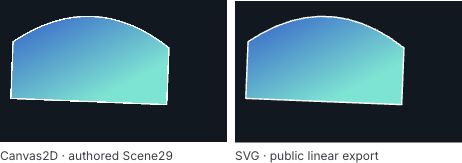
The pictured variant uses gradient endpoint (80,140), turquoise end stop #50e6d2 and Q control Y=-40. It was reopened from editable JSON before that control edit. The complete starting scene below uses the original orange stop and Q control Y=-20.
This guide uses public @barocss/canvas2d version 0.0.0-experimental at local source provider 572ca35de6581b634c11919de9a1881bf5a72d28. The named API is exportSceneLinearSVG; the existing exportSceneSVG keeps its solid-only mapping. Use the matching source package with a TypeScript-capable application build. Source availability does not establish publication or change the earlier Canvas examples' profiles.
For concentric radial paint, follow the separate radial SVG guide. Its newer exportSceneGradientSVG API adds a bounded radial subset; it does not change this guide's original linear-only input, source profile or exporter.
Start with the complete scene
{
  "version": 29,
  "unit": "logical-px",
  "contextId": "LinearSVGExample",
  "nodes": [
    {
      "kind": "path", "id": "Background", "layer": 0,
      "transform": { "x": 0, "y": 0, "scaleX": 1, "scaleY": 1, "rotation": 0 },
      "visible": true, "alpha": 1, "hitMode": "auto",
      "commands": [
        { "kind": "M", "x": 0, "y": 0 },
        { "kind": "L", "x": 320, "y": 0 },
        { "kind": "L", "x": 320, "y": 200 },
        { "kind": "L", "x": 0, "y": 200 },
        { "kind": "Z" }
      ],
      "fill": { "color": [0.06274509803921569, 0.09411764705882353, 0.12549019607843137, 1], "rule": "evenodd" }
    },
    {
      "kind": "group", "id": "GradientGroup", "layer": 1,
      "transform": { "x": 20, "y": 18, "scaleX": 1, "scaleY": 1, "rotation": 0.04 },
      "visible": true, "alpha": 1, "hitMode": "auto",
      "children": [
        {
          "kind": "path", "id": "GradientPath", "layer": 0,
          "transform": { "x": 0, "y": 0, "scaleX": 1, "scaleY": 1, "rotation": 0 },
          "visible": true, "alpha": 1, "hitMode": "auto",
          "commands": [
            { "kind": "M", "x": 0, "y": 40 },
            { "kind": "Q", "cx": 110, "cy": -20, "x": 220, "y": 40 },
            { "kind": "L", "x": 220, "y": 120 },
            { "kind": "L", "x": 0, "y": 120 },
            { "kind": "Z" }
          ],
          "fill": {
            "rule": "evenodd",
            "linear": {
              "from": { "x": 0, "y": 0 },
              "to": { "x": 220, "y": 100 },
              "startColor": [0.12549019607843137, 0.3764705882352941, 0.8156862745098039, 1],
              "endColor": [0.9411764705882353, 0.5647058823529412, 0.18823529411764706, 1]
            }
          },
          "stroke": {
            "color": [1, 1, 1, 1], "width": 2,
            "cap": "butt", "join": "bevel",
            "dash": { "lengths": [], "offset": 0 }, "miterLimit": 4
          }
        }
      ]
    }
  ]
}
The navy background is an authored closed Path, so it appears in both formats. It is not supplied only by a canvas clear color. GradientGroup translates by (20,18) and rotates by.04 radians with positive unit scales. Its child retains the original Q command and closed contour. Sibling layers match source order: background0, group1 and child0.
The stop colors are opaque RGB bytes expressed as normalized channels: [32,96,208]/255 is #2060d0, and [240,144,48]/255 is #f09030. Keep the complete decimal values in JSON. Rounding a channel to a convenient decimal can move it off the supported byte grid.
Export and display with public APIs
exportSceneLinearSVG(input: unknown, logicalSize: Size): SVGExportResult copies and validates the whole input scene before inspecting export support. This CPU operation does not need a DOM or renderer. On success it returns SVG text, an original-ID mapping and an empty diagnostic list.
The following browser application code takes the complete JSON text above as sceneText. It checks SVG support, paints a fresh native canvas, then decodes the actual exported SVG as an image. The caller can mount the returned canvas and image beside each other after success.
import {
  parseSceneJSON, stringifySceneJSON, createCanvas2D,
  createDisplayTreeFromScene, exportSceneLinearSVG, Canvas2DError
} from '@barocss/canvas2d';
import type { SVGExportDiagnostic } from '@barocss/canvas2d';
import { serializeCanvasDocument, stageCanvasDocument } from '@barocss/canvas2d/document';

const logicalSize = { width: 320, height: 200 };
const options = { logicalSize, dpr: 2,
  backgroundColor: [0,0,0,0] as [number,number,number,number] };
const view = { panX: 0, panY: 0, zoom: 1 };

// This local error is application glue, not a package error class.
class UnsupportedSVG extends Error {
  constructor(readonly diagnostics: SVGExportDiagnostic[]) {
    super('SVG export refused');
  }
}
function exported(scene: unknown) {
  const result = exportSceneLinearSVG(scene, logicalSize);
  if (!result.ok) throw new UnsupportedSVG(result.diagnostics);
  return result;
}
async function decodedSVG(svg: string) {
  const url = URL.createObjectURL(new Blob([svg], { type: 'image/svg+xml' }));
  const image = new Image();
  image.width = logicalSize.width; image.height = logicalSize.height;
  image.alt = 'Exported linear SVG'; image.src = url;
  try { await image.decode(); }
  catch (error) { image.removeAttribute('src'); URL.revokeObjectURL(url); throw error; }
  return { image, url };
}

async function prepareViews(sceneText: string) {
  const scene = parseSceneJSON(sceneText);
  const result = exported(scene);
  const tree = createDisplayTreeFromScene(scene);
  const canvas = document.createElement('canvas');
  canvas.style.cssText = 'width:320px;height:200px';
  const renderer = createCanvas2D(canvas, options);
  try {
    renderer.setView(view); renderer.updateScene(tree.snapshot()); renderer.render();
    const decoded = await decodedSVG(result.svg);
    return { canvas, renderer, tree, image: decoded.image, svg: result.svg,
      sourceIdMap: result.sourceIdMap,
      dispose() {
        renderer.dispose(); decoded.image.removeAttribute('src');
        URL.revokeObjectURL(decoded.url);
      }
    };
  } catch (error) { renderer.dispose(); throw error; }
}
The native canvas has 320×200 logical pixels and a 640×400 backing canvas at DPR2. SVG export receives the logical size320×200; passing the backing size would change its SVG viewport. The transparent renderer clear lets the authored background remain the scene's paint authority.
The returned application view owns a native renderer and a Blob URL. Dispose the previous view only after a complete candidate succeeds. If an asynchronous decode finishes after a newer edit or page closure, dispose that stale candidate rather than adopting it. A host should serialize operations or compare a generation token, and revoke every rejected, replaced or closed SVG URL. These are host lifecycle responsibilities, not an atomic export-and-render package operation.
Read gradient coordinates and opacity
The exporter writes a two-stop linearGradient with gradientUnits="userSpaceOnUse", spreadMethod="pad" and color-interpolation="sRGB". Original local endpoints (0,0) and (220,100) share the path's coordinate space. Positive path/group transforms carry the path and gradient together. The endpoints are not percentages of a browser image box.
The stops occur at offsets0 and1 with stop opacity1. pad extends the endpoint colors beyond the gradient interval. The explicit sRGB interpolation is an SVG display policy; it is not a GPU pixel-parity or color-management certificate.
Visibility and inherited node/group alpha become leaf fill/stroke opacity. The exporter does not emit isolated group opacity. An opaque stop requirement therefore differs from node alpha: changing a stop alpha to.5 is unsupported even though Scene29 can admit that paint. Solid fills/strokes keep their own opacity values and supported RGB-grid restriction.
Generated gradient IDs are deterministic and skip every source ID. References are local to the SVG. sourceIdMap relates the context, group and path IDs to emitted IDs; it does not create native SVG pointer routing or editable Canvas handles.
Edit one field and compare the result
- Change
linear.tofrom{ "x":220, "y":100 }to{ "x":0, "y":120 }. This rotates the gradient toward a vertical axis while retaining commands, stroke and group pose. - Change a stop's RGB to another exact byte-grid color while keeping alpha1. In TypeScript, calculate each channel as an integer byte divided by255; paste its full serialized numeric value into JSON.
- Change the Q control to reshape the closed path. Retain every other command and pass the complete fill/stroke when using public
setPath.
The example shows the native Canvas2D scene and the SVG image from the same accepted source. Each renderer has its own rasterization and precision rules. Matching authored records and a readable picture do not establish edge, framebuffer, hit or device parity.
To reproduce the pictured variant:
- In the full scene, set
GradientPath.fill.linear.toto{ "x":80, "y":140 }andendColorto[0.3137254901960784,0.9019607843137255,0.8235294117647058,1], then select Run input. - Select Save editable JSON, then Reset example.
- Open that downloaded JSON file. The edited gradient and original commands return without importing SVG.
- Change the Q command's
cyfrom-20to-40and select Run input. The restored path remains editable, and both views are prepared again.
Download SVG for display and JSON for editing
| Action | File | Preserved role |
|---|---|---|
| Download SVG | linear-path.svg | Browser-display SVG paths, gradient definitions and paint |
| Save editable JSON | linear-path.canvas.json | Complete native Scene29 commands, IDs, hierarchy, transforms and paint in document-v1 |
The vector-only fixture references no images, so its document asset table is empty. Save the accepted tree snapshot before awaiting serialization; source editor drafts are not automatically accepted data.
function download(text: string, type: string, filename: string) {
  const url = URL.createObjectURL(new Blob([text], { type }));
  const link = document.createElement('a');
  link.href = url; link.download = filename;
  document.body.append(link); link.click(); link.remove();
  // Return cleanup to the host; keep the URL alive until download dispatch completes.
  return () => URL.revokeObjectURL(url);
}
type Views = Awaited<ReturnType<typeof prepareViews>>;

function downloadSVG(accepted: Views) {
  return download(accepted.svg, 'image/svg+xml', 'linear-path.svg');
}
async function saveEditableJSON(accepted: Views) {
  const snapshot = accepted.tree.snapshot();
  const text = await serializeCanvasDocument(snapshot, () => null);
  return download(text, 'application/json', 'linear-path.canvas.json');
}
Use a real file input for JSON Open. It stages a fresh canvas through the public document entry, creates new handles, supplies the display view again and reexports the restored scene. It does not import the downloaded SVG.
<label>Open editable JSON <input id="open-json" type="file" accept=".json,application/json"></label>async function openEditableJSON(file: File) {
if (file.size > 48 * 1024 * 1024) throw new Error('Document exceeds 48 MiB');
const text = await file.text();
const canvas = document.createElement('canvas');
canvas.style.cssText = 'width:320px;height:200px';
const staged = await stageCanvasDocument(text, canvas, options);
try {
const result = exported(staged.scene);
const tree = createDisplayTreeFromScene(staged.scene);
staged.renderer.setView(view); staged.renderer.render();
const decoded = await decodedSVG(result.svg);
return { canvas, renderer: staged.renderer, tree, image: decoded.image,
svg: result.svg, sourceIdMap: result.sourceIdMap,
dispose() {
staged.renderer.dispose(); decoded.image.removeAttribute('src');
URL.revokeObjectURL(decoded.url);
}
};
} catch (error) { staged.renderer.dispose(); throw error; }
}
// In the host's file-change handler, pass the actual selected File:
// const next = await openEditableJSON(openInput.files![0]);
// Adopt only if this operation is still current; otherwise next.dispose().Only swap the visible canvas/image after Open, reexport and image decode succeed. Retain the previous accepted views and corrective file/source draft on refusal. Stop late operations after disposal. Reopening creates new handles; old references and listeners are not rebound. View, renderer clear color, source selection and host controls are not document fields.
To edit after Open, resolve the restored path and prepare another full candidate:
function verticalGradientSource(accepted: Views) {
  const candidate = createDisplayTreeFromScene(accepted.tree.snapshot());
  const path = candidate.get('GradientPath');
  if (!path || path.kind !== 'path') throw new Error('Expected GradientPath');
  const data = path.data;
  if (!data.fill || !('linear' in data.fill)) throw new Error('Expected linear fill');
  path.setPath({ commands: data.commands,
    fill: { ...data.fill, linear: { ...data.fill.linear, to: { x:0, y:120 } } },
    ...(data.stroke === undefined ? {} : { stroke:data.stroke })
  });
  return stringifySceneJSON(candidate.snapshot());
}
// prepareViews(verticalGradientSource(accepted)) prepares the new native/SVG pair.
The public SVG importer retains its solid-only contract. Linear SVG display output has no gradient-import or round-trip guarantee. Keep the native JSON when editable commands, paint and hierarchy matter. Document numeric canonicalization is not a signed-bit preservation guarantee.
Handle unsupported output separately from invalid input
Success is {ok:true, svg, sourceIdMap, diagnostics:[]}. A valid scene outside this export subset returns {ok:false, diagnostics} with no SVG. Each diagnostic contains nodeId, code UNSUPPORTED_FEATURE and a feature message. The exporter inspects the whole copied scene, including unsupported containers' descendants; inspect the complete list instead of accepting partial output.
Unsupported features include:
- A scene version other than29 or node kinds other than group/path, including rect, frame, image and glyphRun.
- Radial fills, transparent linear stops or RGB channels outside the 8-bit grid. Grid matching uses rounding tolerance
1e-12. - Negative/signed scales, nonzero pivots, group hit areas, polygon masks or hit modes other than
auto. - Layers that differ from sibling index, a node ID duplicating the SVG root, or unsupported transform mapping.
- Stroke settings beyond butt caps, bevel joins, an empty zero-offset dash and miter limit4.
Malformed Scene data still throws Canvas2DError. For example, identical gradient endpoints violate the native minimum distance.001 and throw INVALID_SCENE; they are not an unsupported-but-valid export. Invalid logical size throws INVALID_SIZE. Output overflow throws SCENE_LIMIT. The helper class UnsupportedSVG above merely carries the public result's diagnostics for that application's control flow.
| Bound | Meaning |
|---|---|
| Native scene | Copied Scene29, at most1MiB snapshot,256nodes, depth16 and32paths |
| Path data | At most256commands per path; native coordinate/paint/closed-contour validation still applies |
| SVG size | Integer logical width/height1..8192; size admission atDPR1 also limits area to16million pixels |
| Linear paint | Two opaque RGB byte-grid stops; original finite local endpoints at least.001 apart |
| Definitions | At most32linear definitions and64stops; deterministic IDs skip source IDs |
| Output | At most1MiB ASCII code units/UTF-8 bytes, checked before fragment assembly |
Canvas rendering has additional geometry/device limits. Export success does not certify GPU admission, arbitrary native SVG hit behavior, pixel/color-management parity or all-device coverage. The example adopts a complete candidate only after its own native renderer and SVG image preparation succeed.
Canvas guides · Canvas examples · Path editing · Versions and availability