Export a radial SVG and retain editable paint
Open Radial SVG export to edit a complete Scene29, compare its native Canvas2D display with the actual exported SVG image, and choose a display or editable file. The playground link opens the same API example.
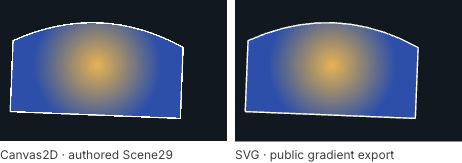
The left view is Canvas2D; the right is the actual decoded SVG. This variant uses radius 90, center (120,70) and gold #F0B040 to blue #2050B0, with all other Scene29 fields unchanged. The complete starting input below uses radius 60. The comparison does not establish pixel parity.
This guide uses experimental @barocss/canvas2d version 0.0.0-experimental at source profile c8a914debde531fcb78c225e4f1e637bf5d78894. The public operation is exportSceneGradientSVG(scene,logicalSize). It admits the bounded Scene29 solid, linear and concentric radial subset. The older linear SVG guide retains its separate 572ca35de6581b634c11919de9a1881bf5a72d28 source and named exportSceneLinearSVG contract. Use the matching TypeScript-capable source consumer; availability does not establish package publication.
Complete initial Scene29
{
  "version": 29,
  "unit": "logical-px",
  "contextId": "RadialSVGExample",
  "nodes": [
    {
      "kind": "path",
      "id": "Background",
      "layer": 0,
      "transform": {
        "x": 0,
        "y": 0,
        "scaleX": 1,
        "scaleY": 1,
        "rotation": 0
      },
      "visible": true,
      "alpha": 1,
      "hitMode": "auto",
      "commands": [
        {
          "kind": "M",
          "x": 0,
          "y": 0
        },
        {
          "kind": "L",
          "x": 320,
          "y": 0
        },
        {
          "kind": "L",
          "x": 320,
          "y": 200
        },
        {
          "kind": "L",
          "x": 0,
          "y": 200
        },
        {
          "kind": "Z"
        }
      ],
      "fill": {
        "color": [
          0.06274509803921569,
          0.09411764705882353,
          0.12549019607843137,
          1
        ],
        "rule": "evenodd"
      }
    },
    {
      "kind": "group",
      "id": "GradientGroup",
      "layer": 1,
      "transform": {
        "x": 20,
        "y": 18,
        "scaleX": 1,
        "scaleY": 1,
        "rotation": 0.04
      },
      "visible": true,
      "alpha": 1,
      "hitMode": "auto",
      "children": [
        {
          "kind": "path",
          "id": "RadialPath",
          "layer": 0,
          "transform": {
            "x": 0,
            "y": 0,
            "scaleX": 1,
            "scaleY": 1,
            "rotation": 0
          },
          "visible": true,
          "alpha": 1,
          "hitMode": "auto",
          "commands": [
            {
              "kind": "M",
              "x": 0,
              "y": 40
            },
            {
              "kind": "Q",
              "cx": 120,
              "cy": -20,
              "x": 240,
              "y": 40
            },
            {
              "kind": "L",
              "x": 240,
              "y": 140
            },
            {
              "kind": "L",
              "x": 0,
              "y": 140
            },
            {
              "kind": "Z"
            }
          ],
          "fill": {
            "rule": "evenodd",
            "radial": {
              "center": {
                "x": 120,
                "y": 70
              },
              "radius": 60,
              "startColor": [
                0.9411764705882353,
                0.6901960784313725,
                0.25098039215686274,
                1
              ],
              "endColor": [
                0.12549019607843137,
                0.3137254901960784,
                0.6901960784313725,
                1
              ]
            }
          },
          "stroke": {
            "color": [
              1,
              1,
              1,
              1
            ],
            "width": 2,
            "cap": "butt",
            "join": "bevel",
            "dash": {
              "lengths": [],
              "offset": 0
            },
            "miterLimit": 4
          }
        }
      ]
    }
  ]
}
Background is an authored navy Path over the 320×200 logical viewport, so both outputs contain it. A transparent canvas clear is not its substitute. GradientGroup translates by (20,18) and rotates by .04 radians. The child Path has an identity transform, a complete Q contour, an even-odd radial fill and a white 2-pixel stroke. Layers equal sibling indices: background 0, group 1 and child 0.
The opaque stops are normalized exact RGB bytes: [240,176,64]/255 gives gold #f0b040; [32,80,176]/255 gives blue #2050b0. Keep their complete numeric channels in JSON. Convenient decimal rounding can move a valid native color outside the exporter's byte-grid subset.
Read the local radial circle
The paint has exactly center, radius, startColor and endColor. It has no authored focal point or inner-radius field. The initial local center is (120,70) and radius is 60 logical pixels. The exported definition contains:
<radialGradient gradientUnits="userSpaceOnUse" spreadMethod="pad"
  color-interpolation="sRGB" cx="120" cy="70" fx="120" fy="70" fr="0" r="60">
  <stop offset="0" stop-color="#f0b040" stop-opacity="1"/>
  <stop offset="1" stop-color="#2050b0" stop-opacity="1"/>
</radialGradient>
This excerpt omits the generated ID and surrounding scene. The actual exporter supplies a local definition ID and the Path's url(#...) reference. fx=cx and fy=cy make the focal point concentric; fr=0 supplies the fixed zero inner radius. These are emitted SVG attributes, not additional Scene29 fields to insert in the JSON.
userSpaceOnUse uses the Path's local logical coordinates. The group/path pose carries both geometry and its gradient into the display. Positive unequal scales can make the local circle appear elliptical. A displayed center is not a new local center; use the retained paint and pose separately. This specimen's unit scales and rotation retain its circular appearance before Path clipping.
The start stop appears at the center, the end stop at the radius, and pad extends the end color outside that circle. The gradient paints only the filled contour. Explicit sRGB interpolation is an SVG display policy, not a GPU color or framebuffer parity certificate.
Export, decode and prepare a fresh native view
The signature is exportSceneGradientSVG(input:unknown,logicalSize:Size):SVGExportResult. It copies and validates the entire input before checking the supported subset. The CPU exporter needs no DOM or renderer. Success returns {ok:true,svg,sourceIdMap,diagnostics:[]}. Valid unsupported input returns {ok:false,diagnostics} with no SVG; malformed native input throws.
Use a browser host with a TypeScript-capable bundler resolving the matching public entries. Add this HTML, put the following module in main.ts, then paste the complete JSON above into the source field and select Run scene. These local functions are application glue, not additional package APIs.
<label>Scene29 JSON <textarea id="source" rows="12"></textarea></label>
<button id="run" type="button">Run scene</button>
<button id="svg" type="button">Download SVG</button>
<button id="json" type="button">Save editable JSON</button>
<label>Open editable JSON <input id="open" type="file" accept=".json,application/json"></label>
<div id="views" style="display:flex;flex-wrap:wrap;gap:8px"></div>
<output id="status"></output>
<script type="module" src="./main.ts"></script>import {
parseSceneJSON, stringifySceneJSON, createDisplayTreeFromScene,
createCanvas2D, exportSceneGradientSVG,
} from '@barocss/canvas2d';
import type { Canvas2DRenderer, SVGExportDiagnostic } from '@barocss/canvas2d';
import { serializeCanvasDocument, stageCanvasDocument } from '@barocss/canvas2d/document';
const size = {width:320,height:200};
const options = {logicalSize:size,dpr:2,
backgroundColor:[0,0,0,0] as [number,number,number,number]};
const view = {panX:0,panY:0,zoom:1};
const sourceInput = document.querySelector<HTMLTextAreaElement>('#source')!;
const openInput = document.querySelector<HTMLInputElement>('#open')!;
const panel = document.querySelector<HTMLDivElement>('#views')!;
const status = document.querySelector<HTMLOutputElement>('#status')!;
const runButton = document.querySelector<HTMLButtonElement>('#run')!;
const svgButton = document.querySelector<HTMLButtonElement>('#svg')!;
const jsonButton = document.querySelector<HTMLButtonElement>('#json')!;
class ExportRefusal extends Error {
constructor(readonly diagnostics:SVGExportDiagnostic[]) {super('SVG export refused');}
}
function exported(scene:unknown) {
const result = exportSceneGradientSVG(scene,size);
if (!result.ok) throw new ExportRefusal(result.diagnostics);
return result;
}
function freshCanvas() {
const canvas = document.createElement('canvas');
canvas.style.cssText = 'width:320px;height:200px';
canvas.setAttribute('aria-label','Native Canvas2D scene');
return canvas;
}
async function completeViews(
scene:Parameters<typeof createDisplayTreeFromScene>[0],
result:ReturnType<typeof exported>,
canvas:HTMLCanvasElement,
renderer:Canvas2DRenderer,
) {
let url:string|undefined;
const image = new Image();
try {
const tree = createDisplayTreeFromScene(scene);
renderer.setView(view);renderer.updateScene(tree.snapshot());renderer.render();
url = URL.createObjectURL(new Blob([result.svg],{type:'image/svg+xml'}));
image.width=size.width;image.height=size.height;
image.alt='Decoded exported radial SVG';image.src=url;
await image.decode();
if (image.naturalWidth!==size.width || image.naturalHeight!==size.height)
throw new Error('Unexpected decoded SVG size');
renderer.captureImageAsset(); // Verify the fresh native view after the await.
const ownedURL=url;
return {canvas,renderer,tree,image,svg:result.svg,sourceIdMap:result.sourceIdMap,
dispose() {
renderer.dispose();image.removeAttribute('src');URL.revokeObjectURL(ownedURL);
},
};
} catch(error) {
renderer.dispose();image.removeAttribute('src');
if (url) URL.revokeObjectURL(url);
throw error;
}
}
async function prepareSource(text:string) {
const scene=parseSceneJSON(text);
// Export the original submitted version before a tree snapshot normalizes it.
const result=exported(scene);
const canvas=freshCanvas();
return completeViews(scene,result,canvas,createCanvas2D(canvas,options));
}
async function prepareFile(file:File) {
if (file.size>48*1024*1024) throw new Error('Document exceeds 48 MiB');
const canvas=freshCanvas();
const staged=await stageCanvasDocument(await file.text(),canvas,options);
let result:ReturnType<typeof exported>;
try {result=exported(staged.scene);}
catch(error) {staged.renderer.dispose();throw error;}
return completeViews(staged.scene,result,canvas,staged.renderer);
}
type Views=Awaited<ReturnType<typeof prepareSource>>;
let accepted:Views|null=null;
let busy=false,closed=false;
async function operation(action:()=>Promise<void>) {
if (busy || closed) return;
busy=true;
runButton.disabled=svgButton.disabled=jsonButton.disabled=openInput.disabled=true;
try {await action();}
catch(error) {
if (!closed) status.value=error instanceof ExportRefusal
? JSON.stringify(error.diagnostics) : String(error);
} finally {
busy=false;
if (!closed) runButton.disabled=svgButton.disabled=jsonButton.disabled=openInput.disabled=false;
}
}
function adopt(next:Views) {
if (closed) {next.dispose();return;}
// Obtain corrective source before changing the visible accepted pair.
let text:string;
try {text=stringifySceneJSON(next.tree.snapshot());}
catch(error) {next.dispose();throw error;}
const prior=accepted;
panel.replaceChildren(next.canvas,next.image);accepted=next;sourceInput.value=text;
prior?.dispose();status.value='Scene and SVG accepted';
}
const downloadURLs=new Set<string>();
function download(text:string,type:string,filename:string) {
if (closed) return;
const url=URL.createObjectURL(new Blob([text],{type}));downloadURLs.add(url);
const link=document.createElement('a');link.href=url;link.download=filename;
document.body.append(link);link.click();link.remove();
// Host cleanup after download dispatch; this is not a download-completion signal.
setTimeout(()=>{URL.revokeObjectURL(url);downloadURLs.delete(url);},1000);
}
runButton.addEventListener('click',()=>operation(async()=>{
const next=await prepareSource(sourceInput.value);adopt(next);
}));
openInput.addEventListener('change',()=>operation(async()=>{
const file=openInput.files?.[0];openInput.value='';if (!file) return;
const next=await prepareFile(file);adopt(next);
}));
svgButton.addEventListener('click',()=>{
if (accepted && !closed) download(accepted.svg,'image/svg+xml','radial-path.svg');
});
jsonButton.addEventListener('click',()=>operation(async()=>{
if (!accepted) return;
const scene=accepted.tree.snapshot(); // Copy before awaiting serialization.
const text=await serializeCanvasDocument(scene,()=>null);
download(text,'application/json','radial-path.canvas.json');
}));
window.addEventListener('pagehide',()=>{
closed=true;accepted?.dispose();accepted=null;
for (const url of downloadURLs) URL.revokeObjectURL(url);
downloadURLs.clear();
},{once:true});The native canvas uses 320×200 logical pixels and a 640×400 backing canvas at DPR 2. Export receives the logical size, not the backing size. SVG decoding produces an actual browser image from the returned text. These are separate render paths with their own rasterization and precision; the example makes no pixel, edge, color-management or hit parity claim.
The caller prevents overlapping async operations and keeps the previous accepted view until a complete candidate succeeds. On page closure, a late candidate is disposed instead of mounted. SVG URLs and native renderers belong to the host. Export, renderer admission, drawing and image decoding are separate operations, not one atomic package transaction. Context loss can make a live frame unavailable even while the accepted CPU scene remains intact.
Enlarge the gradient without changing the contour
Change only RadialPath.fill.radial.radius from 60 to 90 and select Run input. The center, commands, stroke and group pose remain unchanged. The gold-to-blue transition covers a larger local distance. With pad, points outside the radius still use the end blue. This edit changes paint, not Path geometry or a physical circle primitive.
Then change center.x from 120 to 80. The gradient moves within the same contour and posed group. Restore center 120 before comparing the radius-only variant. Keep all four radial fields; do not add fx, fy, fr or arbitrary stop arrays to the native DTO.
For a handle-based edit after Open, use copied paint and full commands:
function radius90Source(accepted:Views) {
  const candidate=createDisplayTreeFromScene(accepted.tree.snapshot());
  const path=candidate.get('RadialPath');
  if (!path || path.kind!=='path') throw new Error('Expected RadialPath');
  const data=path.data;
  if (!data.fill || !('radial' in data.fill)) throw new Error('Expected radial paint');
  path.setPath({commands:data.commands,
    fill:{...data.fill,radial:{...data.fill.radial,radius:90}},
    ...(data.stroke===undefined?{}:{stroke:data.stroke}),
  });
  return stringifySceneJSON(candidate.snapshot());
}
// prepareSource(radius90Source(accepted)) prepares another candidate pair.
setPath replaces paint, so the complete copied fill and stroke must accompany retained commands. The data getter returns copies; changing those records alone does not edit the live handle. The original accepted tree remains separate from this candidate.
Save display SVG or editable JSON
| Action | File | Role |
|---|---|---|
| Download SVG | radial-path.svg | Paths and gradient definitions for browser display |
| Save editable JSON | radial-path.canvas.json | Native document-v1 containing the complete Scene29 commands, IDs, hierarchy, transforms and paint |
To reopen and edit, change radius to 90, save editable JSON, then open that physical file through a fresh canvas. The public document stage admits and renders the stored scene. Create new handles from staged.scene and reexport that original staged scene before any tree snapshot can upgrade a version. Open does not import SVG or reconstruct paint from pixels. Re-edit radius or center using the restored native fields.
This vector-only fixture has no referenced image assets, so its document asset table is empty. Copy the accepted scene before awaiting serialization. Display options, current view, editor draft, DOM listeners and selected controls are supplied by the host; they are not document fields. Document numeric canonicalization is not a signed-bit preservation guarantee.
The SVG importer retains its existing solid-only limits. Exporting radial or linear paint does not establish gradient SVG import or an editable SVG round trip. Keep the native JSON for subsequent paint and command edits.
Inspect IDs, opacity and complete refusals
sourceIdMap maps the context, background, group and Path to emitted SVG IDs. Generated gradient IDs use a separate local namespace and skip every source ID. Each local url(#...) resolves its own definition. This mapping does not install SVG pointer routing, native editable handles or persistent object bindings.
The exporter requires both radial stops to have alpha 1. Native node/group alpha is a different quantity: inherited alpha and visibility become leaf fill/stroke opacity. Groups are not emitted with isolated group compositing opacity. Hidden descendants still undergo export inspection; hiding an unsupported gradient does not make it admissible.
| Candidate | Outcome |
|---|---|
Set startColor[3] to .5 | Valid native paint, but export returns complete UNSUPPORTED_FEATURE diagnostics and no SVG |
| Set radius to 0 | Native schema throws Canvas2DError code INVALID_SCENE |
| Round an RGB channel off the exact byte grid | Valid native color can return UNSUPPORTED_FEATURE; grid tolerance is 1e-12 |
| Add focal/inner-radius DTO fields | Extra fields violate the native radial record shape |
| Use a nonzero pivot, signed scale, group hit area/mask or non-auto hit mode | Valid outside-subset records return UNSUPPORTED_FEATURE |
| Submit a valid older scene version | Export returns version diagnostics; do not silently normalize it before export |
Inspect the entire diagnostic list, whose entries have nodeId, code and feature. The whole copied scene is checked before SVG assembly, including unsupported containers' descendants. There is no partial SVG to adopt. Invalid logical size throws INVALID_SIZE; native snapshot or output bounds can throw SCENE_LIMIT. The local ExportRefusal class above only carries public diagnostics for application control flow.
Stay within the supported profile
| Limit | Contract |
|---|---|
| Native input | Copied Scene29; snapshot at most 1 MiB UTF-8; 256 nodes, depth 16 and 32 Paths |
| Path data | 2..256 commands per Path; complete native coordinate, closure and paint validation still applies |
| Radial values | Center coordinates in [-1e6,1e6]; radius in [.001,1e6] local logical pixels |
| Paint | Solid colors or two opaque linear/radial stops on the RGB byte grid; no arbitrary stop count or off-center focal DTO |
| Scene mapping | Group/Path nodes; positive scales; zero or absent pivot; sibling-index layers; supported rotation mapping |
| Stroke | Butt cap, bevel join, empty zero-offset dash, miter limit 4 and supported RGB-grid color |
| SVG viewport | Integer logical width/height 1..8192; DPR-1 admission also limits area to 16 million pixels |
| Definitions | At most 32 mixed linear/radial definitions and 64 stops; bounded deterministic local ID allocation |
| Output | At most 1,048,576 ASCII code units / UTF-8 bytes, checked before fragment assembly |
Native Canvas2D rendering and document staging have their own resource and device bounds. CPU export admission does not certify renderer admission or behavior on every device. Retain accepted native context on refusal while it is live; a lost graphics context cannot promise preserved pixels.
Linear SVG export · Canvas guides · Canvas examples · Path editing